Setting PUM Source Options
The PUM Source Options page is used to define the PUM source as well as managing the Customization Repository, Test Repository and Migrating Customer Data.
Note:
When Change Assistant is installed as a part of the PeopleSoft Update Image DPK, the PUM Source database is defined in Change Assistant.
This example illustrates the fields and controls on the PUM Source Options page. You can find definitions for the fields and controls later on this page.
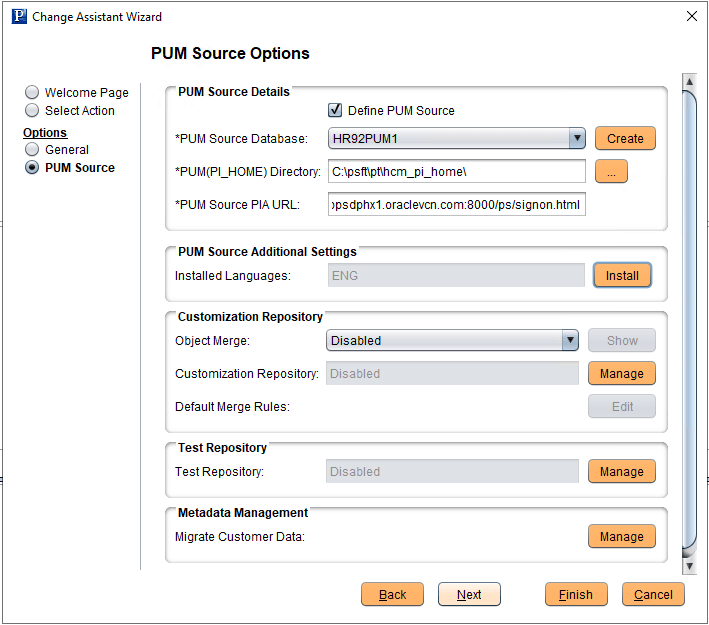
| Field or Control | Description |
|---|---|
|
Define PUM Source |
Select this checkbox to define the PUM Source. Note: Not all Change Assistant actions require a PUM Source. |
|
PUM Source Database |
If the database has already been defined, it will be available from the drop-down list. After you select a database that has already been configured, the database information on the remainder of the page will be displayed in read-only mode. If the database has not been defined yet, click Create which will launch the Database Wizard. |
|
PUM(PI_HOME) Directory |
Enter the path to the pi_home share on the PI. The pi_home share contains all files needed for patching. Note: The drive is a path mapped to the pi_home share folder. |
|
PUM Source PIA URL |
Enter the URL to sign on to the PUM Source. |
|
PUM Source Additional Settings |
Select Install to install additional languages on the PUM Source. |
|
Customization Repository |
This section is used to manage the Customization Repository. |
|
Test Repository |
Select Manage to enable the Test Repository and upload tests to the PUM source. |
|
Metadata Management |
Select Manage to migrate metadata from a previous PUM Source. See Migrating PUM Data. |
When you click OK, Change Assistant will validate the connection to the PUM Source database.