Managing Notification Configurations
Use the Notification Settings page to define and maintain notification configurations that determine the notification type and personalization options by notification name.
Navigation:
In the left panel of the Notification Administration fluid navigation collection, select the Notification Settings item.
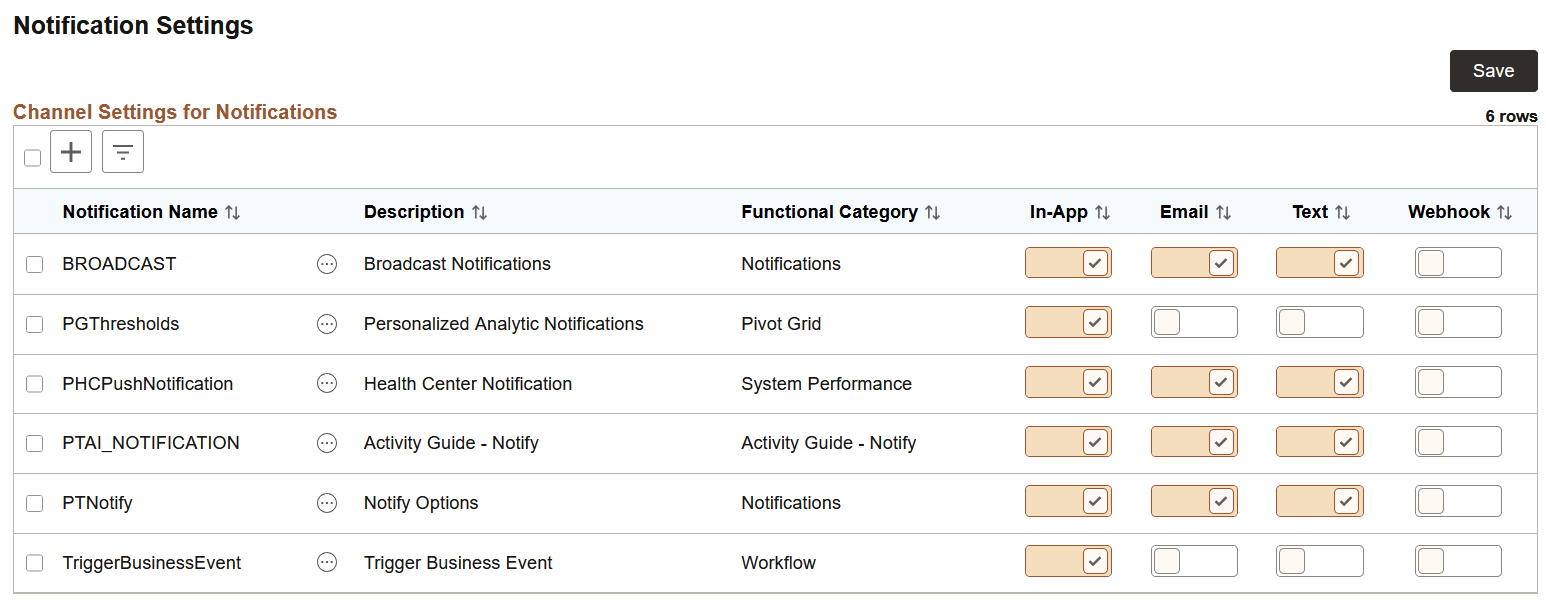
This example illustrates the fields and controls on the Notification Settings page. You can find definitions for the fields and controls later on this page.
| Field or Control | Description |
|---|---|
|
Notification Name |
The notification name must match exactly the name defined in the custom PeopleCode application class that implements the delivered PTPN_PUBLISH:PublishToWindow class. This key value is entered on the Add page, and cannot be edited later. For example, the following PeopleCode excerpt defines the BROADCAST notification for the SENDNOTE event: See Publishing Events. |
|
Description |
Specifies a description for this notification configuration. |
|
Functional Category |
Specifies a functional group name for this definition. Note: At creation or configuration time, the functional category can be entered as free-form text or selected from existing values. |
|
In-App |
Specifies whether notifications for this notification are delivered to the Notifications panel. |
|
|
Specifies whether notifications for this notification are delivered by email. |
|
Text |
Specifies whether notifications for this category are delivered by text message. Important: You must establish an account with Twilio in order to use text messaging as a notification option for the delivery of push notifications. See the section titled “Defining the PTTEXTMESSAGING URL Identifier” in Managing Global Settings. |
|
Webhook |
Specifies whether notifications for this category are delivered as a webhook. |
|
|
Bulk actions include: Deleting all selected notification configurations. |
|
|
Related actions include:
|


Important:
Alerts from the Process Scheduler cannot be managed via the Notification Settings page. No notification definition is delivered for these events and alerts. Alerts will be delivered to users’ Notifications panel even though the system is not configured for in-app notifications.
Adding or Updating Notification Configurations
Use the notification Add page to create new notification configurations; use the Configure page to update existing notification configurations. The Add and Configure pages have similar fields, except that the Notification Name is not editable on the Configure page.
Note:
In releases prior to PeopleTools 8.59, the notification name had to match exactly the name defined in the custom PeopleCode application class that implements the delivered PTPN_PUBLISH:PublishToWindow class.
This example illustrates the fields and controls on the notification Add page. You can find definitions for the fields and controls later on this page.
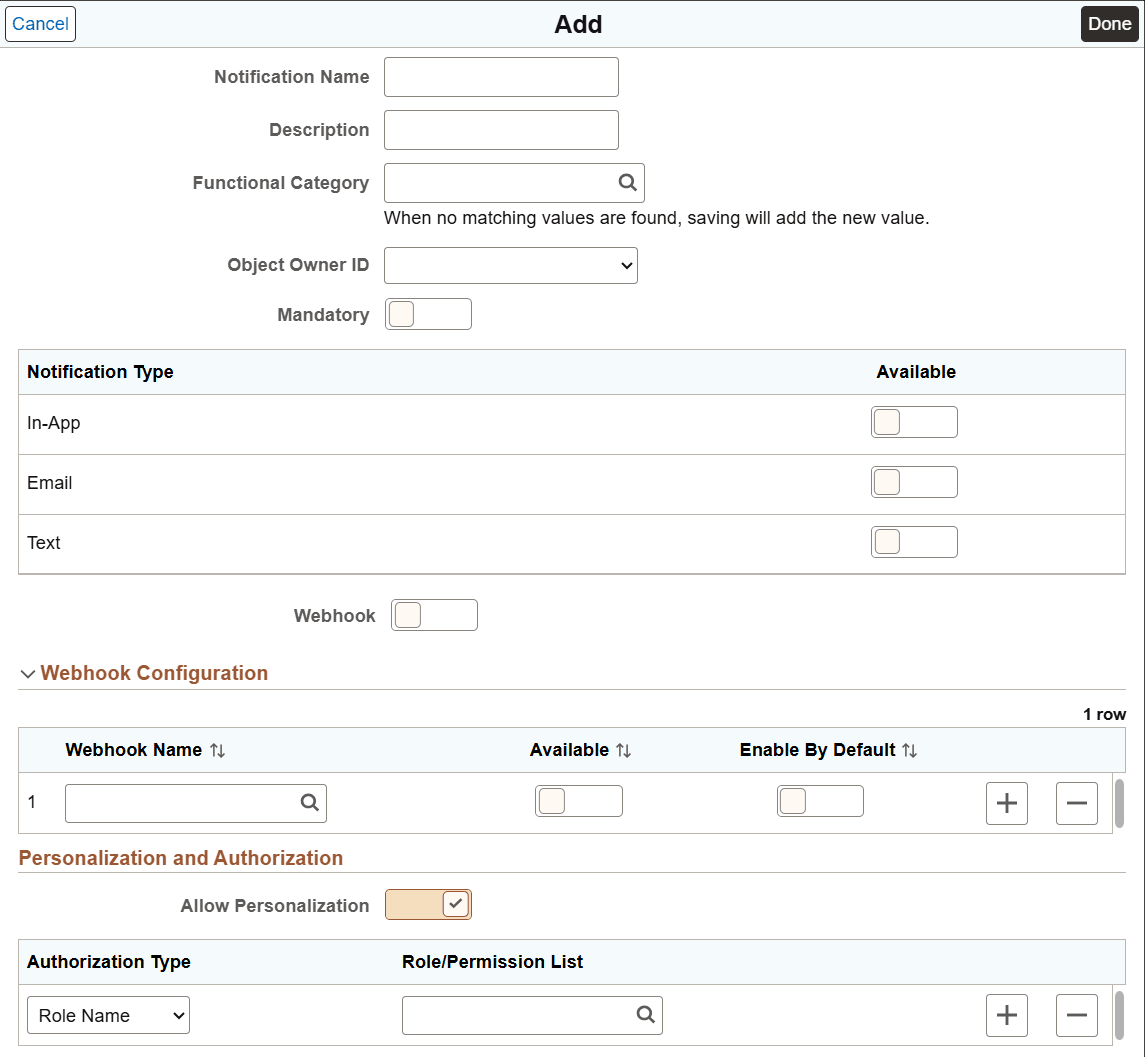
In addition to the fields that have already been defined for the Notification Settings page, adding or updating a notification configuration includes these additional fields:
| Field or Control | Description |
|---|---|
|
Object Owner ID |
Select an owner for this definition. |
|
Mandatory |
Select the mandatory option to indicate whether the notification type is mandatory, which means that if personalization is allowed, each user must subscribe via at least one notification type. When you specify a notification as mandatory, set at least one notification type as enabled by default (preferably In-App) to ensure that a user receives notifications. Note: This setting is ignored if personalization is not enabled. |
|
Available |
Indicates whether the notification type is available for use for this notification type. |
|
Enable by Default |
Indicates that this notification type is on by default for all users. |
|
Webhook |
Indicates whether the notification type is enabled for this notification definition. If you select this option, you must use the Webhook Configuration grid to specify the webhook definitions that are available for this notification. |
|
Webhook Name |
Select the webhook definition (configured in Integration Broker) to associate with the notification. The webhook definition identifies the endpoint configuration used to send outbound notifications to the external service. Multiple webhook definitions can be associated with a notification. Use the Available and Enable by Default options as required. |
|
Allow Personalization |
Specify whether users can personalize this notification. |
|
Role/Permission List |
Enter one or more role names, one or more permission lists, or both to restrict which users can personalize this notification. If there are no entries in this grid, then all users are allowed to personalize this notification. |