Defining Routing Parameters
This section provides an overview of defining transformations for any-to-local routing definitions and discusses how to define general routing parameters.
Understanding Routing Parameters for Requests and Responses
A routing definition contains routing parameters for each inbound request, inbound response, outbound request and outbound response associated with a service operation. The routing parameters that you can define include for each request or response include, routing alias, message names before and after transformation, and transformation program names.
You define routing parameters using the Routings – Parameters page in the Routings component.
The following tables list the number of routing parameters a routing definition contains based on the service operation type and whether the sending and receiving nodes are local.
Note:
Parameters for routing definitions for REST service operations are not included in the following tables, since they are system generated.
Asynchronous service operations have the following routing parameters:
| Service Operation Type | Sender is Local | Receiver is Local | Inbound Request Routing | Outbound Request Routing | Inbound Response Routing | Outbound Response Routing |
|---|---|---|---|---|---|---|
|
Asynchronous One- Way |
Y |
Y |
N |
Y |
N |
N |
|
Asynchronous One- Way |
Y |
N |
N |
Y |
N |
N |
|
Asynchronous One- Way |
N |
Y |
Y |
N |
N |
N |
|
Asynchronous One- Way |
N |
N |
Y |
Y |
N |
N |
Synchronous service operations have the following routing parameters:
| Service Operation Type | Sender is Local | Receiver is Local | Inbound Request Routing | Outbound Request Routing | Inbound Response Routing | Outbound Response Routing |
|---|---|---|---|---|---|---|
|
Synchronous |
Y |
Y |
Y |
Y |
Y |
Y |
|
Synchronous |
Y |
N |
N |
Y |
Y |
N |
|
Synchronous |
N |
Y |
Y |
N |
N |
Y |
|
Synchronous |
N |
N |
Y |
Y |
Y |
Y |
Asynchronous-to-synchronous service operations may have the following routing parameters:
| Service Operation Type | Sender is Local | Receiver is Local | Inbound Request Routing | Outbound Request Routing | Inbound Response Routing | Outbound Response Routing |
|---|---|---|---|---|---|---|
|
Asynchronous-to-synchronous |
Y |
Y |
Y |
N |
N |
Y |
|
Asynchronous-to-synchronous |
Y |
N |
N |
Y |
Y |
N |
|
Asynchronous-to-synchronous |
N |
Y |
Y |
N |
N |
Y |
|
Asynchronous-to-synchronous |
N |
N |
Y |
Y |
Y |
Y |
Asynchronous request/response service operations may have the following routing parameters:
| Service Operation Type | Sender is Local | Receiver is Local | Inbound Request Routing | Outbound Request Routing | Inbound Response Routing | Outbound Response Routing |
|---|---|---|---|---|---|---|
|
Asynchronous Request / Response |
Y |
Y |
N |
Y |
Y |
N |
|
Asynchronous Request / Response |
Y |
N |
N |
Y |
Y |
N |
|
Asynchronous Request / Response |
N |
Y |
Y |
N |
N |
Y |
|
Asynchronous Request / Response |
N |
N |
Y |
Y |
Y |
Y |
Understanding Transformations on Any-to-Local Routing Definitions
If you define a transformation on an any-to-local routing definition, the system uses the input message.version on the transform for the inbound request for WSDL. If a transform is defined on the outbound response, then the system uses the message.version on the output of the transformation for WSDL.
In cases where the input message.version or output message.version are not defined on the transform, the system uses the request or response message.version defined on the service operation for WSDL.
Note that any-to-local routing definitions are read-only when WSDL has been exported. As a result, you cannot change the in/out message transformation, aliases, and so on.
Defining Routing Parameters for Requests and Responses
Use the Routings-Parameters page (IB_ROUTINGDEFNDOC) to view and define parameters for requests and responses associated with a service operation. Information you define includes, routing external aliases for inbound and outbound requests and responses, as well as any inbound or outbound transformations to invoke.
To access the Routings - Parameters page, select and click the Parameters tab.
This example illustrates the fields and controls on the Routings – Parameters page. You can find definitions for the fields and controls later on this page.
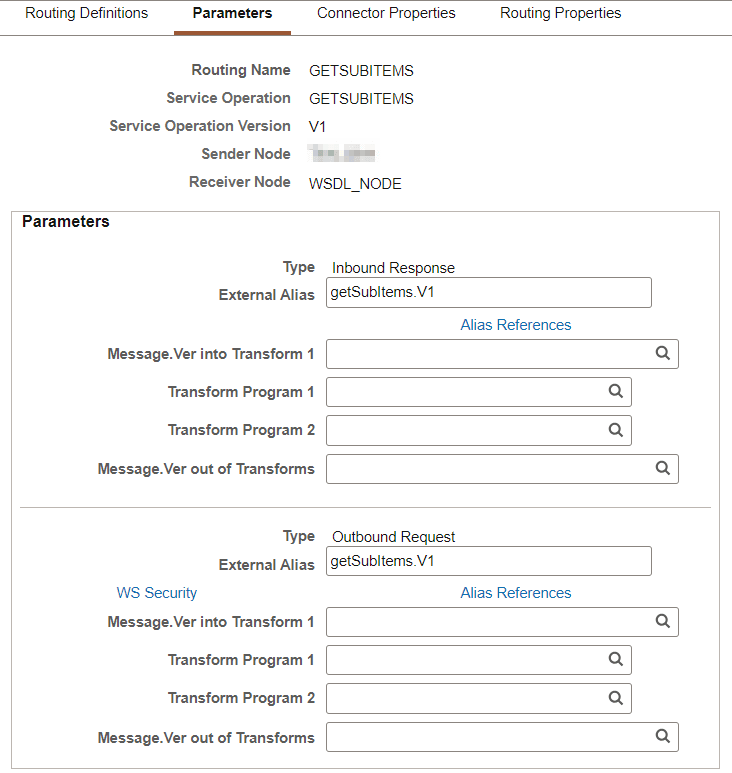
The following page elements display on the Routings-Parameters page:
| Field or Control | Description |
|---|---|
|
Type |
Specifies the routing direction and the type of message (request or response) associated with the service operation. This information is automatically populated from the service operation definition. |
|
External Alias |
This alias is used as a SOAPAction attribute in the WSDL binding to identify the service operation in the Integration Broker metadata. The routing external alias defaults to <ServiceOperationAlias>.<Version>, if present. Otherwise it defaults to <ServiceOperation>.<Version>. In an asynchronous request/response any-to-local routing, the outbound routing alias format is <Alias Name>_CALLBACK.<Version>. For inbound transactions you can fire multiple service operations for one invocation when external aliases on the routing definition are the same for each service operation. This is called service operation mapping. See Service Operation Mapping. Duplicate external aliases are not allowed for synchronous operations. |
|
Alias References |
Click the link to view other routing definitions with the same external alias. |
|
WS Security |
This link appears on the Parameters page when you are working with:
|
|
Message.Ver into Transform 1 |
Displays the name of the request or response message associated with the service operation before any transformations are applied. For inbound transactions, this is the message name and version as it arrives from the integration partner system, before any transformations are applied. For outbound transactions, this is the message name and version directly from the PeopleSoft system, before any transformations are applied. |
|
Transform Program 1 |
(Optional.) Enter the name of the transform program to invoke on the message listed in the Message.Ver into Transform 1 field. |
|
Transform Program 2 |
(Optional.) Enter the name of the transform program to invoke after the transform program in the Transform Program 1 field has completed processing. When you invoke two transform programs, the output from the first transform program (Transform Program 1) is used as the input into the second transform program (Transform Program 2). |
|
Message.Ver out of Transforms |
(Optional.) Enter the name of the message after all transform program have completed processing. For inbound messages, this is the message name and version that the PeopleSoft system is expecting. For outbound messages, this is the message name and version that the integration partner system is expecting. |
When the Routings-Parameters page first displays values for the Message.Ver into Transform 1 and Message.Ver out of Transforms fields display values to assist you in choosing transform programs. After you save the page, values do not appear in these fields unless the transform programs have an input/output messages associated with them.
Note:
Based on the transform selected, the message.version of the inbound request or response and the message.version of the outbound request or response that the system populated on the page can be different then those specified on the component. Should this occur a warning message displays and you can accept or reject the message.version information populated on the Routings - Parameters page. If you reject the message.version information populated on the page, you can modify the fields with the appropriate message.version information, or change the information that is specified on the component.
Digital Signing Option on Outbound Response
If an inbound request for a synchronous provider web service is not digitally signed, use the Request Alias Name option on the Routing Security page to digitally sign your outbound option.
To be able to digitally sign a response that does not have a digitally signed request, the Request Alias Name needs to be provided. The gateway uses the Request Alias Name to retrieve the appropriate digital certificate from the keystore.
Note:
The customer can enable web services that require digitally signed responses. The customer must configure the integrationGateway.properties file to enable their own OAuth2 authentication.
This example illustrates the Routings Security page that appears when you select the WS Security link.
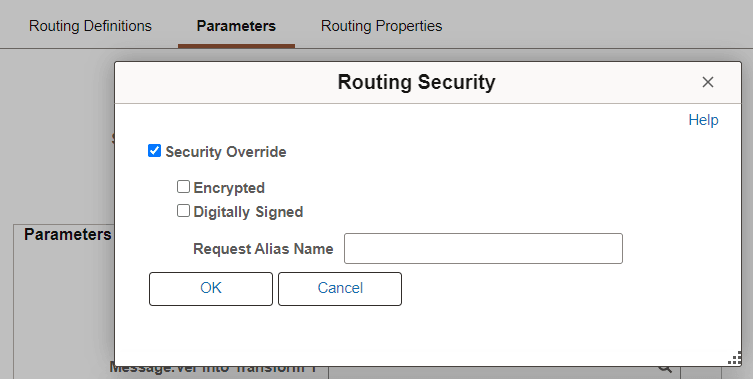
To digitally sign your outbound option:
-
Access the Routings-Parameters page (From , select the Parameters tab).
-
Select the WS Security link.
The Routing Security page appears.
-
Select the Security Override check box.
The Request Alias Name field appears.
-
Enter the Request Alias Name in the Request Alias Name field to digitally sign a response.