Initiating System-Generated Routing Definitions
The Default Service Operation Version section of the Service Operations-General page features a Routing Actions Upon Save group box where you can choose the type of routing to generate, any-to-local or local-to-local.
To access the Service Operations-General page select
This example illustrates the Routings Actions Upon Save group box that appears on the Service Operations – General page when you are working with an asynchronous service operation definition.
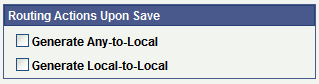
The previous example shows the Routing Actions Upon Save group box that appears when you are working with an asynchronous service operation definition. When you are working with a synchronous service operation definition, the group box features an additional control.
This example illustrates the Routings Actions Upon Save group box that appears on the Service Operations – General page when you are working with a synchronous service operation definition.
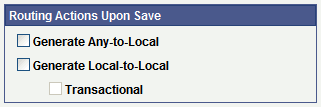
When you select Generate Local-to-Local, the Transactional check box becomes available for selection. By choosing the Transactional check box, the system routes the service operations using the OnRequest event on a single transaction.
When you initiate system-generated any-to-local or local-to-local routings, PeopleSoft Integration Broker checks to see if the routing you are initiating is already in the system. This situation can arise when any-to-local and local-to-local routings are created in another database and are imported into the current database. If the routing already exists in the current database, a message appears indicating so and no new routing is generated. You must remove the routing before generating a new one.
See Deleting Duplicate Routing Definitions.
Note:
Any-to-Local routing definitions are read-only, with the exception of the external alias name and transform information. You may need to change the external alias name for WSDL generation.
To initiate a system-generated routing definition:
-
From the Service Operations-General page, locate the Default Service Operation Version section.
-
In the Routing Actions Upon Save group box select one of the following options:
-
Generate Any-to-Local. Generates an any-to-local routing definition when you save the service operation record.
-
Generate Local-to-Local. Generates a local-to-local routing definition when you save the service operation.
If working with a synchronous service operation, click the Transactional check box if you want to generate a transactional local-to-local routing.
-
-
Click the Save button.
When you save the service operation the system generates the routing definition that you selected.
After you save the service operation definition the Routing Status group box displays a status of Exists for the routing definition generated.
To view the routing definition , click the Service Operations – Routings tab and click the name of the routing. The Routing Definitions page appears and you can view and modify routing definition details.