Including Pivot Grid Only View on the Application Page
To include the Pivot Grid Only view on the application page:
-
Access the Pivot Grid Wizard by selecting Reporting Tools, Pivot Grid, Pivot Grid Wizard.
-
Access the Pivot Grid Display page - Step 5 and click the Configure Pivot Grid Views link to access the Pivot Grid View page, where you can create an additional Pivot Grid Only view for the Pivot Grid model. Alternatively, access the Specify Data Model Options page - Step 4 and change the default view of the Pivot Grid model to Pivot Grid Only.
For detailed steps to configure the pivot grid model through pivot grid wizard see, Specifying Data Model Options.
Also see, Viewing Pivot Grid Displays.
-
In Application Developer, open the application page for job opening HR_OPEN_JO_FLU.
-
Remove the chart area PTS_NUI_CHARTAREA, if needed.
-
Insert the grid area PTS_NUI_GRIDAREA.
-
Optionally, insert the facet subpage PTS_NUI_FACETSBT and the filter subpage PTS_NUI_FLTSBP.
-
Return to the application fluid page Job Openings.
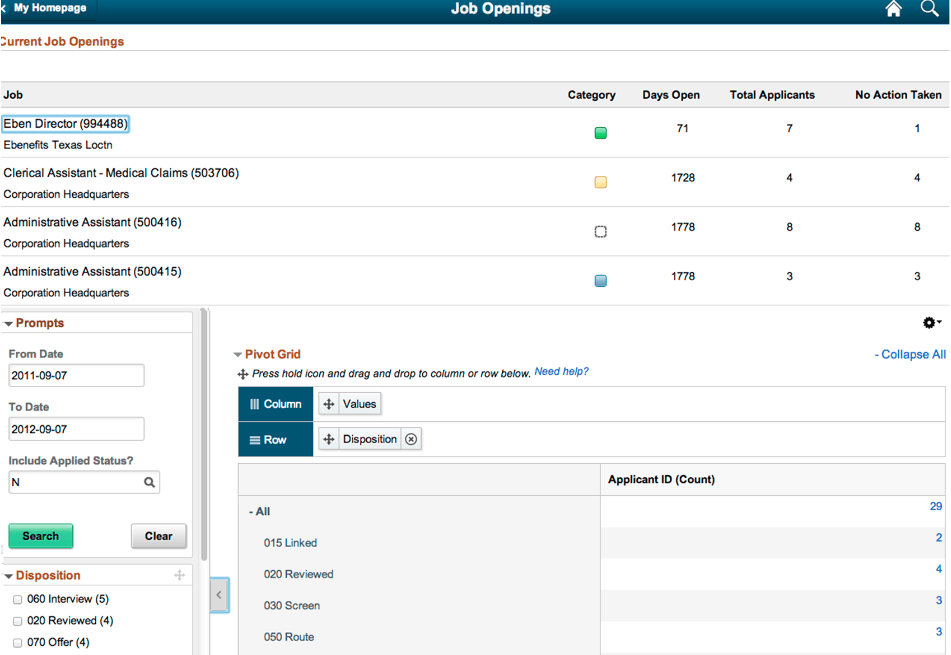
This example shows the rendered application fluid page Job Openings. The application page includes a grid, facet, and filters.