Configuring Trace and Debug Options
Access the Web Profile Configuration page. (Select Select the Debugging tab.)
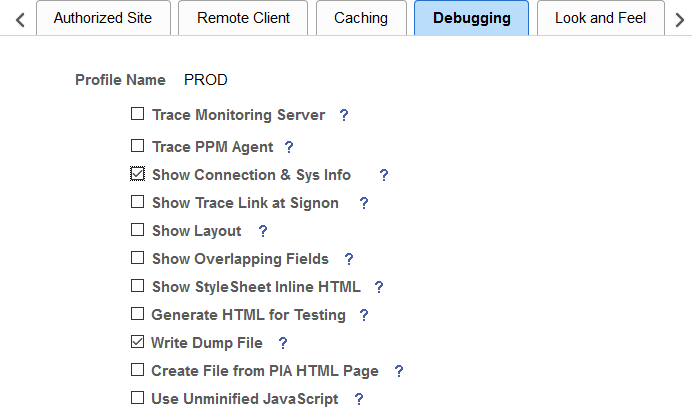
This example illustrates the fields and controls on the Web Profile Configuration - Debugging page. You can find definitions for the fields and controls later on this page.
| Field or Control | Description |
|---|---|
|
Trace Monitoring Server |
Select to have the PeopleSoft Performance Monitor and PPMI servlets write debug information to the web server log. This check box is deselected by default. Note: This feature is not an agent trace. For an agent trace, use Trace PPM Agent. |
|
Trace PPM Agent |
Select to enable PeopleSoft Performance Monitor tracing on performance agents. This check box is deselected by default. |
|
Show Connection Information |
Select to have the application generate a system information page, which includes the browser, OS, PeopleTools release, application release, service pack, page definition name, component definition name, menu definition name, user ID, database name, database type, and application server address when you press Ctrl+J. The default is deselected. Note: This information is useful for orientation and troubleshooting purposes, but might not be suitable for end users. |
|
Show Trace Link at Signon |
Select to display a URL link at sign-in. The link opens a page for setting trace parameters. |
|
Show Layout |
Select to apply border and color attributes in a table layout for pages. This enables developers to see the position of PeopleSoft Application Designer objects in HTML. |
|
Show Overlapping Fields |
Select to include comments in generated HTML pages that may help in diagnosing page layout problems, such as fields overlapping other fields. |
|
Show StyleSheet Inline HTML |
Select to insert the page's style sheet into its generated HTML. Note: Only classic style sheets are generated inline; fluid style sheets are not generated inline. |
|
Show JavaScript Inline HTML |
Select to display all the JavaScript functions that are used for processing in the generated HTML page. |
|
Generate HTML for Testing |
Select to alter the generated HTML to assist with testing and troubleshooting. For example, this option provides additional white space and comments on the page to aid readability. Also, it includes additional name attributes for reference from SQA robot scripts. Note: Selecting this option may cause some pages or pagelets not to appear correctly. You can also set this in the application server configuration file with the TracePIA option. To ensure that all pages appear correctly, verify that TracePIA isn't enabled in the configuration file. |
|
Write Dump File |
Select to have the system write a log file to the web server if an Oracle Jolt exception error occurs. |
|
Create File from PIA HTML Page (create file from PeopleSoft Pure Internet Architecture HTML page) |
Select to view and debug the source HTML that the application server generates. The system saves each generated page as PS_CFG_HOME\appserv\domain\LOGS\client\element\N.html. The variables in the name are:
Warning! Use this tracing feature only for troubleshooting and testing. Enabling this feature generates numerous directories and files on the application server, which significantly affects performance. Use it for short periods, preferably only for a single-user test scenario. Never enable it on a production website. |
|
Use Unminified JavaScript |
Select to disable the execution of minified JavaScript for the PeopleSoft Pure Internet Architecture domain. During runtime, the PeopleSoft system compresses, or minifies, all JavaScript stored in HTML definitions created in Application Designer. This is the default behavior. JavaScript that has been minified has been stripped down to only the essential strings required for runtime execution to save bandwidth. For more information on minified JavaScript in HTML definitions, see Application Designer Developer’s Guide: Working with JavaScript in HTML Definitions. |
See Configuring Custom Properties and Performance Monitor: Working with Performance Monitor Web Profile Properties.