Copying Menu Layouts
This example illustrates the fields and controls on the Copy Menu page. You can find definitions for the fields and controls later on this page.
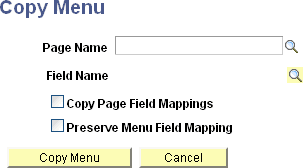
Use the Copy Menu page to copy a page field contextual field menu layout and services configuration from one page field to a different page field on the same page or on a different page within the same component.
The following values are copied to the new page field:
-
Service target.
-
Service label.
-
Key field mappings.
-
Fixed value mappings.
-
System variable mappings.
-
Page field mappings (see note).
-
Menu layout.
-
Menu to which the copied service is attached.
Important:
The Copy Page Field Mappings option must be selected to copy page field mappings. However, no error checking is performed to ensure that the page field mappings are still correct. Therefore, select this option only in circumstances that provide equivalent mapping of page fields.
The Preserve Menu Field Mapping option is valid only when the Copy Page Field Mappings option is also checked. Use the Preserve Menu Field Mapping option only when the menu location is moved to the new field. For example, a service parameter is mapped to the User ID field, which is marked as the menu display field as well. When this menu is copied to a new page field, Description, we want to keep the original parameter mapping to the User ID field. In this instance, we would also select the Preserve Menu Field Mapping option.
After the menu layout and service configuration is copied to the new page field, additional manual configuration might be required depending on the original configuration and how it was copied:
-
If the services copied do not contain any page field mappings or if the Copy Page Field Mappings option was selected, the services will automatically be marked active and will be assumed as completely configured.
-
If the services copied contain page field mappings that were not copied, the services will automatically be marked inactive by default. You must manually map these service parameters to page fields. See Configuring Service Parameters, Filters, and Security.
-
After you manually map unmapped service parameters, the PeopleSoft Related Content Framework will check other services in the same menu to see if they contain a service parameter by the same name. If so, you will be prompted to copy this mapping to the other services as well. Choosing yes will apply the same mapping to any other inactive services in the same menu that also contain the same service parameter. The framework will not update any active service configurations that also contain the same service parameter.
-
After the framework applies this service parameter mapping to other inactive services, an additional check will be made to determine if all service parameters are now mapped. If they are, you will be prompted to mark all inactive services as active in the new page field menu.