Custom Navigation Pages
While standard navigation pages automatically display only the contents of a selected menu folder, custom navigation pages can be defined to display any content references and folders available in the menu navigation, regardless of their location.
Unlike standard navigation pages, you access custom navigation pages using links in the menu navigation instead of folder icons.
For example, in PeopleSoft Interaction Hub, selecting the Context Manager Center link in the menu navigation displays the Context Manager Center custom navigation page as shown here:
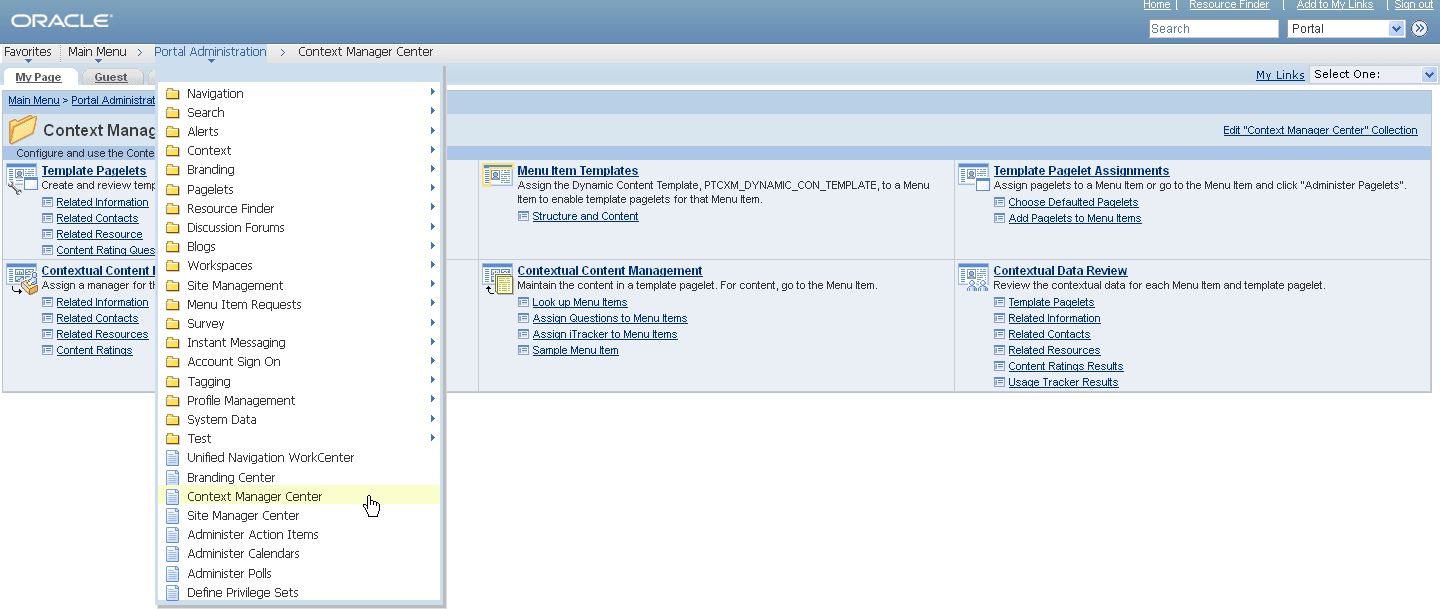
Similar to standard navigation pages, when you click a folder link on a custom navigation page, you access another navigation page that reflects the contents of the selected folder. When you click a content reference link on a custom navigation page, you access the component to which the content reference points.
See Creating or Editing a Navigation Collection.
Folder and Link Sequence on Custom Navigation Pages
The sequence in which folders and links appear on custom navigation pages is defined in the navigation collection. Once the folder and link sequences for a navigation collection are registered, their sequence numbers are propagated to the portal registry. However, any modifications to navigation collections (and the generated custom navigation pages) must be made in the navigation collection definition. Do not modify custom navigation pages in the portal registry.