Navigation Collection-Based Pagelets
Navigation collections are portal objects that you use to create your own groupings of existing folders and content references, which you can then deploy or publish to different users or groups of users. Navigation collections enable you to create links to content that you already have in the portal registry and to organize the links in ways that specifically address your users' business needs.
Navigation collection-based pagelets appear in the pagelet area as folders and links. When users click a folder, the folder contents appear in the pagelet. When users click a link, the resource opens in the target content area by default. Because navigation collections are designed as alternate menu structures, you navigate through folders to find links, which generally reference components. When users click the link, the component search page appears in the target content area unless the search record is configured so that the search page is bypassed. In such cases, the component requires no search parameters and immediately opens in the target content area.
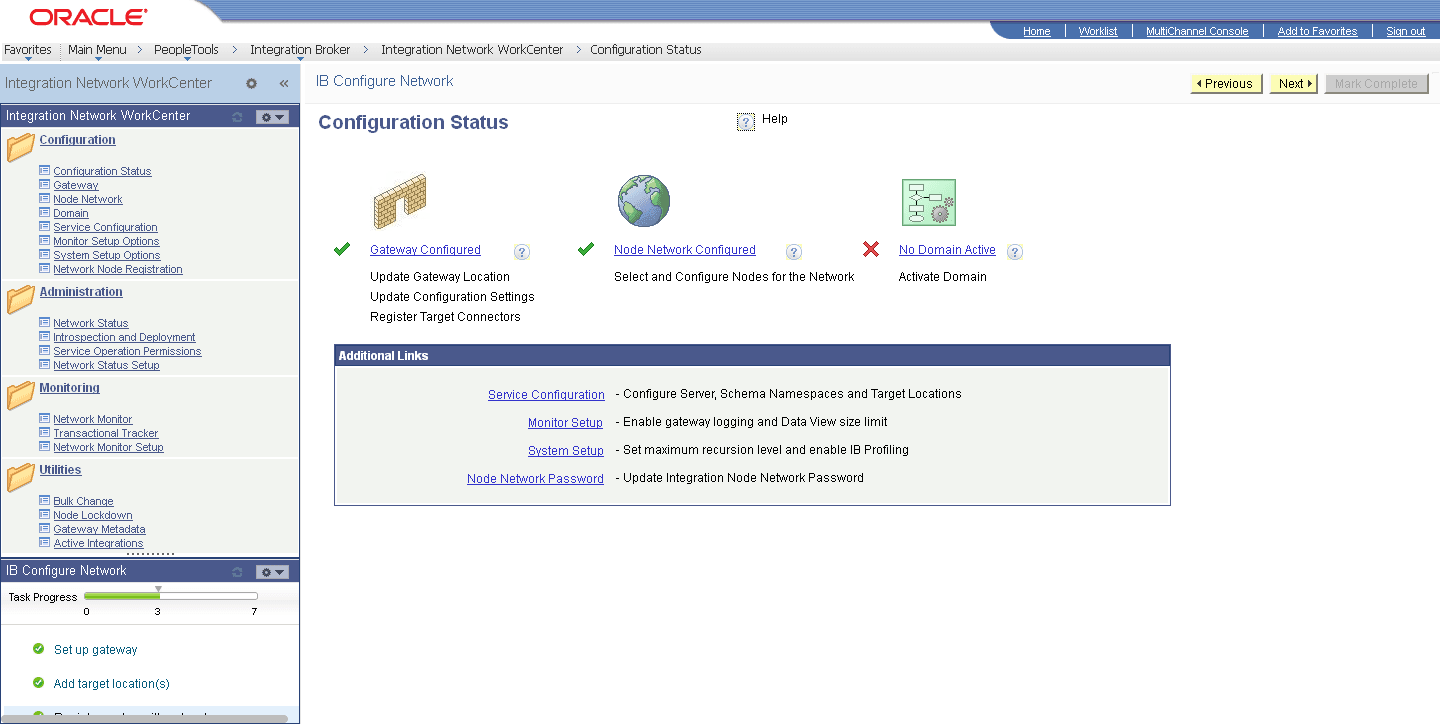
In this example, the Integration Network WorkCenter navigation collection pagelet is displayed in the pagelet area of the WorkCenter page with the Configuration Status page in the target content area:
Publishing Navigation Collection-Based Pagelets for Use With WorkCenter Pages
You create and maintain navigation collections using the navigation collections component. Using the pages in this component, you set the properties that determine the order in which the folders and links appear, and also the location where the target appears. If you decide to create pagelets based on navigation collections, you should review the link properties to ensure that neither replace the current page or open in a new browser window is selected. This will allow the content to open in the target content area, which is typically the desired behavior in a WorkCenter context.
You can use Pagelet Wizard to create pagelets based on any published navigation collection. At step two of the pagelet creation process in Pagelet Wizard, you must specify your navigation collection as the data source. Choose from any of your custom navigation collections or the PeopleSoft-delivered navigation collections. Continue through the process to step 6, where you specify Homepage Pagelet or Template Pagelet as a publishing option. When you save the pagelet, Pagelet Wizard creates the pagelet and you can then assign it to the pagelet area of a WorkCenter page.
Specific details for creating and publishing navigation collections and using Pagelet Wizard to publish them as pagelets are located in this documentation.
See Creating or Editing a Navigation Collection.