Selecting the Activity Guide Template Type
Use the Select Activity Guide Template Type page to select the activity guide data type and process type.
Navigation:
On the Manage Activity Guide Templates page, click the Create Template button to create a new template definition.
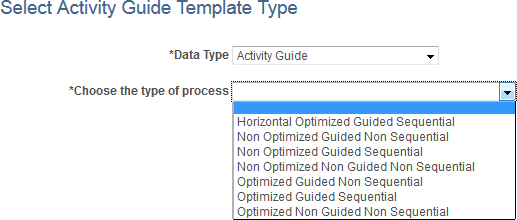
This example illustrates the fields and controls on the Select Activity Guide Template Type page. You can find definitions for the fields and controls later on this page.
| Field or Control | Description |
|---|---|
|
Data Type |
Select Activity Guide to use the PeopleTools-delivered activity guide data source. Note: If you have created a custom activity guide data type, you can select it instead of Activity Guide. See Creating a Custom Activity Guide Data Type for more information. |
|
Choose the type of process |
Select one of the seven activity guide template types. See the preceding section, “Template Process Types,” for a table describing the features of each of the template types. Important: Once a template type has been selected, it cannot be changed for that template definition. |
Related Topics