Managing Activity Guide Templates
Use the Manage Activity Guide Templates page to manage the activity guide templates.
Navigation:
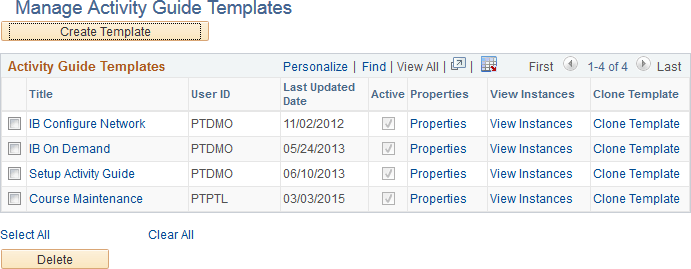
This example illustrates the fields and controls on the Manage Activity Guide Templates page. You can find definitions for the fields and controls later on this page.
| Field or Control | Description |
|---|---|
|
Create Template |
Click the Create Template button to create a new activity guide template. After you specify the activity guide template type (and data type), the new activity guide template is displayed in the Setup Activity Guide WorkCenter. |
|
Title |
Click a title link to manage the action items for this template. Clicking this button opens Setup Activity Guide WorkCenter with the Configure Action Items step selected. |
|
Properties |
Click the Properties link to manage the properties for this template. Clicking this button opens Setup Activity Guide WorkCenter with the Template Properties step selected. |
|
View Instances |
Click the View Instances link to view the Manage Activity Guide Instances page displaying all instances created from this template. |
|
Clone Template |
Click the Clone Template link to make a copy of this activity guide template. |
|
Select All |
Click to select all templates. |
|
Clear All |
Click to clear the selection of any templates. |
|
Delete |
Click to delete the selected templates. |