Setting Content Reference Permissions
Access the Content Reference Security page (Select Click the Edit link for a content reference; then select the Security page.)
This example illustrates the fields and controls on the Content Reference Security page. You can find definitions for the fields and controls later on this page.
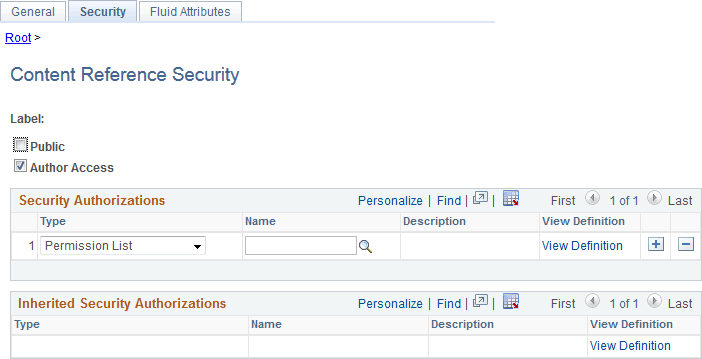
This page is similar to the Folder Security page. You can specify the permission lists and roles that grant security access to the content reference.
Certain URL types inherit the security permission list and role authorizations from the referenced object. For these URL types, you can view, but not modify the security by using the Content Reference Security page. All fields except Public and Author Access are display-only. This is the list of URL types that inherit security authorization:
-
PeopleSoft Component.
-
Worklist.
-
PeopleSoft Script.
When you save a content reference that points to a PeopleSoft component or script on the default local node, the security settings for the content reference are inherited automatically from the menu or script security settings. Any permission lists or roles that you entered on the Content Reference Security page before saving the content reference are deleted and replaced by those of the component or script. These new security settings are also propagated up the folder hierarchy. This ensures that the content reference is visible and all folders are viewable, enabling users to navigate to the component.
Note:
If you copy, move, or add a content reference to a folder, the security settings of the content reference are propagated up the folder hierarchy. This ensures that the content reference is visible and all folders are viewable, and it enables users to navigate to the content reference. If you remove the content reference from that folder, the security settings that were applied when it was added to the folder are also removed from the folder hierarchy, without disturbing any settings still required for other content references remaining in that folder.
Note:
While a content reference link does inherit cascaded security from it's own parent folder, it does not inherit cascaded security from the linked-to content reference's parent folder.
| Field or Control | Description |
|---|---|
|
Public |
Select to make the content reference available to all users. When this check box is selected, all other fields except Label are hidden. |
|
Author Access |
Select to allow content reference access to the creator of the definition, regardless of how other permissions are set. This setting is useful for troubleshooting and testing purposes. |