Self-Service Schedule Page
Use the Self-Service Schedule page to setup the environmental specific information like Server, Distribution List and Template.
Navigation:
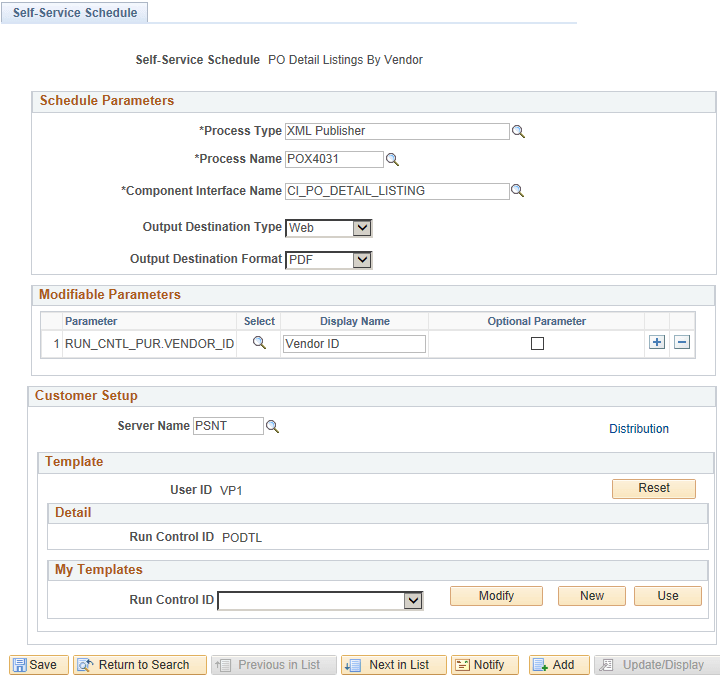
This example illustrates a Self-Service Schedule PO Detail Listing By Vendor page. You can find the definition for the fields and controls in the Customer Setup section later on this page.
| Field or Control | Description |
|---|---|
|
Server Name |
Enter the server name to execute the schedule on the specified Server. Note: If this field is left blank, the default Process Scheduler Server assignment takes place. |
|
Distribution |
Click this link to specify the distribution details. Use the Distribution Detail page to specify the users who would receive the process status notification with link to generated reports and other status information. See Defining Distribution Lists and Setting Report Distribution |
|
User ID |
Specify the user associated with the selected run control ID. |
|
Reset |
Click this to reset the parameters in the customers setup section. This removes the run control template that is associated to this self-service schedule. Note: The run control is not deleted. |
|
Detail |
Displays the selected run control ID that is used as a template. |
|
Run Control ID |
Select an existing run control ID. |
|
My Template |
Allows users to set the run control. |
|
Modify |
Allows editing of the Run Control. It opens up the Run Control page for editing the Run Control. |
|
New |
Allows creation of a new run control. |
|
Use |
Sets the Run Control Id selected in the Drop-down as the Current Active Template. |