Defining Advanced Settings for Number Facets
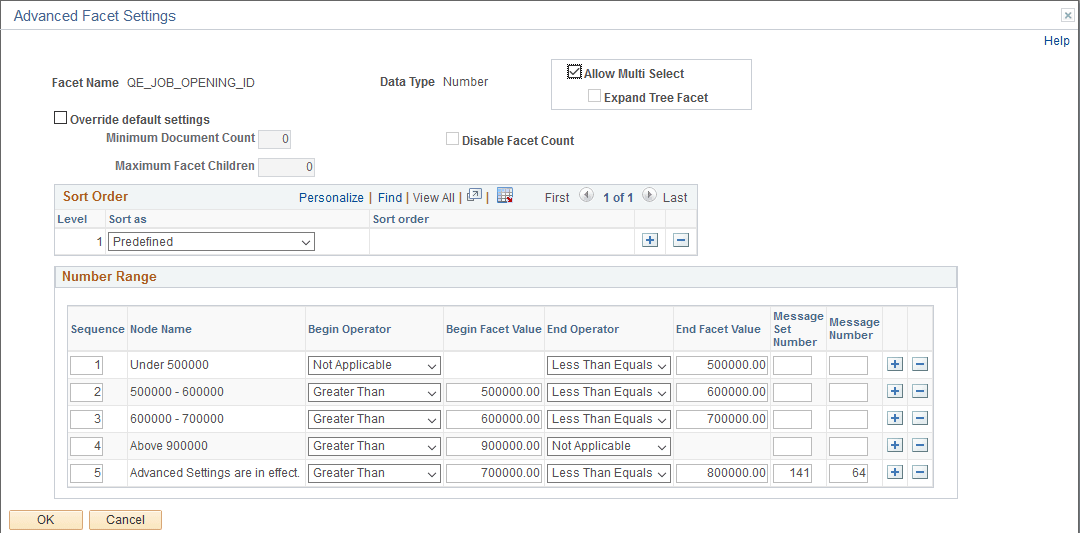
When the search attribute is a number data type, the Advanced Facet Settings page enables you to configure the sort order and ranges.
This example illustrates the fields and controls on the Advanced Facet Settings page (for date data types). You can find definitions for the fields and controls later on this page.
| Field or Control | Description |
|---|---|
|
Allow Multi Select |
By default, all facets enable you to choose multiple facet values on the Global Search results page and the component search results page to filter and narrow down the search results. Select the Allow Multi Select check box to enable multiple facet-values selection in hierarchical facets. If you deselect this option, single select applies to the current facet. Note: Selecting multiple facet values is supported only on fluid search pages; not on classic or classic plus search pages. |
|
Expand Tree Facet |
The Search Options page contains the Expand Tree Facet option to specify the setting at the system level. The default value is collapsed, that is, the Expand Tree Facet check box is not selected. You can use this option to override the setting specified on the Search Options page. |
|
Override default settings |
Select to override the values entered on the Search Options page (). When selected the disabled settings on the page become enabled so that you can override the equivalent values entered on the Search Options page. The override values apply to the current facet only. If not selected, the values entered on the Search Options page apply. |
|
Minimum Document Count |
Set the minimum number of search results (documents) required to display a facet. Default is 1. This property can be overridden by selecting Advanced Settings on the Facets page (, Facets, Advanced Settings). |
|
Maximum Facet Children |
Set the maximum number of children to be returned for each facet node. Default is 100. Options to enter are:
|
|
Disable Facet Count |
Enables controlling the display of the result count (document count) for each facet node. For example, if 15 search results met a facet node’s criteria, (15) appears next to the facet label. Enter Y for Yes or N for No. |
Sort Order
Displays an additional option than the string sort order, Predefined, which displays the facet node, based on the sequence number in which the ranges are defined.
Number Range
| Field or Control | Description |
|---|---|
|
Sequence |
Order in which the ranges are defined. |
|
Node Name |
Display name of the facet range. This is a display only field. The facet node is derived from the begin and end values specified for the ranges or by using the Message Catalog. Message Catalog has the precedence. |
|
Begin Operator |
The first operator for the range sets the beginning of the range. To set the beginning of the range, you have these options to operate against the beginning facet value specified:
|
|
Begin Facet Value |
Set the beginning value for a facet range. |
|
End Operator |
The second operator for the range, sets the end of the range. To set the end of the range, you have these options to operate against the end facet value specified:
|
|
End Facet Value |
The end value for the facet range. |
|
Message Set Number |
Message catalog set number to provide a custom facet node name. |
|
Message Number |
Message number to provide a custom facet node name. |