20 Agent Memory
Agent memory is the part of an AI agent system that lets the agent retain and reuse information across turns, tasks, or sessions.
Unlike the model’s context window, which is temporary and limited to the current prompt, memory can persist facts, preferences, prior decisions, tool outputs, intermediate plans, or observations about the environment.
Agent Memory in Oracle AI Data Platform
AI Data Platform provides short-term memory that is limited to the duration of a session. You can configure what can be kept in memory in the Context tab of your agent.
Single-Agent Memory Configuration
Memory configuration of a single agent system can be found in the Context tab of the agent node.
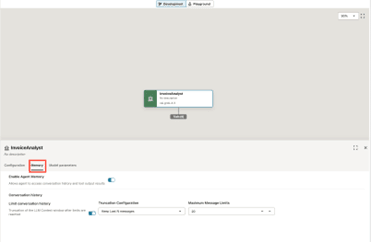
| Memory Configuration | Description |
|---|---|
| Enable Agent Memory | This setting enables agent memory. When disabled, the agent is essentially a stateless system. Each turn is treated independently, and no follow up question can be asked. We recommend that memory is enabled. |
| Limit conversation history | When this selection is disabled, previous turns will fill up the memory until the model runs out of context and an error is returned. If short sessions are expected, it is ok to disable this setting. However, for most use cases Oracle recommends limiting conversation history. |
| Truncation configuration | If you opt to limit the conversation history, you can decide to truncate the history by:
|
| Maximum Message Limits | If you elect to keep the last N messages, you can set a value of N. |
| Token budget | Alternatively, you can set an overall token budget. First tokens are eliminated to keep the most recent ones in memory. |
Multi-agent System Memory Configuration (Supervisor Pattern)
The memory of a multi-agent system is configured in the Context tab of the supervisor agent.
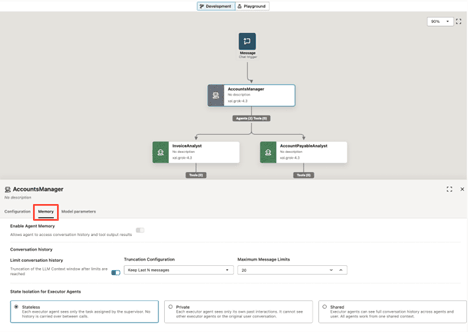
Memory for a multi-agent system is enforced and cannot be disabled, and the memory truncation options displayed in the supervisor agent node are only applied to the supervisor agent memory. Each executor agent memory truncation policy can be configured in the executor node Context tab based on the state isolation policy selected for the entire system.
The multi-agent system memory configuration also allows you to select the memory sharing policy of the executor agents. Three options are possible: Stateless, Private, and Shared. Note that the policy is applied to all executor agents.
| State Isolation for Executor Agents | Description |
|---|---|
| Stateless | Each executor agent sees only the task assigned by the supervisor. No history is carried over between calls. No follow up request can be made to the supervisor agent by the executor agent.
If stateless is selected, the memory of each executor agent is disabled. |
| Private | Each executor agent sees only its own past interactions. It cannot see other executor agents or the original user conversation with the supervisor agent.
If private is selected, you can configure the memory truncation policy separately for each executor agent in each agent node Context Memory tab. |
| Shared | Executor agents can see the full conversation history across agents and users. All agents work from one shared context.
If shared is selected, you can configure the memory truncation policy separately for each executor agent in each agent node Context tab. |
Stored Memory in Agents
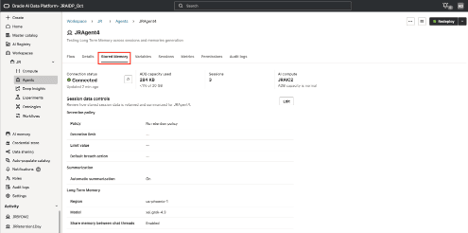
As your agent is deployed and serving more users, it becomes important to monitor the amount of database capacity used to store session data for your agent. You can see and modify the stored memory settings for you agent from the Stored Memory tab. You can click Edit to modify the long term memory and session retention settings.
| Setting | Description |
|---|---|
| Connection status | Connection status to the Oracle Autonomous AI Lakehouse where all session data is stored. |
| ADB capacity used | Total database capacity used across all session of this agent. |
| Sessions | Total number of sessions for this agent. Includes both test (Playground) and deployment sessions. |
| AI Compute | Name of the AI compute hosting the agent. If the agent is deployed, this is the AI compute hosting the deployment. Otherwise, this is the AI compute hosting the Playground. |
Long Term Memory
You configure your agents so users interact with the same agent through multiple sessions. The user can share important information, like preferences, and the agent can also learn from common patterns adopted in multiple sessions, like tools used. The ability to access extracted memories across multiple sessions is enabled through long term memory.
You can configure long term memory from the Stored Memory tab in your agent.
Session Data Retention
Session data in Oracle AI Data Platform refers to all messages exchanged between an agent and user during a session.
Note:
Oracle highly recommends you create cold storage copies of the session data stored in the Oracle Autonomous AI Lakehouse database to retain complete records of all messages exchanged between users and agents to support audits, legal discovery, and litigation.Sessions can potentially last hours, days, or even weeks, leading to a large number of messages exchanged and retained by session data. All AI Data Platform session data is stored in the Autonomous AI Lakehouse provisioned for your instance to enable AI features. For more information, see AI Feature Management.
By default, AI Data Platform doesn't limit the amount of session data stored for each session in the provisioned Autonomous AI Lakehouse. As a result, session data can grow rapidly in scenarios where agents are in regular use for many users across multiple sessions. To manage this, Oracle recommends configuring limits to the amount of retained session data.
When you first create an agent, you can configure its session retention settings. See Create an Agent. If the agent is already created and you want to reconfigure its session retention settings, you can do so from the Session Memory tab.
| Setting | Description |
|---|---|
| Session retention | Enable Apply retention policy to configure how and when session data is removed when specified limits are reached. |
| Retention limit | Select the method for managing session data limits:
|
Automatic Summarization
Automatic summarization can be enabled independently of session retention. Automatic summarizations are applied to conversational data injected in the Context window of the model. This option summarizes older messages that would exceed 80% of the context length of the model selected.
This is a good option to enable if you want to persist the data from long sessions in the database while also preventing these long sessions from overtaking the context window of the agent.
Note:
Summaries are generated by an LLM to retain important context before older source messages are deleted. Some exact wording, intermediate steps, or lower-priority details may not be preserved.Enable Long Term Memory for an Agent
You can enable long term memory for agents so you can interact with the same agent across multiple sessions.
- Navigate to your agent.
- Click the Stored Memory tab.
- Select Enable long term memory.
- Select the model and region to use to support long term memory for the agent.
- Optional: You can enable agent memory to be shared between sessions. If disabled, your agent is limited to only the memories extracted within the same session. If this option is enabled, the agent has access to memories extracted across all sessions initiated by the same user.
View Agent Session Data Retention Settings
You can view the current configuration of session data retention settings for your agents in the Stored Memory tab.
- Navigate to your agent.
- Click the Stored Memory tab.
Modify Agent Session Data Retention Settings
You can enable, disable, and modify session data retention settings for your agents.
- Navigate to your agent.
- Click the Stored Memory tab.
- Click Edit.
- Select Apply retention policy to enable or de-select it to disable.
- Configure the Retention limit:
- For Retention period, provide the number of days session data is retained before it is deleted from your Oracle Autonomous AI Lakehouse.
- For Session size limit, provide the maximum storage limit in MB for retained session data. When this limit is reached, the oldest session messages are deleted.
- For Thread count limit, provide a limit to the number of threads (combinations of user messages and agent responses) retained. When this limit is reached, the oldest session threads are deleted.
- Select Automatic summarization to retain summaries of important session information.
- Click Save changes.