About Filter Groups (Preview)
In Oracle Analytics, you can use filter groups to create complex filters.
Filter groups are available for preview and you can use them in the filter bar as workbook or canvas filters, in dashboard filters as filter controls, or as visualization filters. Ask your administrator to turn on the Enable Shared Filter Groups in Workbooks option in System Settings. See Preview System Settings.
You create a filter group to combine multiple filters that you want to apply and control together. Oracle Analytics applies the filters sequentially from the first to last filter defined in the group, and you can use the operators AND or OR to combine them.
- List
- Top Bottom N
- Range
- Date Range
- Relative Time
- Expression
For more information about these filter types, see Filter Types.
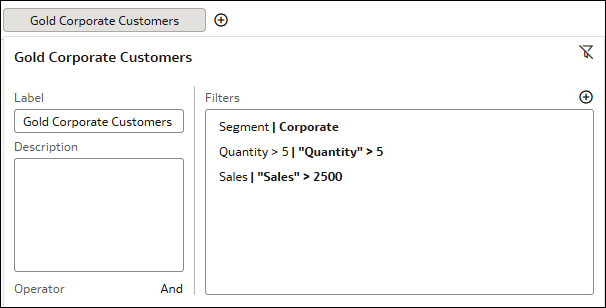
AND operator so they're applied together. Your filter group acts as a definition for a Gold Corporate Customer and filters your data accordingly:
- Segment is a list filter with the segment Corporate selected.
- Quantity is an expression filter for quantity sold over 5 units.
- Sales is an expression filter for sales over $2,500.
Depending on the filter settings you configure in Present, consumers can view, add, and modify filter groups used in the filter bar or as visualization filters. You can hide these filter groups from consumers or you can control the level of interactivity you want them to have. See Specify Workbook Filter Options in Present for filter groups in the filter bar and Show or Hide a Visualization Filter in Present for filter groups used as visualization filters. Dashboard filters are intended for consumer interaction, so consumers can modify filter groups used as dashboard filter controls.
You can also reuse filter groups in other workbooks by making them shared objects. For information about sharing a filter group, see About Shared Filter Groups (Preview).