Make a Data Action Shareable
Use these steps to create a shared data action.
You can turn any existing data action into a shared data action unless it uses columns from multiple subject areas, a mixture of subject areas and XSAs (Non Subject Area-based sources), or different XSAs.
You can't unshare a data action once it's in the Shared Actions folder. If you want to use the shared data action as an unshared action in your workbook, see Copy a Shared Data Action.
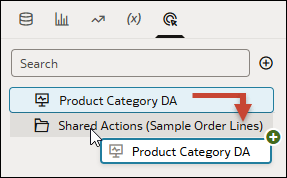
When you add a data action to the Shared Actions folder, both show green dots on their names to indicate your changes aren't saved and the data action isn't available in other workbooks yet.
- In the Data panel, click Actions
 .
. - Move the data action to the Shared Actions folder by doing one of the following:
- Right-click the data action and click Share in <dataset or subject area name>.
- Drag the data action to the Shared Actions folder.