View Instance Details
You can view details about an Oracle Integration instance and perform tasks such as accessing the instance login page to design integrations and processes, editing an instance, adding tags, deleting instances, and viewing custom endpoint details and instance life cycle activity.
The integration instance details look slightly different depending on whether you've enabled disaster recovery.
Figure 10-1 Oracle Cloud Console - Integration instance details
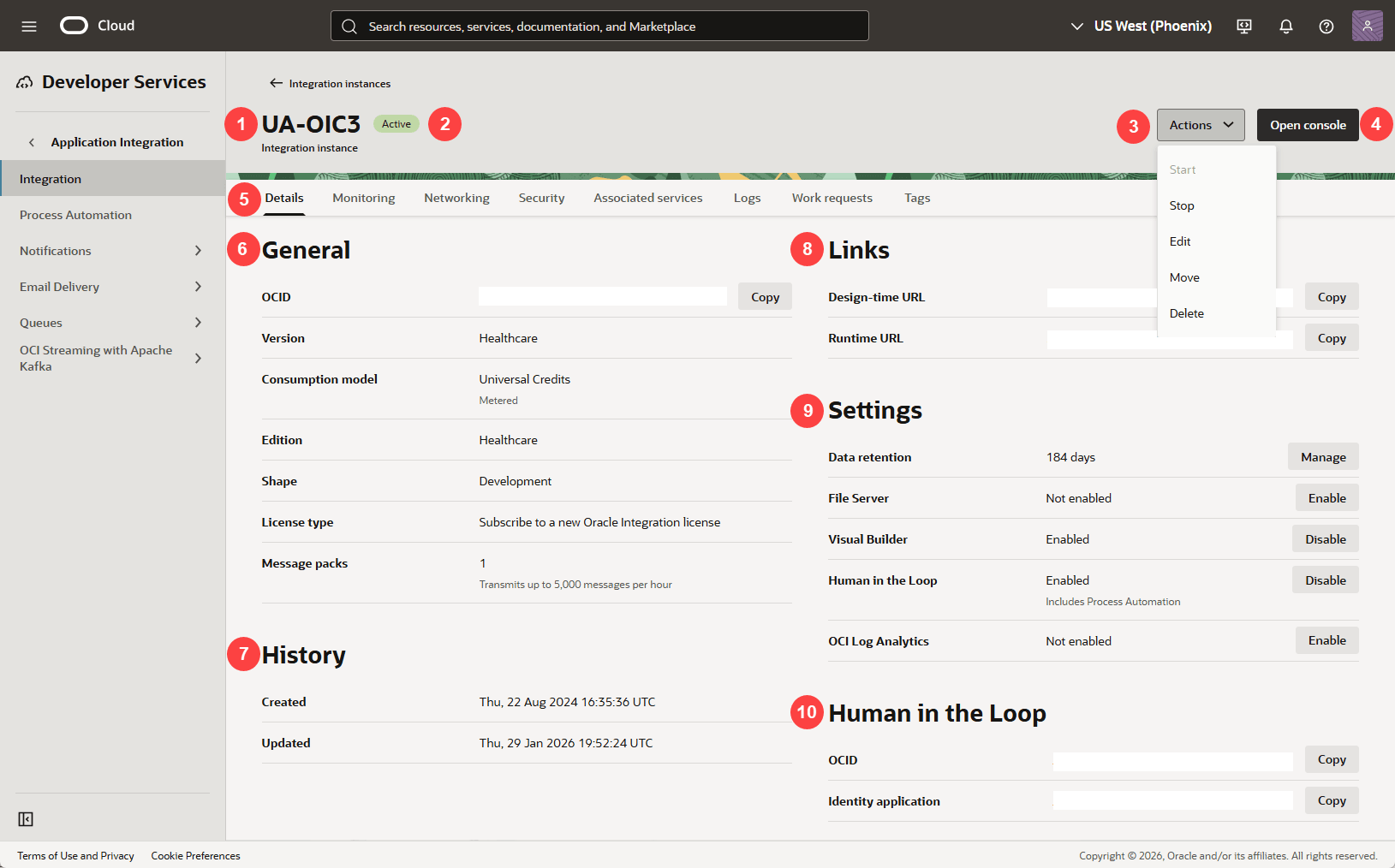
Figure 10-2 Oracle Cloud Console - Integration instance with disaster recovery
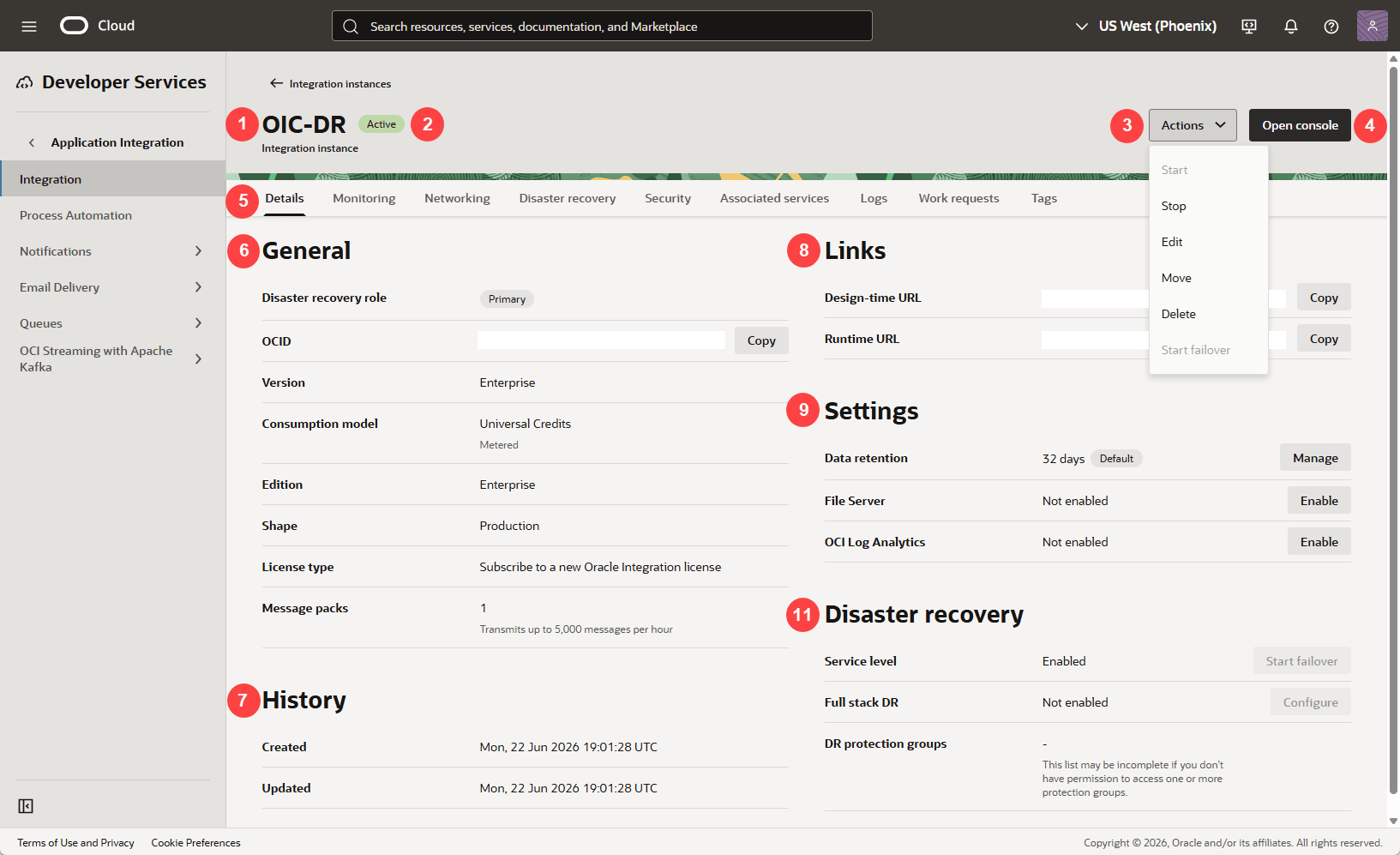
| Callout | Element | Description |
|---|---|---|
|
1 |
Instance name |
At the top of the details page, you see the name of the instance. |
|
2 |
Status |
Next to the instance name you see the status of the instance:
|
|
3 |
Actions menu |
Click Actions to see other options:
|
|
4 |
Open console button |
Click Open console to access Oracle Integration. See Get Familiar with the Home Page in Getting Started with Oracle Integration 3. |
|
5 |
Tabs |
Click a tab to see additional information about the service instance:
|
|
6 |
General |
Under General you see the following general information:
Note: The IP address of your instance is not visible in the Oracle Cloud Console. If you need the outbound NAT address, you can get it from the Oracle Integration web application About box. See View Instance Outbound and Inbound IPs. |
|
7 |
History |
Under History you see the following information:
|
|
8 |
Links |
Under Links you see the following information:
|
|
9 |
Settings |
Under Settings you see the following information:
|
|
10 |
Human in the loop |
Under Human in the Loop, you see the following information:
|
|
11 |
Disaster recovery |
If you enabled disaster recovery, you see the Disaster recovery section, which includes the following information:
|
Access an Oracle Integration Instance
The easiest way to access an Oracle Integration instance is by navigating to the URL in your welcome email or provided by the service administrator. You can also access it from the Oracle Cloud Console.
Note:
The user who creates the instance automatically has the ServiceAdministrator role and can access the Oracle Integration instance. All other users must be assigned the appropriate role for access. See Assign Roles to Groups.- Next to the Oracle Integration instance you want to access, at the far right, click
 , and select Open console to access the Oracle Integration login page.
 If you don't see the instance you're looking for, make sure you're viewing the correct region (in the banner) and compartment (at the top of the instance list, next to Applied filters).
If a message appears that access was denied, or the home page flashes, you don't have access to the Oracle Integration instance. See Assign Roles to Groups.
- Learn about the features of Oracle Integration. See Oracle Integration.
- Assign service roles to users (such as Developer or Administrator) to allow them to work with the features of Oracle Integration. See Assign Roles to Groups.