Oracle NoSQL Database Cloud Service Limits
Learn how to manage Oracle NoSQL Database Cloud Service limits.
Oracle NoSQL Database Cloud Service enforces limits on table operations and resource use. Some limits apply to individual tables, while others apply at the regional level. Because a tenancy can be active in multiple regions, the service calculates regional limits separately for each combination of tenancy OCID and region.
When you create a table, the service checks that the requested resources are within the applicable limits. For tables that use On-Demand Capacity, it validates the request against the On-Demand Capacity limits.
To view the primary limits, current usage, and available capacity for Oracle NoSQL Database Cloud Service in a region, follow these steps in the OCI Console:
- On the navigation menu, select Governance & Administration > Tenancy Management > Limits, quotas, and usage.
- Select the required region from the Console header.
- Select Edit filters, and then select NoSQL from the Service drop-down list.
- Verify that Scope shows the selected region and Compartment shows the root compartment. Select Update.
The page displays the Hosted Environments, Read Unit Count, Write Unit Count, and Table Size (GB).
Administrators can set compartment quotas to control how resources are allocated within compartments. Quotas are applied in addition to cloud service limits, so a quota can reduce the capacity available in a compartment even when the tenancy has not reached its cloud service limit. If the available capacity shown in the OCI Console is lower than expected, check whether quota policies apply to the selected compartment or its parent compartments.
The following example shows the limits for the Ashburn region.
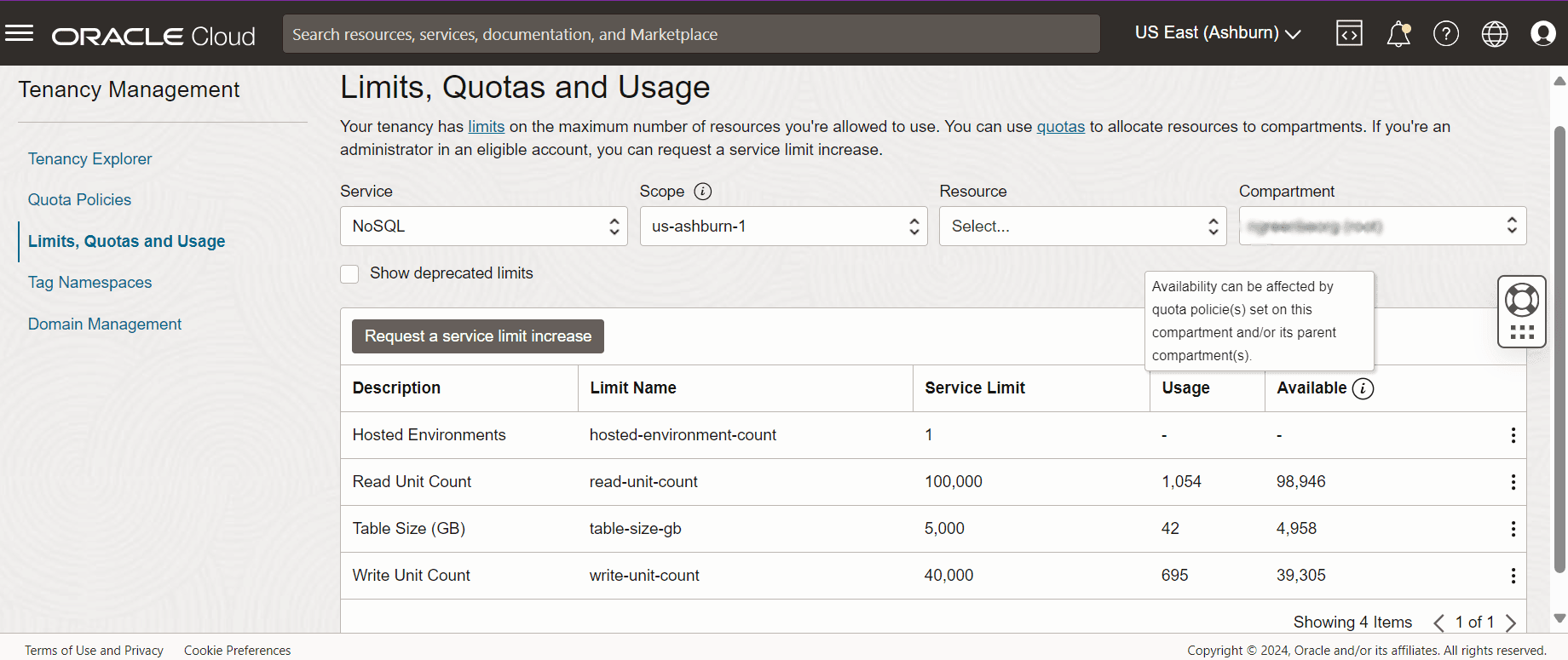
Description of the illustration limit-quotas-usage.png
Cloud Service Limit Values
The following table lists each limit, its scope and description, and its value in non-hosted and hosted environments.
The Scope column indicates where each limit applies:
- Table: The limit applies to an individual table.
- Region: The limit applies to the tenancy in a specific region.
- Request: The limit applies to an individual request.
- Index, Column, Row, and Query: The limit applies to the corresponding database object or query.
Table: Cloud Service Limits for Non-Hosted and Hosted Environments
| Limit | Scope | Description | Value in a non-hosted environment | Value in a hosted environment |
|---|---|---|---|---|
| Maximum table storage size | Table | Maximum total storage size per tenant. The total storage used for one or more tables can’t exceed this value. | 5 TB | 17.5TB |
| Table Names | Table | Maximum length and allowed characters for table names. Names must begin with a letter (a–z, A–Z). Subsequent characters can be letters, digits (0–9), or underscores. | Maximum 256 characters | Same as a non-hosted environment. |
| Provisioned Capacity - Maximum read and write throughput | Table | Maximum read and write throughput when provisioning a table. | 40,000 read units and 20,000 write units per table. | Up to 420,000 read units and 280,000 write units total for all tables in the hosted environment. |
| On-Demand Capacity - Maximum read and write throughput | Table | Maximum read and write throughput while using On-Demand Capacity to provision tables. | 10,000 read units and 5,000 write units per table. | Not allowed/needed in a hosted environment. |
| On-Demand capacity - Number of tables | Region | Number of tables with On-Demand Capacity. | 3 | Not allowed/needed in a hosted environment. |
| Change the provisioning mode | Table | Change the provisioning mode between Provisioned and On-Demand Capacity. | Can be changed only once per day. | N/A |
| Maximum number of tables | Region | Maximum number of tables. | 30 | Can be customized by requesting a cloud service limit increase. |
| Maximum number of columns. | Table | Maximum number of columns in a table. | 50 | Can be customized by requesting a cloud service limit increase. |
| Maximum number of table schema updates | Table | Maximum number of schema updates for a table. | 100 | Can be customized by requesting a cloud service limit increase. |
| Maximum number of indexes | Table | Maximum number of indexes on a table. | 5 | Can be customized by requesting a cloud service limit increase. |
| Maximum number of changes for throughput and storage limits | Table | Number of changes allowed to throughput and storage limits. | Oracle allows:
|
Can be customized by requesting a cloud service limit increase. |
| Index Names | Index | Maximum length and allowed characters for index names. Names must begin with a letter (a–z, A–Z). Subsequent characters can be letters, digits (0–9), or underscores. | Maximum 64 characters | Can be customized by requesting a cloud service limit increase. |
Maximum number of individual operations per WriteMultiple request |
Request | Maximum number of individual operations in a WriteMultiple request. |
50 | Same as a non-hosted environment. This can also be increased by request |
Maximum data size for WriteMultiple request. |
Request | The maximum data size for a WriteMultiple request. |
25 MB | Same as a non-hosted environment. This can also be increased by request. |
| Columns Names | Column | Maximum length and allowed characters for column names. Names must begin with a letter (a–z, A–Z). Subsequent characters can be letters, digits (0–9), or underscores. | Maximum 64 characters | Same as a non-hosted environment. |
| Maximum secondary index key size | Index | Maximum size of a secondary index key. | 64 bytes | Can be customized by requesting a cloud service limit increase. |
| Maximum primary index key size | Index | Maximum size of a primary key. | 64 bytes | Can be customized by requesting a cloud service limit increase. |
| Maximum row size | Row | Maximum size of a row. | 512 KB | Can be customized by requesting a cloud service limit increase. |
| Maximum query string length. | Query | Maximum length of a query string. | 10 KB | Can be customized by requesting a cloud service limit increase. |
| Maximum supported rate of DDL operations. | Region | Maximum rate of DDL operations. | 4 per minute | Can be customized by requesting a cloud service limit increase. |
| Maximum values for throughput and data storage resources. | Region | Maximum values for throughput and data storage resources. | Per region, Oracle allows:
Oracle allows a maximum storage size of 5-TB per-tenant. The region can have a single table with storage size of 5 TB, in which case the region is not able to create another table. Or have multiple tables and ensure that the data within all these tables is within the maximum storage size of 5 TB. |
Up to 420,000 read units, 280,000 write units, and 17.5 TB of storage |
Increasing Cloud Service Limits
You can request an increase to a cloud service limit listed on the Limits, quotas, and usage page in the OCI Console, or for a limit in the Cloud Service Limits for Non-Hosted and Hosted Environments table table above marked as customizable. Submitting the request creates a CAM ticket. For changes to limits in the table, add the details in the Reason for request field.
- Open Governance & Administration > Tenancy Management > Limits, quotas, and usage in the OCI Console, and select the required region.
- Click Request a service limit increase to open the Request limit increase page.
-
Enter a request name and reason for request.
The Console lists Hosted Environments, Read Unit Count, Write Unit Count, and Table Size (GB). To request an increase to a limit that is not listed, specify its name and the requested value in the Reason for request field.
Click Next.
- Under Requested items, click Add. Select NoSQL from the Service drop-down list and then click Next.
- Select the required limit from the Limit name drop down list. For a limit not listed in the drop down list, select Table Size (GB).
- Enter the requested value. For a limit not listed in the drop down list, enter 7000 for Table Size (GB).
- Click Save, and then click Next.
- Review the request details, and then click Submit.
Example: Cloud service limit update request to increase the read-units limit in the Ashburn region from 100000 to 110000.
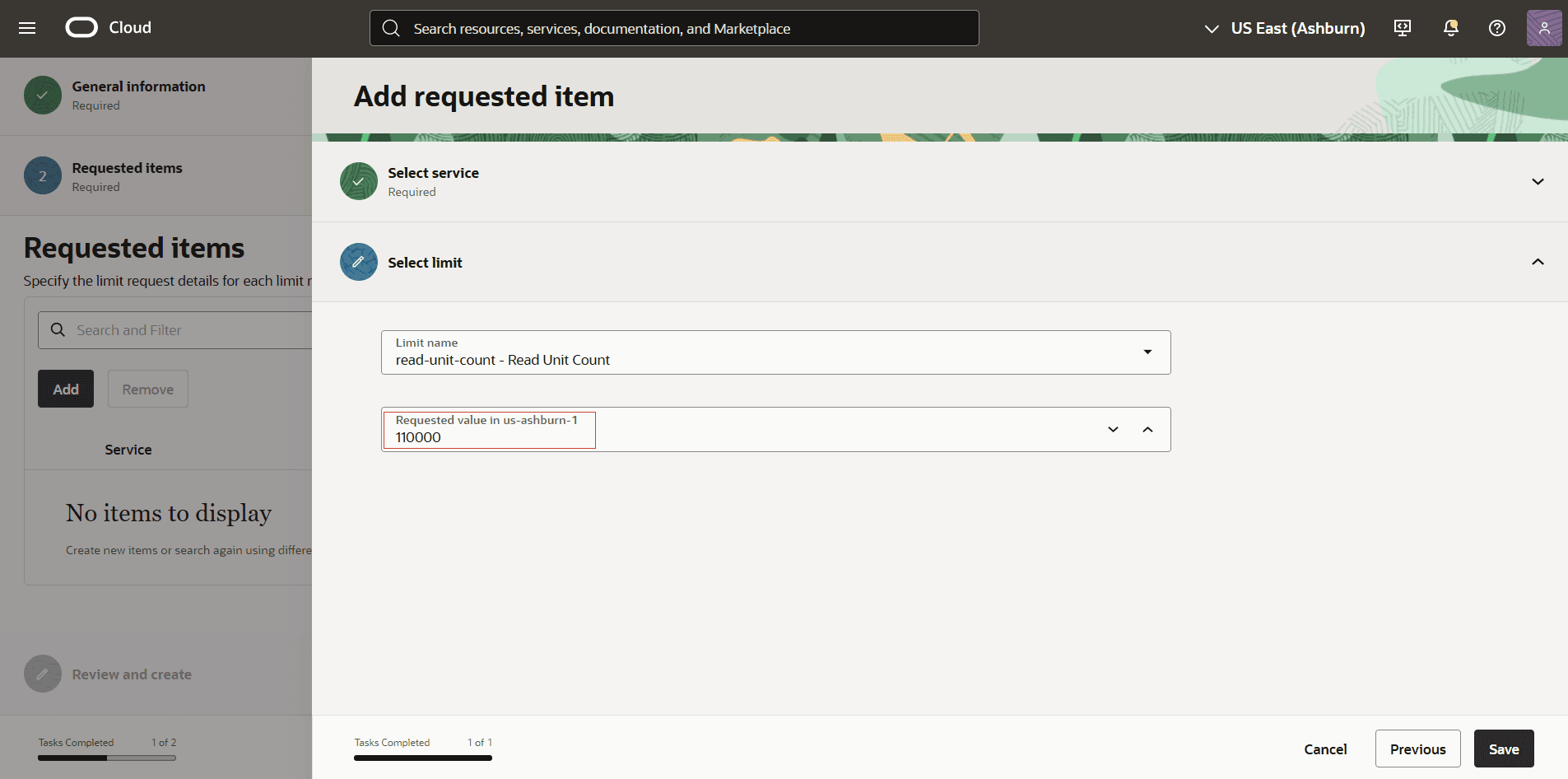
Description of the illustration ndcs-req-ser-limit-upd.png