Create Variables to Temporarily Store Data Changes in a Buffer
When you work with variables based on component data providers such as Service Data Provider and Array Data Provider, you can temporarily store data changes in a buffer until they are ready to be committed to the data source. To do this, you use variables based on a Buffering Data Provider.
The Buffering Data Provider is a wrapper that provides buffering for an underlying data provider, so edits can be committed to the data source later on. The underlying data provider is responsible for data fetches, while the Buffering Data Provider takes care of merging any buffered edits with the underlying data. This is useful functionality for batch processing, especially in the context of editable tables. For example, when users edit multiple existing rows or create new rows in a table, all changes can be stored in a buffer until the user clicks a Save button, at which time a REST call posts the buffered changes to the backend service. The buffered changes are held in a variable based on the built-in Buffering Data Provider type.
Buffering Data Providers require data providers that provide the actual data. For example, when you create a table based on a quick start, a Service Data Provider type variable is created to hold the table’s data. The Buffering Data Provider simply wraps this underlying data provider to provide additional functionality, such as buffering for CRUD operations, commit, and revert. So before you create a Buffering Data Provider variable, make sure the underlying data provider is available.
Here’s how to create a Buffering Data Provider variable and map it to the underlying data provider:
-
Open the Variables editor for your scope and create a variable of type Buffering Data Provider (for example,
employeesBDP). Here’s an example of a newly created Buffering Data Provider variable: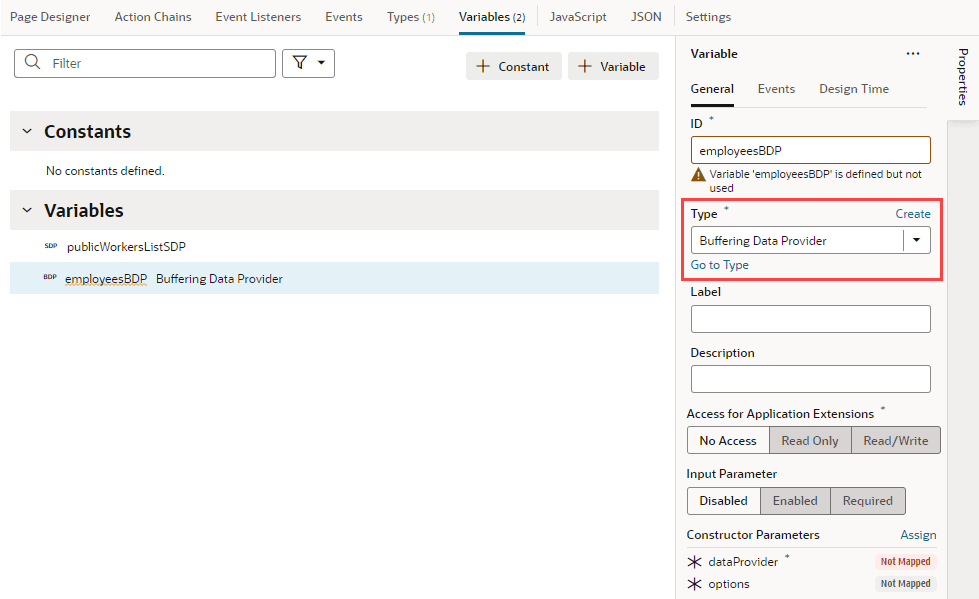
- The Buffering Data Provider variable allows you to pass values to the constructor to initialize the newly created instance’s properties. Here are the two Constructor Parameters it accepts:
dataProviderwhich must be set to an underlying data provider, andoptions, as supported by the Oracle JET DataProvider API. See Final Class: CollectionDataProvider.- To map the Buffering Data Provider variable to your component’s underlying data provider, in the newly created variable’s Properties pane, click the dataProvider Constructor Parameter.
In the Map Variables to Parameters dialog, map the original data provider on the Sources pane (for example, the
publicWorkersListSDPvariable created when a table component is mapped to its data source) to the dataProvider parameter on the Target pane. Click Save. - To pass any options from the underlying data provider, click options under Constructor Parameters, map the required variables, and click Save.
- To map the Buffering Data Provider variable to your component’s underlying data provider, in the newly created variable’s Properties pane, click the dataProvider Constructor Parameter.
In the Map Variables to Parameters dialog, map the original data provider on the Sources pane (for example, the
- Bind the Buffering Data Provider variable to your component. Variables based on the Buffering Data Provider type can be bound to tables, list views, or any component that accepts a data provider.
- Switch to the Page Designer and select (for example) your table component.
-
In the table’s Data tab, click
 to open the Variables picker and select the instance of the Buffering Data Provider, instead of the original data provider. For example, you might replace
$variables.publicWorkersListSDPwith$variables.employeesBDP.instance: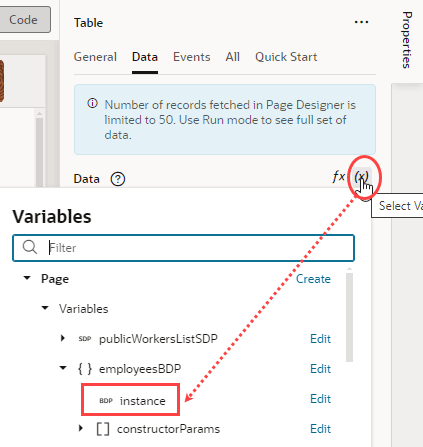
Buffer Changes to Hierarchical Data
For a component with parent and child rows, use a Buffering Tree Data Provider variable to hold pending additions, updates, and removals. For example, a Public Workers table can display employees and their phone contacts, with new phone contacts held locally in the buffer. Public Workers is read-only; saving requires a separate writable service.
The buffering provider wraps a Mutable Array Tree Data Provider or Array Tree Data Provider that supplies the existing hierarchy. Create that underlying provider first; see Create Variables for Tree Data Providers. Use an application version that offers Buffering Tree Data Provider in the variable’s Type list and a component that supports it. The underlying JET provider is available in Oracle JET 19.0.0 and later.
-
Open the Variables editor for the appropriate scope and create a variable named
employeeBuffer. Select Buffering Tree Data Provider as its Type. -
In the Properties pane, click Assign under Constructor Parameters. Map the parameters in the Map Variables To Parameters dialog:
Parameter Required Example mapping dataProviderYes Select Expression and enter $variables.employeeTree.instance, whereemployeeTreeis the underlying tree provider variable.optionsNo Leave unmapped to use the defaults, or supply the options supported by Buffering Tree Data Provider. Map the underlying provider’s
.instance, rather than the array containing employee data. Click Save. -
Bind the component’s
dataproperty to$variables.employeeBuffer.instance. For a dynamic table, use the Data tab in the Page Designer’s Properties pane and retain the table’s metadata and layout bindings.
The table displays the underlying hierarchy together with pending edits. Add, update, or remove pending items through the buffering provider’s addItem, updateItem, and removeItem methods. Preserve the underlying provider’s keys, including array key paths when configured. Do not also apply a pending insertion to the underlying array, which would duplicate the new row.
Buffering a change does not save it to the backend. Your application must submit pending items to the appropriate service, track their submission status, and handle failures. The getSubmittableItems and setItemStatus methods support that workflow; see BufferingTreeDataProvider for methods and options.
For an example that adds phone contacts beneath a selected employee, see Insert Rows in a Dynamic Table.