Create Variables for Tree Data Providers
Use a tree data provider variable to supply hierarchical data to a component that supports parent and child rows. For example, a Public Workers table can display employees as parent rows and their phone contacts as children.
VB Studio offers these types under Component Data Providers in a variable’s Type list:
| Type | Purpose |
|---|---|
| Mutable Array Tree Data Provider | Supplies a hierarchy from an array without requiring Knockout observable arrays. Preferred for new array-based hierarchies. |
| Array Tree Data Provider | Supplies a hierarchy from an array or a Knockout observable array. Use this when adapting an existing implementation that uses this provider. |
| Buffering Tree Data Provider | Wraps an underlying tree provider and holds pending additions, updates, and removals. See Buffer Changes to Hierarchical Data. |
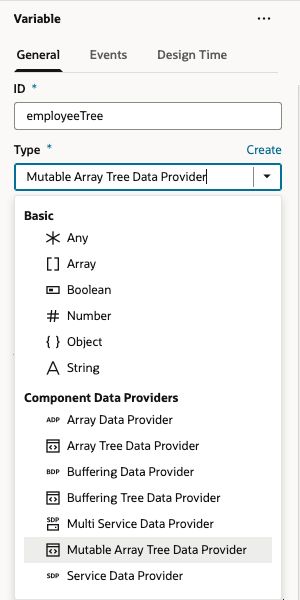
The array-based providers use data already available in the application; they do not retrieve REST data themselves. Retrieve and arrange service data before passing it to the provider, or use a local array. Make sure your application’s version offers the type you want to use and that the target component supports tree data.
Prepare the Hierarchical Data
Create an array variable, such as employees of type object[]. Each object represents a row. Put child rows in a nested array, using children as the property name for the examples below:
[
  {
    "id": 1001,
    "DisplayName": "Employee 1001",
    "children": [
      {
        "id": 101,
        "DisplayName": "Work phone",
        "contactValue": "202-555-0142"
      }
    ]
  },
  {
    "id": 1002,
    "DisplayName": "Employee 1002",
    "children": []
  }
]
Keep row identifiers stable. The id values in this sample are unique throughout the tree. For service data, map the response into the required hierarchy; see Retrieve and Arrange the HR Data.
Create a Mutable Array Tree Data Provider Variable
-
Open the Variables editor for the scope containing your data and create a variable. Set its ID to
employeeTreeand its Type to Mutable Array Tree Data Provider. -
In the Properties pane, click Assign under Constructor Parameters. In the Map Variables To Parameters dialog, map these parameters:
Parameter Required Example mapping dataYes Select Expression and enter $variables.employees.keyAttributeYes Select Static Content and enter the JSON string "id".optionsNo Select Static Content and enter { "useKeyPaths": "on" }to use array key paths.Select a target parameter to view or enter its value. Click Save when the mappings are complete.
-
Bind the component’s
dataproperty to$variables.employeeTree.instance. The.instanceproperty supplies the constructed provider to the component. For a dynamic table, retain the appropriate metadata and layout bindings for its displayed fields.
With useKeyPaths set to on, the sample employee has key [1001] and its phone contact has key [1001, 101]. Preserve the returned key’s type and structure when selecting or modifying rows.
To update this provider’s underlying data, construct a new array with the required changes and assign it to the root provider’s data property. Do not modify that property with push or splice. Mutable Array Tree Data Provider avoids the Knockout dependency of observable-array updates. See MutableArrayTreeDataProvider for update behavior and additional options.
For pending edits that users will save later, wrap the provider in a Buffering Tree Data Provider instead of changing the underlying data for each pending edit.
Create an Array Tree Data Provider Variable
-
Open the Variables editor and create a variable named
employeeArrayTree. Select Array Tree Data Provider as its Type. -
Click Assign under Constructor Parameters and map the following parameters, then click Save:
Parameter Required Example mapping dataYes Select Expression and enter $variables.employees.optionsNo Select Static Content and enter { "keyAttributes": "id", "childrenAttribute": "children" }.These options identify the sample’s row identifier and nested child array. Unlike Mutable Array Tree Data Provider, this type configures
keyAttributesinsideoptions; it has no separatekeyAttributeConstructor Parameter. -
Bind the component’s
dataproperty to$variables.employeeArrayTree.instance.
This mapping uses globally unique id values and the provider’s default global key scope. Do not assume that its keys have the same array-path structure as the Mutable Array Tree Data Provider configuration above.
Array Tree Data Provider accepts plain arrays and Knockout observable arrays. With plain arrays, do not expect in-place changes to generate update notifications. Existing implementations that need observable-array notifications must follow the provider’s Knockout update conventions. See ArrayTreeDataProvider for key options and change-notification requirements.
To buffer edits, pass $variables.employeeArrayTree.instance to a Buffering Tree Data Provider’s dataProvider Constructor Parameter. Match all edit keys to the underlying provider’s key conventions. For a complete example using the mutable provider, see Insert Rows in a Dynamic Table.