Single Sign-on Support in B2C Service
B2C Service includes single sign-on (SSO) support for agents working on the Service Console or Agent Browser UI and customers using the Customer Portal.
Typically, agents and customers log in using the logins and passwords specified in their B2C Service staff account and contact records. With single sign-on, however, agents and customers are authenticated by a different application, and B2C Service accepts authentication and logs them in.
- To enable single sign-on for agents, customers, or both, contact your Oracle account manager.
- The Username in single sign-on (SSO) for agents working on the Agent Browser UI is case sensitive but the Username in SSO for the Service Console is case insensitive. Oracle recommends creating Username taking this difference into account and using lower and upper case characters for Usernames.
B2C Service supports two types of SSO:
- IdP-initiated SSO
- Service Provider (SP)-initiated SSO (supported only for agents)
IdP-initiated SSO
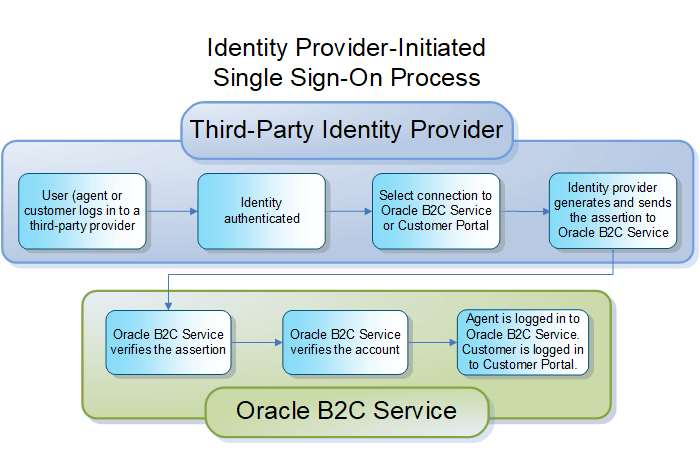
When agents and customers log in to a external identity provider, the IdP must authenticate their identity. Then they select a connection to the Service Console (for agents) or your customer portal (for customers).
An overview of the IdP-initiated single sign-on process is shown here.
SP-initiated SSO
B2C Service also supports SSO initiated from a service provider (SP) instead of an IdP. For example, an agent may attempt to access B2C Service by launching the login window. If SSO is enabled for this specific agent, B2C Service automatically redirects the agent to the appropriate login page the external IdP. The IdP captures the agent credentials and, if the authentication is successful, redirects the agent back to B2C Service with a SAML assertion.