Generating a Calculation Statistics Diagnostics Report
The Calculation Statistics Diagnostics report shows you diagnostics information for up to five calculation records. The report shows additional rule execution detail which can be useful in diagnosing rule performance issues.
The report prints in an Excel format and has two worksheets:
To generate a Calculation Statistics Diagnostics report:
-
From the Home page, select Modeling, and then Calculation Analysis.
-
From the Calculation Analysis page, select up to five calculation records.
-
Click More Actions, and select Calculation Statistics - Diagnostics.
-
Open the downloaded
EngineStatisticsComparisonReport.xlsxfile.
Job Statistics
Job Statistics shows the calculation record-level statistics and provides a comparison on some of those statistics. Job Statistics include information such as:
-
Job ID
-
Batch ID
-
Job Start Time
-
Job End Time
-
Job Total Time (min)
-
POV Name
-
Model Name
-
Model Snapshot Time
-
Job Status
-
Total Number of POVs Run During Same Time
-
Max Number of Rules Run During Same Time
-
Comment
-
POD_TYPE
-
EPM Build Number
-
Essbase Build Number
-
Calculation Threads
-
Essbase Clear Type
-
Non Empty Tuple
-
Scratch Cells Optimization
-
Clear Calculation Data Time (min)
-
Clear Aggregations Time (min)
-
Rules Total Time (min)
-
Clear Scratch Cells Time (min)
-
Merge Slices Time (min)
-
Create Aggeregations Time (min)
-
Generation Time (min)
-
Execution Time (min)
-
Allocation Time (min)
-
Custom Calc Time (min)
-
Driver Query Time (min)
-
Clear Partial Time (min)
-
Cells Updated
-
Number of Rules
-
Rules Complete
-
Sub Rules
-
Sub Rules Complete
-
SDE Rules
-
CDE Rules
-
SR Rules
-
CR Rules
-
CC Rules
-
SASDD Rules
-
ATPS Rules
-
Number of Scripts
-
Scripts Complete
-
Skipped Scripts Count
-
Allocation Scripts
-
Custom Calc Scripts
-
Driver Queries
-
Clear Partial Scripts
-
Attribute Dimensions
-
Attribute Dimension Members
-
Attribute Associations
-
Dimensions
-
Dimension Members
-
Dimension Members Cross Product
-
Essbase Sessions Pre
-
Essbase Sessions Post
-
Input Cells Start
-
Incremental Input Cells Start
-
Aggregate Cells Start
-
Input Cells End
-
Incremental Input Cells End
-
Aggregate Cells End
-
SDE Rules Total Time (min)
-
CDE Rules Total Time (min)
-
SR Rules Total Time (min)
-
CR Rules Total Time (min)
-
CC Rules Total Time (min)
-
SASDD Rules Total Time (min)
-
ATPS Rules Total Time (min)
-
ASO Cache Concurrent Consuming Threads
-
Auto Merge Maximum Slice Number
-
Skip Scripts Enabled
Sample Job Statistics
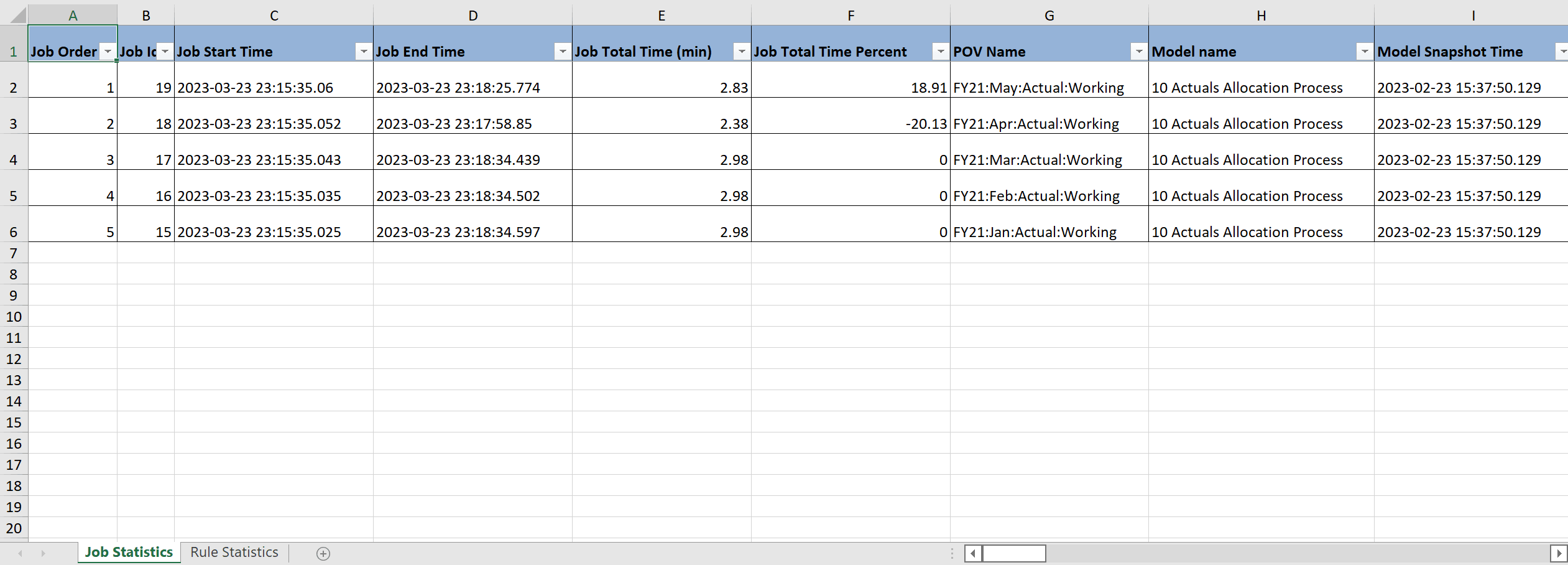
Tip:
Use the scroll bar at the bottom of the Excel spreadhsheet to see additional Job Statistics.Rule Statistics
Rule Statistics shows all the rules that were executed and the order in which they were executed along with statistical data about each rule. Rule Statistics include information such as:
-
Job ID
-
POV Name
-
Model Name
-
Start Time
-
End Time
-
Rule Set Name
-
Rule Name
-
Rule Type
-
Top 10 Slowest Rules
-
Total Time (min)
-
Generation Time (min)
-
Execution Time (min)
-
Execution Time Percent
-
Execution Time - Allocation Calc (min)
-
Execution Time - Custom Calc (min)
-
Execution Time - Driver Query (min)
-
Execution Time - Clear Partial (min)
-
Cells Updated
-
Cells Updated Percent
-
Potential Sources
-
Potential Destinations
-
Potential Allocations
-
Segments
-
Number of Scripts
-
Scripts Complete
-
Skipped Scripts Count
-
Allocation Scripts
-
Custom Calc Scripts
-
Driver Queries
-
Clear Partial Scripts
-
Sub Rules
-
Sub Rules Complete
-
Total Number of Rules Run During Same Time
-
Source Data Total
-
Driver Data Total
-
Execution Details
-
Driver Upper Level Member Used
-
Driver Dynamic Member Used
-
Source Cherry Pick Member Count
Sample Rule Statistics
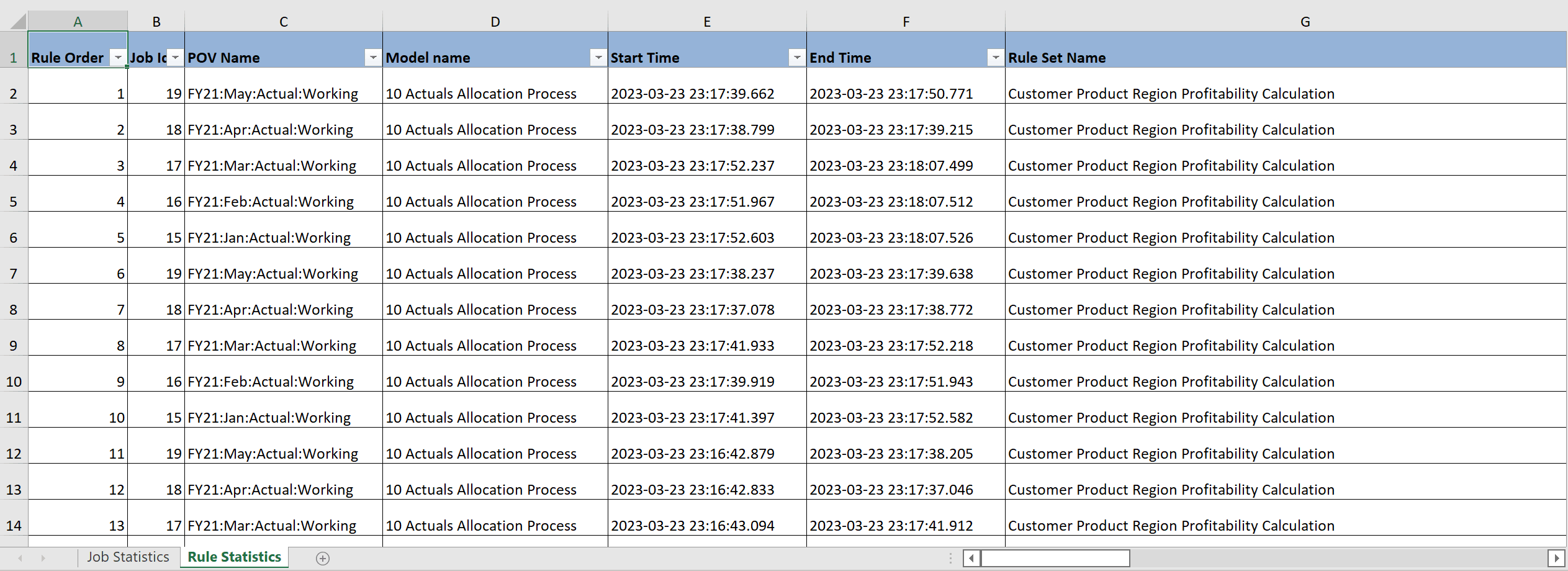
Tip:
Use the scroll bar at the bottom of the Excel spreadhsheet to see additional Rule Statistics.