Configure Checkpoints In Policy Modeling for B2C Service Interviews
You can configure checkpoints for:
You can also configure an interview to automatically remove the checkpoint from B2C Service when the interview is submitted.
Tip: The connection details page in Intelligent Advisor Hub shows whether checkpoints are supported for the B2C Service connection. It indicates whether the connection can support contact and agent checkpoints or contact checkpoints only or none.
Configure agent-only checkpoints
When checkpoints are configured for agent interviews, agents are able to continue or complete another agent's interviews.
To configure checkpoints for agent-only interviews, in Policy Modeling:
Configure contact-only checkpoints
When checkpoints are configured for customer interviews, contacts logged in to Customer Portal have the option to resume an interview when revisiting the same advice experience.
To configure checkpoints for agent-only interviews, in Policy Modeling:
- Choose a B2C Service connection for the project that supports checkpoints.
- Select the Screens That Will Create Checkpoints.
Configure shared checkpoints
When checkpoints are configured for multi-channel interviews, logged-in contacts can save and resume checkpoints. In addition, you can allow agents to resume interviews started by any contact or agent so that both user types can share interviews. For example, an agent could resume a contact's partially completed interview, help them with their application or provide advice, and then pass the interview back to the contact for completion.
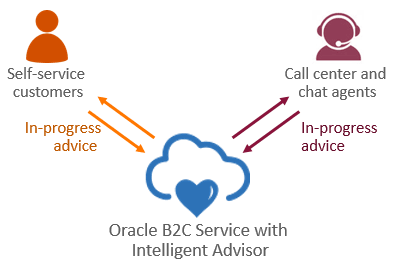
To configure checkpoints for shared interviews, in Policy Modeling:
- Choose a B2C Service connection for the project that supports checkpoints.
- Select the Screens That Will Create Checkpoints.
- Select the option Agents can save and resume Contact checkpoints.
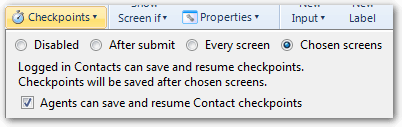
Important: This setting also allows contacts to resume interviews checkpointed by agents, including showing any data entered by agents. When using this setting, ensure your interview does not contain any agent-specific content that is not intended to be shown to the contact.
Remove checkpoints on submit
For both agents and contacts, you can configure an interview to automatically remove the checkpoint from B2C Service when the interview is submitted. This allows the interview to start afresh next time it is used, provided no additional checkpoints have been created on later screens.
To do this:
- In the Checkpoints drop-down window, select the option Chosen screens.
- Select the option Delete existing checkpoint after submit screen.

Note: Any screens that submit data are no longer available to select as screens that save checkpoints.