About Behaviors
In Fusion Marketing, behaviors help you define events and conditions associated with visitors, users, or customers across a digital property. Behaviors use business-friendly labels instead of technical event definitions or expressions, making them easier to understand and use in business workflows.
A behavior can represent either a visitor-generated event, such as submitting a form or viewing a page, or a system-generated event, such as sending an email or entering an automation.
Behaviors also include attributes that occur as part of the same event, known as event attributes. For example, a Submit form behavior might include the form name or the title of the page where the form was submitted. Other attributes can be retrieved from related data stored in Fusion Unity Data Platform through a foreign key. These are known as lookup attributes.
For example, for a View page behavior, the page might be an Oracle-hosted landing page presented as part of a marketing program. Lookup attributes could include the marketing program name, retrieved using the program identifier, or the visitor’s first name, retrieved using a visitor or participant identifier.
- Define rules that trigger marketing tactics
- Determine when participants meet tactic objectives
- Define segment conditions
- Trigger data orchestration workflows
- Personalize marketing content such as landing pages, banners, and other content delivered to web-enabled properties.
- Identify the occurrence of a behavioral signal
- Capture detailed behavior attributes, and
- Enrich the behavior with more lookup attributes from related data objects.
Behavior Examples
| Behavior Type | Example |
|---|---|
| Email Engagement |
|
| Web Activity |
|
| Content Consumption |
|
| Commerce Activity |
|
| Product Usage |
|
| Form Activity |
|
Behavior Event and Lookup Attributes
Event attributes are parameters (metadata) associated with the occurrence of a behavior. For example, if the behavior is Submit form, an event attribute is the name of the form or the page where the form is accessed. Some event attributes might beBrowser Name, City, Country, Device Type, Page Title, and so on.
Event attributes are retrieved from the occurrence of an event, or after an event that's
gone through post-processing. Lookup attributes are database fields from the Unity Data Platform (UDP) that enrich a behavior with additional information. For example, if a customer identifier is collected on the occurrence of the behavior, the ID can be used to look up the customer’s first name or email address.
Behavior Workbook
| Field | Meaning |
|---|---|
| Behavior type | User-triggered identifies an action initiated by a person. System-triggered identifies an event produced by a platform or process. Rules evaluation identifies an outcome produced when configured criteria are met. |
| Expression | The event condition used to identify the behavior. Expressions are shown as defined in the source workbook. |
| API name | The programmatic identifier for the behavior. If the workbook doesn't provide one, the guide states that it isn'tm specified |
| Attribute expression | The source expression used to populate or resolve the behavior attribute. |
| Foreign key | The related identifier used to connect the event to another UDP data object. Not specified means the workbook doesn't define a foreign-key mapping for that attribute. |
| 26C | An attribute labeled 26C is marked Added in 26C in the source workbook. |
Access Predefined Behaviors
- Sign in to Oracle Applications Cloud with the required permissions.
- Go to .
-
The Behaviors list page is displayed as follows:
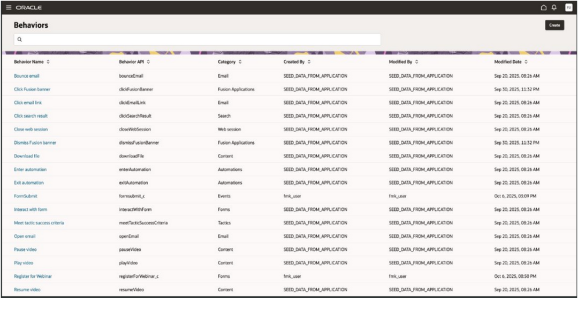
- Select the behavior name to view comprehensive information about the
selected behavior, such as:
-
Basic Details
-
Capture Expression
-
Event Attributes
-
Lookup Attributes
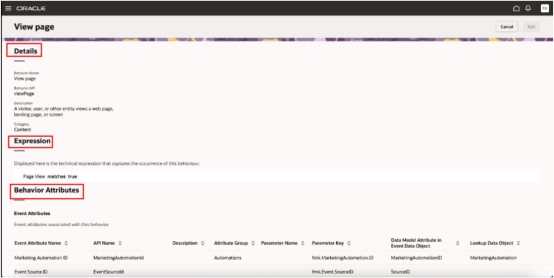
The Behavior Details page provides a comprehensive view of a selected behavior, including its definition, logic that identifies the occurrence of the behavior, and associated attributes.
This screenshot show an example of behavior details:
-
| Send email | Unsubscribe from channel | View product | Click search result |
| Click email link | Skip email | Add product to cart | View advertisement |
| Meet tactic success criteria | Open email | Purchase product | Click advertisement |
| Bounce email | Subscribe to channel | View products in shopping cart | Play video |
| View page | Send spam complaint | View order status | Pause video |
| Close web session | View form | Download file | Resume video |
| Enter automation | Submit form | Search for phrase | Sign in |
| Exit automation | Interact with form | View search results | Sign out |