FSM Consumable Inventory and Fulfillment
Field Service Management (FSM) uses the stock location, quantity, and selected inventory details recorded on each consumable. Automatic fulfillment requires both fulfillment and Locations to be enabled. For the overall flow, prerequisites, and item-type limits, see FSM Consumable Processing.
Consumable automatic fulfillment does not supply Inventory Status assignments. For accounts using Inventory Status, disable consumable automatic fulfillment and fulfill manually.
Location Scenarios
The following table describes processing for different location conditions.
|
Location Condition |
Processing Effect |
|---|---|
|
A stock option supplies a location |
Save that location on the consumable and use it for sales-order addition and fulfillment matching by task and location. |
|
Intercompany Cross-Subsidiary Fulfillment enabled |
Write and assess the sales-order line's Inventory Location rather than its ordinary Location field. |
|
Locations disabled |
The automatic fulfillment assessment is skipped. This condition does not turn off sales-order addition or transaction-link completion. |
|
Stock location missing or inconsistent with the order line |
Processing does not replace it from the customer address, service address, or employee location. Correct stock data and matching location are needed for the intended inventory result. |
Ordinary and Numbered Stock Usage
An ordinary stock entry carries item, quantity, and location. A serialized entry also identifies the selected serial number. A lot-numbered entry identifies the selected lot and its quantity. Each standard numbered-stock entry supplies one selected inventory number. Bins add another assignment dimension, described in Carry Bin Selections.
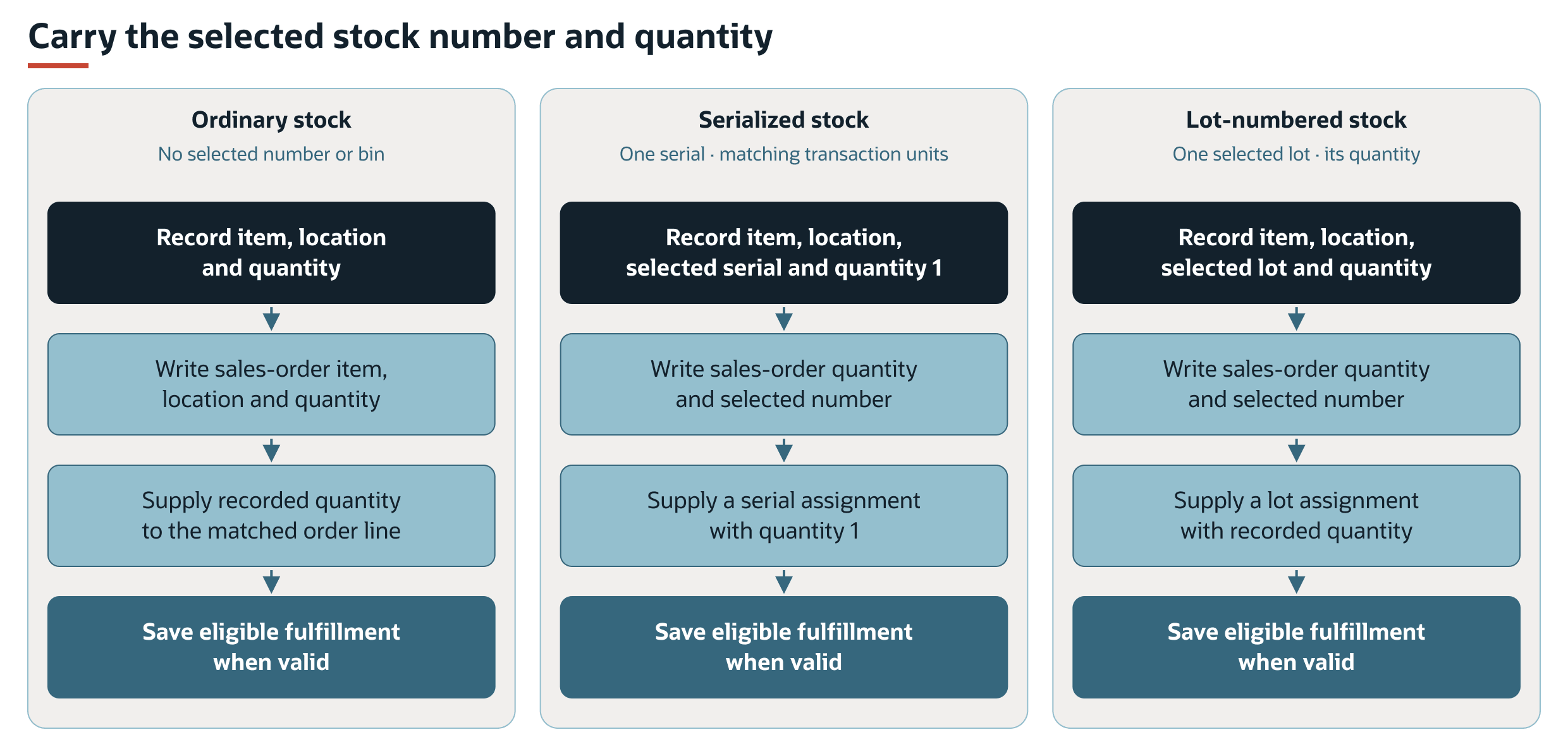
The serialized flow assumes one unit for the selected serial number and matching transaction units. FSM does not split a larger entered quantity into additional serial numbers or explicitly set a Units field during this sales-order addition. For lot-numbered stock, one selected lot can supply several units, subject to availability and transaction validation.
Carry Bin Selections
When the item and location require bins, the selected bin must accompany the fulfillment assignment. Advanced Bin / Numbered Inventory Management writes inventory detail. With basic bin management, the sales-order addition does not write a bin field. The consumable's selected bin is used when preparing fulfillment.
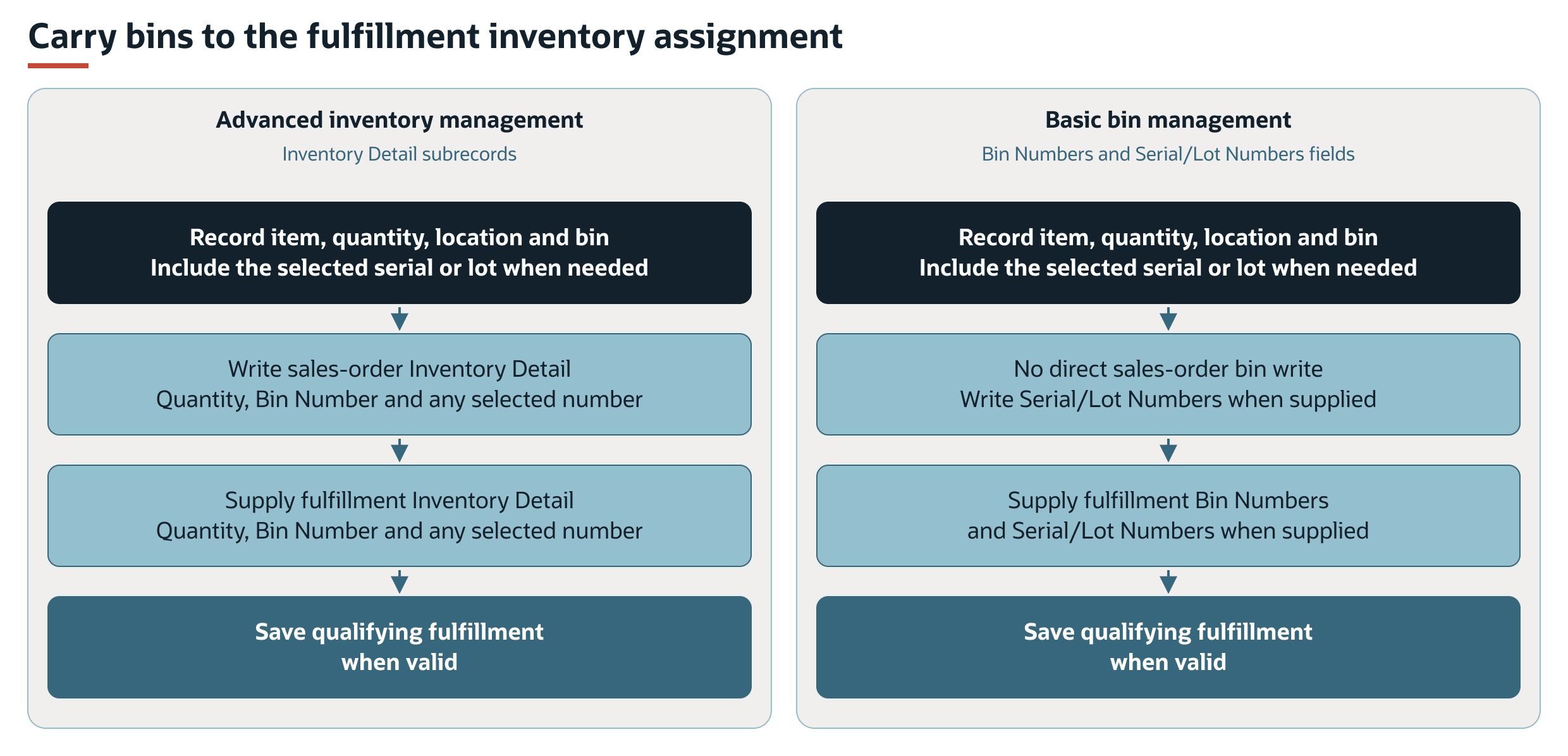
The number and bin must describe the stock being issued at the recorded location. See Inventory-Assignment Scenarios for the exact differences.
Inventory-Assignment Scenarios
Inventory assignments are separate from pricing. A zero-rate line follows the same location, quantity, bin, and inventory-number requirements as other fulfillable usage.
|
Recorded Stock Scenario |
Sales-Order Addition |
Automatic Fulfillment |
|---|---|---|
|
Ordinary item without bin or number |
Write item, quantity, and supplied location. No selected-number/bin assignment is added. |
Use the recorded quantity for the matched order line. |
|
Serialized item |
Carry the selected serial number. With advanced management, write Issue Inventory Number and assignment quantity in Inventory Detail. Otherwise write Serial/Lot Numbers. |
Prepare a serial assignment using the selected number and quantity. NetSuite requires a serial number for each unit. One selected number does not support several distinct units. |
|
Lot-numbered item |
Carry the selected lot in the same stored number field. With advanced management, write Issue Inventory Number and assignment quantity. Otherwise write Serial/Lot Numbers. |
Prepare a lot assignment using the selected lot and recorded quantity. |
|
Bin-managed item with advanced management |
Write Inventory Detail with quantity and Bin Number, plus Issue Inventory Number when supplied. |
Write the corresponding bin/number assignment in Inventory Detail. |
|
Bin-managed item with basic management |
Retain the selected bin on the consumable. No direct bin field is written by the sales-order addition. Any selected serial or lot number uses Serial/Lot Numbers. |
Convert the selected bin and quantity into Bin Numbers. Convert any selected serial or lot assignment into Serial/Lot Numbers. |
|
Numbered item at a bin-using location |
Both the selected number and bin identify the stock. |
The assignment must contain both the required number and bin. |
|
Missing required number or bin |
Sales-order save can fail NetSuite inventory validation. |
FSM removes incomplete required assignments. If their remaining quantity is zero, it skips the fulfillment line. NetSuite still validates the assignments that are retained. |
The standard FSM Mobile entry supplies one selected number and one bin. Its transaction path does not allocate a quantity across other lots, serial numbers, or bins automatically. For the NetSuite serial-quantity requirement, see Fulfill a Single Order Using Advanced Shipping.
Fulfill Eligible Lines at the Recorded Location
After transaction linking, fulfillment is considered when earlier assessment phases have no work. Automatic consumable fulfillment requires both fulfillment and Locations to be enabled. It can process existing eligible consumable sales-order lines even when consumable billing is disabled.
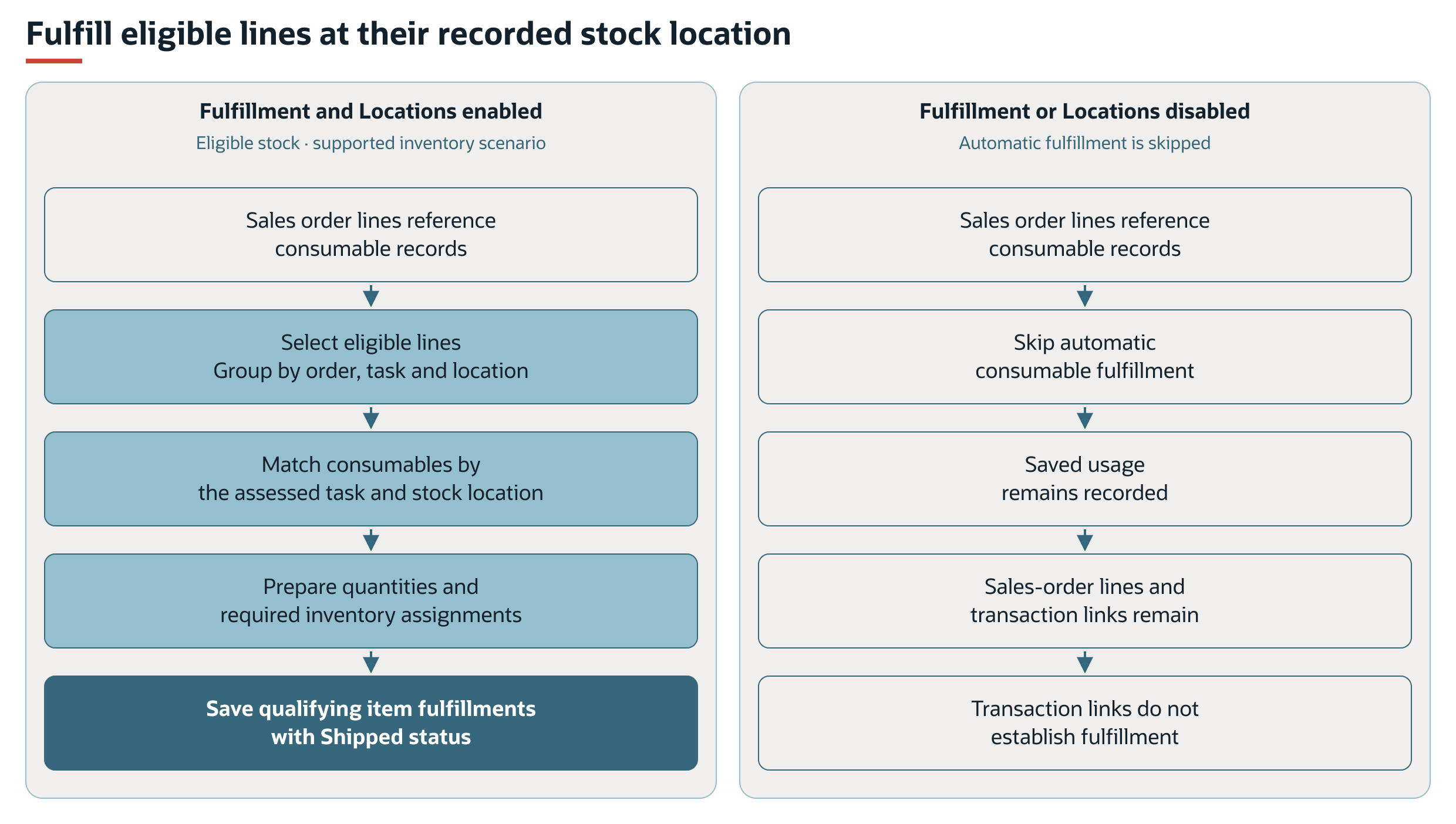
If no lines qualify, FSM does not save an item fulfillment. Transaction links alone do not establish that fulfillment succeeded. Check the intended fulfillment lines and quantities. See Fulfillment Eligibility and Quantity for the selection and assignment rules.
Fulfillment Eligibility and Quantity
The fulfillment assessment selects sales order lines that reference a consumable, have a fulfillable item, and are not fully fulfilled. It groups the work by sales order, task, and location.
FSM retrieves consumables for the assessed task and location and prepares fulfillment quantities and inventory assignments for matching order lines. The assignments use the selected serial or lot number and bin when supplied. Collection is not limited to the employee who completed the task.
The fulfillment model checks assignments for items that require numbered inventory or bin details. It checks for the required number and, when both the item and location use bins, the required bin. It calculates quantity from retained assignments and skips a line if that quantity is zero. This presence check does not establish valid available stock. NetSuite validates the transaction when it is saved.
The consumable processor supplies its recorded quantity. This path does not reduce that quantity to the order line's remaining quantity after another fulfillment, or choose replacement stock. Existing partial fulfillment therefore requires checking the intended remaining quantity and assignments. Selection as not fully fulfilled does not establish that the recorded quantity can be fulfilled again.
If no lines qualify, FSM does not save an item fulfillment. When a fulfillment is saved through this process, FSM sets its status to Shipped.