FSM Consumable Sales Orders and Pricing
Field Service Management (FSM) adds unlinked consumables to a case's sales order when billing processing selects the case. The case transaction determines the order selection, and validation determines Billable and Price Level before sales-order addition. For the overall flow and prerequisites, see FSM Consumable Processing.
Choose the Sales Order Record
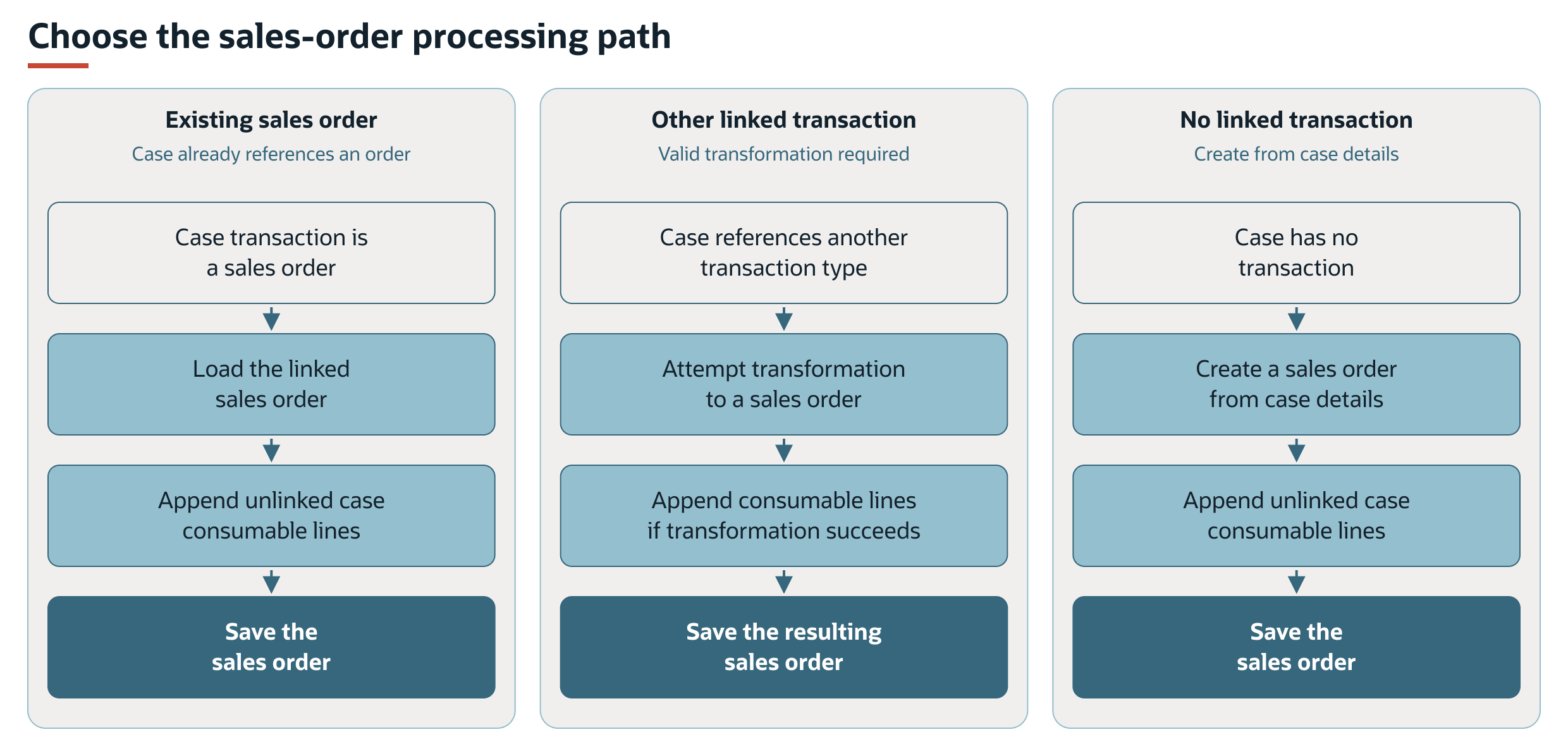
The case's transaction determines which of the following alternative paths applies. The transformation path requires a valid source transaction and shows the result when transformation succeeds.
The record choice is separate from what FSM writes to each new line. Item, quantity, location, and the references to the consumable, task, and asset identify the usage. Billable and Price Level determine pricing. Bin and inventory-number selections determine inventory assignments. See Record Interactions for the fields affected.
Sales Order Record Selection
When the case's transaction is a sales order, FSM adds consumable lines to that sales order.
When the case references another transaction type, FSM attempts to transform that transaction into a sales order before adding the consumable lines. This requires a valid NetSuite transformation from the source transaction to a sales order. A transaction reference alone does not establish that it can be transformed.
When the case has no transaction, FSM creates a sales order using case details, including its customer, project, asset, and purchase-order reference. FSM uses the creation date of the first collected consumable for that sales order. The sales-order model supplies Pending Fulfillment as its initial status. Existing or transformed orders retain their applicable transaction context. FSM does not rebuild their body from every consumable.
The case transaction field's full label is Field Service Transaction. The supplied Field Service Case form uses the shorter label, Transaction.
Price Level and Rate
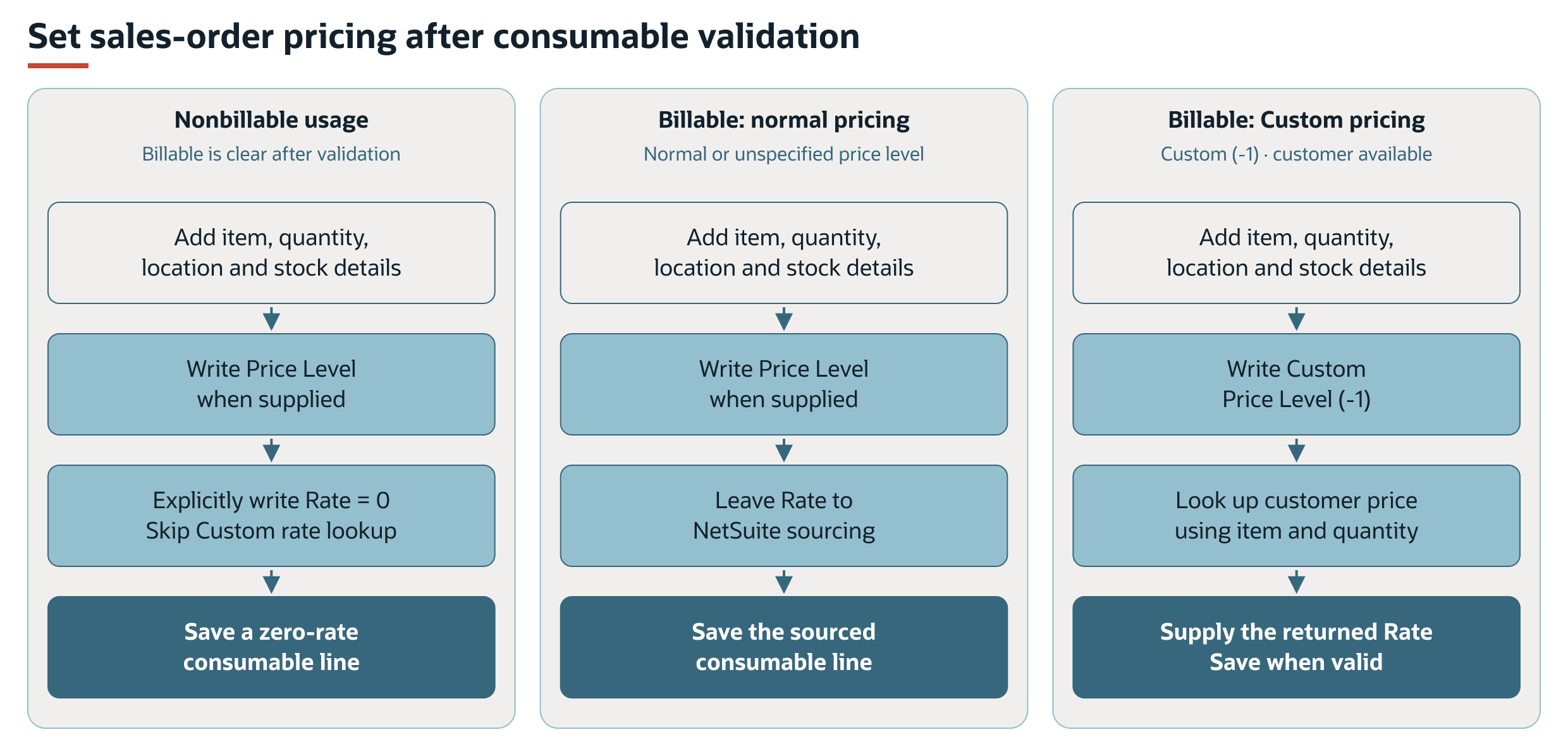
Billing processing includes both billable and nonbillable consumables. After consumable validation, FSM writes Rate = 0 when the Billable box is cleared. Price Level can still be written. For billable usage, a normal price level uses NetSuite rate sourcing. Custom pricing uses a separate customer-price lookup when a customer is available. FSM does not explicitly write the sales-order line Amount in this path.
See Billable and Price-Level Scenarios for rule precedence, blank price levels, Multiple Prices, and missing-price limits.
Billable and Price-Level Scenarios
The Billable box is checked by default on the supplied consumable record. When an item and task are present, validation can replace the entered billing values.
|
Validation Scenario |
Result on the Consumable |
|---|---|
|
The task has a Billing Rule |
Evaluate the configured consumable billing result and reapply Billable. The rule can make usage nonbillable or supply a numeric price level. |
|
The task has no Billing Rule |
Retain Billable rather than evaluating the consumable billing rule. With Multiple Prices enabled, Price Level is still recalculated through the customer/default path. |
|
Multiple Prices enabled and billable usage has a usable numeric rule result |
Use that price level. A Boolean billable result alone supplies no price-level ID. |
|
Multiple Prices enabled and no usable rule price level, including nonbillable usage |
Use the task customer's item pricing level, or List Price (internal ID 1) when no customer or pricing result supplies one. |
|
The chosen customer or rule price level is Custom (internal ID -1) |
Leave the stored Consumable Price Level blank. When collecting ordinary items for sales-order addition, FSM interprets a blank level as Custom. |
|
Multiple Prices disabled |
This consumable model does not map or validate Price Level. The sales-order addition relies on NetSuite pricing, with Rate = 0 still explicitly supplied for nonbillable usage. |
After validation, sales-order addition uses the following pricing scenarios.
|
Line Scenario |
Price Level Write |
Rate Write |
Other Effects |
|---|---|---|---|
|
Billable cleared |
Write the supplied nonempty level, including Custom where applicable. |
Write 0 after Price Level and skip the Custom customer-rate lookup. |
Add the item and quantity with location and inventory details. A fulfillable item remains eligible for fulfillment. |
|
Billable checked, normal price level |
Write the supplied level. |
No explicit rate override in this addition path. NetSuite sources the rate. |
Normal pricing for the item, customer, and transaction applies. |
|
Billable checked, Custom level and transaction FSM customer available |
Write Custom (-1). |
Look up the item price for that customer, quantity, and Custom level. Supply the returned rate. |
Quantity Pricing is considered by the lookup when enabled. A missing price result does not establish a valid charge. |
|
Billable checked, no price level supplied, or Custom without a transaction FSM customer |
No level write when absent. Write Custom when supplied. |
No explicit rate override in this addition path. |
NetSuite sourcing and validation determine the resulting line. |
|
Billable checked, Custom customer lookup finds no price |
Write Custom (-1). |
The lookup returns a blank price, which this addition can supply as a blank Rate. |
A successful lookup attempt does not establish valid pricing. Verify the saved transaction result. |
|
Item Group |
The consumable collection supplies no price level for the group. |
Billability still controls the addition's rate override. |
Pricing and fulfillment for the group and its components require valid NetSuite results of their own. Do not infer component-level assignments from the group entry. |
Nonbillable does not mean that Price Level, Rate, quantity, or inventory details are omitted. FSM explicitly writes Rate = 0, can also write Price Level, and leaves Amount calculation to NetSuite. This does not exclude the usage from the sales order or prevent stock fulfillment. It also does not establish the invoice total or the accounting effect of other transaction lines.
Billable and Price Level entered on a consumable are subject to the validation described in Billable and Price-Level Scenarios. The standard FSM Mobile form has no direct rate or amount entry. A configured Billable choice must be compatible with the billing rule that runs during validation. For rule selection and related-record billing, see FSM Billing Rules.