FSM Consumable Processing
Field Service Management (FSM) processes item usage recorded against a CRM task and case. Recorded usage includes the inventory location and any selected bin, serial number, or lot number. Technicians record usage in FSM Mobile. Background processing adds consumables to sales orders and, when enabled and supported, creates item fulfillments from the recorded stock location.
In this feature, billing means adding consumable lines to a sales order and recording the sales order reference. The consumable billing processor creates or updates a sales order.
How It Works
Consumable processing separates recording usage, adding sales-order lines, linking records, and optional fulfillment. The standard configuration enables both billing and fulfillment, with separate controls for each. The flow here and the diagrams in the child topics show successful eligible work. The Key Behaviors and Processing Model and Lifecycle sections explain selection rules, assessment priority, and processing errors.
From Usage and Location to Transaction Links
Usage must reach NetSuite through synchronization before background processing can use it. With billing enabled, an unlinked consumable whose CRM task is Completed can make its case eligible. FSM then collects unlinked consumables by case and adds these consumables to sales-order lines.
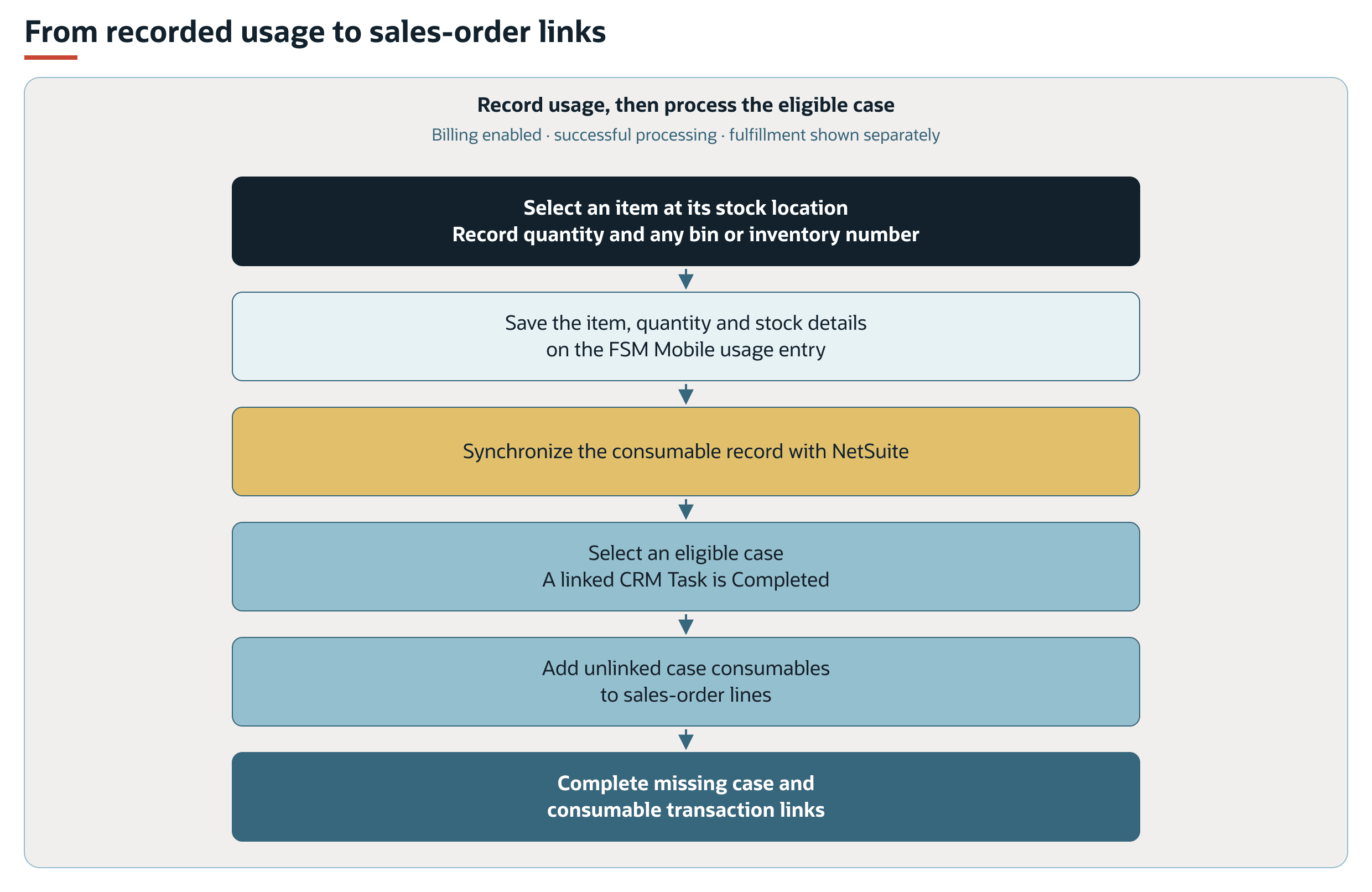
These stages can span several assessments. The assessment gives existing missing transaction links priority over new billing or fulfillment work. See Assessment Priority and Record Linking. Case-wide collection can include consumables from unfinished tasks, as explained under Case Billing Scope.
The case transaction determines which sales order receives the consumable lines. Billable and Price Level determine pricing. Inventory selections supply stock assignments. See FSM Consumable Sales Orders and Pricing for the order-selection and pricing diagrams, and FSM Consumable Inventory and Fulfillment for the location, numbered-stock, bin, and fulfillment flows.
Prerequisites
The following table lists the prerequisites for consumable processing.
|
Condition |
Why It Matters |
|---|---|
|
A standard CRM task and its case relationship |
Task completion identifies eligible cases. Billing collects unlinked consumables by case. Project tasks use the separate FSM Mobile Sales Order feature. |
|
The Consumables tab and its supporting inventory data are available in FSM Mobile |
The tab records usage. Shared inventory options supply item and stock details. Availability depends on the account's resource setup. |
|
Correct stock location and required inventory details |
Location identifies the stock used. Requirements for serial or lot numbers and bins depend on the item and enabled NetSuite inventory features. |
|
Billing enabled for new sales-order addition |
The processing control selects new billing work. The consumable's Billable box controls pricing rather than whether a line is added. |
|
Fulfillment and NetSuite Locations enabled for automatic fulfillment |
Eligible lines are processed by sales order, task, and location. Inventory Status assignments are not supplied by this path. |
For setup and validation, see Configuring FSM Consumable Processing.
Key Behaviors
This section describes how the feature responds to different conditions and actions.
Record Usage and Its Stock Location
Consumable processing uses standard NetSuite CRM task records linked to cases. It does not support project tasks. FSM Mobile Sales Order Management provides a separate path for project tasks. See Deciding Between the Consumables and Sales Order Tabs.
The standard Consumables tab in FSM Mobile is labeled Inventory. Each saved entry represents an item and quantity used on a task. The resource supplies the task, the selected asset or task asset, and the current employee.
The standard list selects consumable records for the current task and employee, then filters the list by asset. It marks existing entries as read-only when the task is Completed.
The selected inventory option supplies the item, location, bin, and serial or lot details when available. The standard form displays these derived details as read-only, rather than independent stock choices. It stores the inventory-number value separately from its displayed serial or lot number label.
Standard stock options include active items marked Field Service Show On Mobile with available quantity. These stock options use the technician's Field Service Employee Location, unless a location is supplied to the inventory resource. Location-based searches select stock at that location. The stock location is distinct from the customer or service address. The ordinary stock search differs according to whether Multi-Location Inventory is enabled. Serialized, lot-numbered, and bin searches supply their respective stock dimensions.
The standard Quantity field accepts whole numbers of at least 1. The record's quantity field is separately defined as a decimal numeric field with a positive minimum. A decimal record field does not make fractional input available in the standard FSM Mobile form.
Inventory options are cached until FSM Mobile refreshes. A displayed option or available quantity does not guarantee that the same stock remains available when NetSuite saves the sales order or fulfillment. See Inventory Section in FSM Mobile.
For detailed mobile instructions, see Consumables Tab in FSM Mobile.
Billing includes both billable and nonbillable usage. A nonbillable consumable can still become a zero-rate sales-order line and remain eligible for fulfillment. See FSM Consumable Sales Orders and Pricing for validation and pricing scenarios.
Stock location and required serial, lot, and bin details determine inventory assignments. See FSM Consumable Inventory and Fulfillment for location scenarios and differences between basic and advanced inventory management.
Record Interactions
This section describes how consumable fields affect sales order lines, fulfillment lines, and transaction links.
Consumable fields identify the item, quantity, task, case, asset, and stock used. Processing writes the applicable sales-order fields, prepares fulfillment assignments, and completes missing transaction links. For the field-by-field effects and order-body defaults, see FSM Consumable Transaction Field Mapping.
Processing Model and Lifecycle
This section explains when processing occurs and what can affect its progress and results.
Task completion or an eligible consumable change can request background processing. Assessment gives missing transaction links priority over additional billing or fulfillment work. A request, transaction link, or completed execution does not establish that every intended update succeeded.
A completed task can make a case eligible for billing. Collection for that case can then include unlinked consumables associated with other unfinished tasks. Completing one task does not restrict the collection to that task's consumables.
For request conditions, case billing scope, assessment priority, processing indicators, and error effects, see FSM Consumable Billing Eligibility and Processing Lifecycle. For fulfillment selection and quantity rules, see FSM Consumable Inventory and Fulfillment.
Configuration
The standard configuration enables both consumable billing and fulfillment. Billing controls the addition of unlinked consumables to sales orders. Fulfillment controls processing of eligible consumable sales order lines.
Turning off consumable billing leaves the completion of missing case or consumable transaction links enabled. Fulfillment is evaluated independently of billing, although the assessor prioritizes the earlier linking and billing phases.
For setup instructions, see Configuring FSM Consumable Processing. Existing published guidance is available in Consumables Tab Configuration. For shared billing and fulfillment control definitions, see Configuring FSM Consumable Processing.
FSM Mobile resource settings and inventory selection are separate from the background processing controls. For resource and article properties, see FSM Mobile Resource Properties Reference. For inventory element settings, see FSM Mobile Element Reference. For inventory option searches and mappings, see FSM Searches and Field Mapping.
Consumable processing adds unlinked consumables and completes missing transaction links. Its billing collection excludes consumables with a Billing Transaction, and its sales order operation appends lines rather than updating an existing consumable line.
Limitations and Constraints
The billing assessment uses case-associated CRM task records. Project tasks require the separate FSM Mobile Sales Order capability.
Consumable automatic fulfillment does not supply Inventory Status assignments. For accounts using Inventory Status, disable consumable automatic fulfillment and fulfill manually. Use the separate Sales Order tab when its Inventory Status support is required. See Consumables Tab Limitations and Key Considerations.
The following item distinctions separate supported item types from what the standard inventory searches display.
|
Item Type or Scenario |
Consumables Behavior or Boundary |
|---|---|
|
Inventory, serialized inventory, and lot-numbered inventory |
Supported. Selection and fulfillment depend on location and required assignments. |
|
Assembly stock |
Included by standard inventory searches where its inventory features and available stock qualify. |
|
Item Group |
Partially supported. Standard processing loads marked groups without checking every component's stock at the technician location. A group entry does not select separate bins or serial/lot numbers for every component. |
|
Non-inventory, Service, and Other Charge items for sale or resale |
Supported through additional option searches. Fulfillment still depends on the item's fulfillable setting. |
|
Purchase-only variants, Kit/Package, Description, Discount, Markup, Payment, and Subtotal |
Unsupported on the Consumables tab. Kit selection belongs to the separate Sales Order path. |
For the published support matrix, see Supported Item Types on the Consumables Tab.
The supplied form and processing path do not automatically split usage across stock assignments, reconcile prior partial fulfillments, or update an existing linked consumable sales-order line. NetSuite transaction and inventory validation still apply. Successful synchronization, a saved order link, or a completed scheduled execution does not establish that every intended line was priced or fulfilled correctly.