FSM Mobile Stock Transfers
FSM Mobile lets you order, receive, and return stock in Field Service Management (FSM). Use the Order, Receive, and Return tabs for these activities. These tabs handle stock requests and transfers between locations.
How It Works
Stock movements have two ends: the location supplying stock and the location receiving it. The employee's Field Service Location supplies the technician or van location. Field Service Warehouse can supply the initial choice for the other end of a transfer.
A local Save does not confirm a stock movement. The following diagram shows successful Order, Return, and Receive workflows:
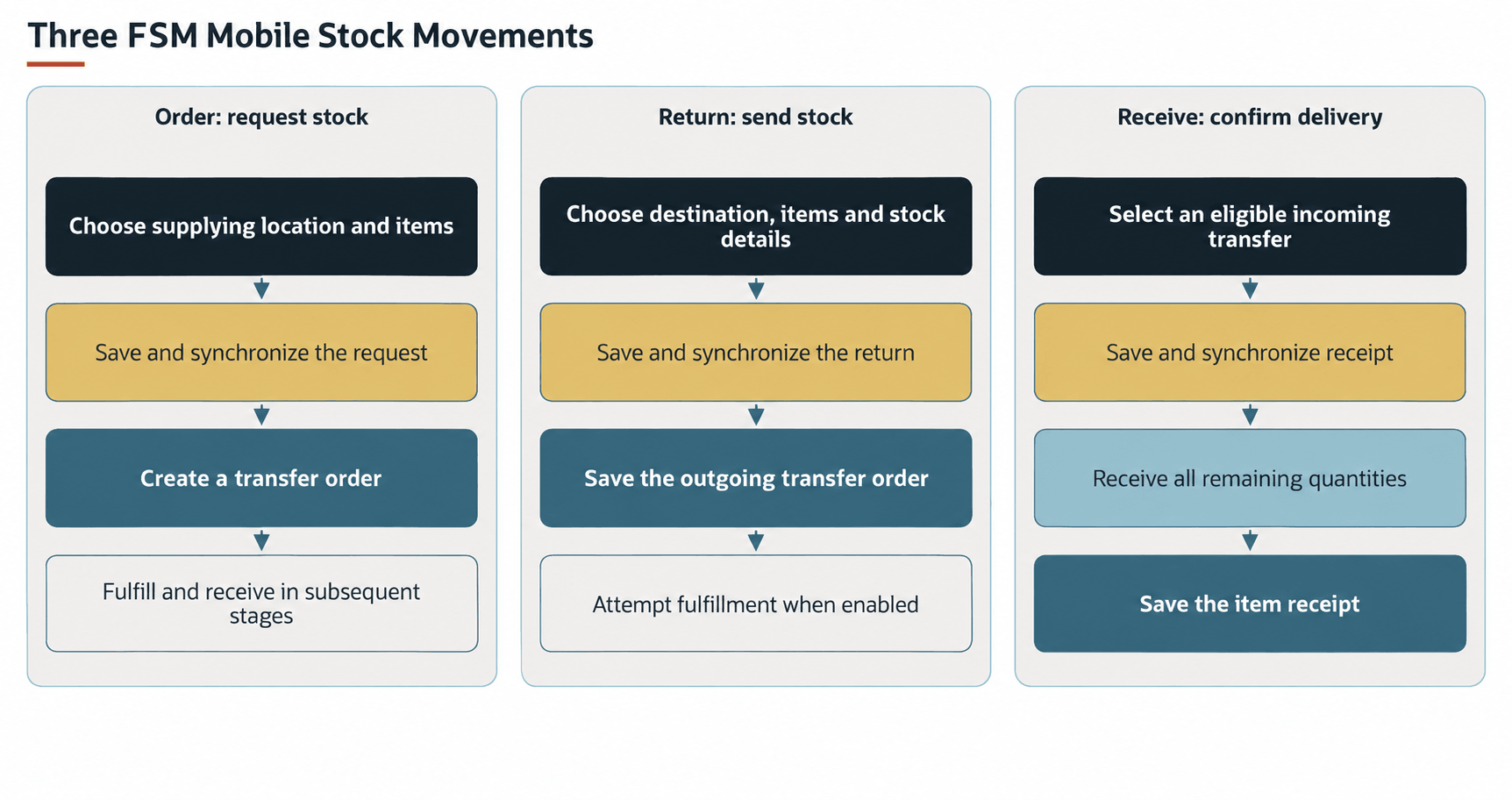
The standard stock-request tab is labeled Order. Account configuration can change the labels and the tabs available for a task.
The following table summarizes each stock activity, its direction or purpose, and its transaction result.
|
Activity |
Direction or Purpose |
Transaction Result |
|---|---|---|
|
Request stock in the Order tab |
Another location → employee's location |
Creates a transfer order. Fulfillment and receiving are subsequent stages. |
|
Send stock in the Return tab |
Employee's location → another location |
Creates a transfer order and, with automatic fulfillment enabled, attempts an item fulfillment. |
|
Receive stock in the Receive tab |
Confirm an eligible incoming transfer at the employee's location |
Creates an item receipt from the transfer order, using its related item fulfillment where required. |
Return is a stock transfer between locations. It does not create a customer return authorization.
Prerequisites
The following conditions determine whether these workflows are available and can process stock:
-
NetSuite Locations must be enabled for the standard Order, Return, and Receive tabs to be visible.
-
The account's FSM Mobile configuration must select the required tabs for the relevant tasks and retain their shared inventory data.
-
The employee needs the appropriate Field Service Location (
custentity_nx_location). When configured and included in the allowed locations, Field Service Warehouse (custentity_nx_warehouse) supplies a default source for requests and a default destination for returns. -
The item and location records must be suitable for the transaction. Return stock choices and applicable inventory details depend on the enabled inventory, multi-location, serial-number, lot-number, and bin-management features.
For record preparation, see Configuring Item Records for Field Service Management and Managing Warehouse and Van Locations for Field Service Management.
Key Behaviors
This section describes how the feature responds to different conditions and actions.
Locations and Item Choices
The default request and return location choices exclude the employee's own location. When subsidiaries are enabled, the choices also apply the employee's subsidiary. A configured warehouse is the default when it is among the allowed choices. It does not restrict every transfer to that warehouse.
The following table shows the different default lists that each tab uses from the shared Inventory section.
|
Tab |
Default List |
What It Shows |
|---|---|---|
|
Order |
|
Active items marked Field Service Show On Mobile ( |
|
Receive |
|
Incoming transfer orders for the employee's Field Service Location in Pending Receipt or Pending Receipt/Partially Fulfilled. |
|
Return |
|
Active inventory and assembly items with positive available quantities at the employee's Field Service Location. |
The following details explain the choices for each tab:
-
Order - The shared list also includes active discount items and a Subtotal entry. The search does not filter by stock at the supplying location or the employee's location, so an item can appear with no stock available.
-
Receive - Depending on the transfer-cost preference, the choices identify a transfer order with shipped lines or an individual unreceived item fulfillment. Selecting a choice shows its items and quantities in a read-only table.
-
Return - Items must be marked Field Service Show On Mobile. Bin, lot, and serial-number choices use the available inventory details for that item and location.
Order uses an orderable item list. Return uses stock at the employee's location. An item appearing in Order does not establish that NetSuite accepts it on a transfer order or that the supplying location can fulfill it.
The standard Order and Return quantity fields accept positive whole numbers. When you add an item entry, Return starts its quantity at 1. Their default quantity controls do not cap the entered quantity at available stock.
Transfer Requests
The Order tab loads transfer orders linked to the current CRM task or project task. These orders are requested by the current employee and destined for that employee's location. When a request is created, it supplies the employee and available task, customer, case, and date context.
When a loaded transfer order has a pending-receipt status, the standard Order tab makes the order read-only. Creating the request does not itself fulfill the transfer or receive stock.
Returns and Inventory Details
Return loads outgoing transfer orders linked to the current task and employee, with the employee's location as the source. When a Return is created, it uses Pending Fulfillment as its NetSuite transaction default and enables automatic fulfillment.
The item controls provide available bin, lot, and serial-number selections for the employee's location. Serial selections each contribute one unit to the fulfillment assignments. Selecting more serial numbers than the entered quantity increases the submitted quantity to the serial count. A lot or bin assignment carries the entered quantity. Required inventory details must agree with the stock being issued.
Automatic fulfillment processes eligible lines. Missing required inventory details can leave a line unfulfilled. A saved transfer order, or a successful FSM Mobile synchronization response, does not by itself establish that every return line was shipped.
Receiving
The default Receive choices are transfers to the employee's location in Pending Receipt or Pending Receipt/Partially Fulfilled.
The transfer order's Use Item Cost as Transfer Cost preference changes how incoming stock is selected. When this preference is cleared, the list uses transfer order lines with shipped quantities. When this preference is selected, the list identifies individual item fulfillments and excludes fulfillments already received.
The standard Receive item table is read-only. The displayed choices can contain shipped quantities captured when the list was loaded. Receipt creation uses the quantities still remaining in NetSuite. Creating the receipt receives all remaining quantities on the resulting receipt, including when the Default Items to Zero Received/Fulfilled preference in NetSuite is selected. Receive does not provide a destination-bin selector.
Save an FSM Mobile receipt only when the full delivery represented by the selected transfer or fulfillment has arrived. The standard Receive workflow does not let you reduce quantities for a short delivery or choose a partial receipt.
After an item receipt has a transaction number, its source-transfer choice is read-only.
Record Interactions
The following table describes how records connect the location data, stock movements, and service work.
|
Record |
Role in This Feature |
|---|---|
|
Employee |
Supplies the technician's Field Service Location, warehouse, and subsidiary context. |
|
Item and location |
Supply eligible item choices, available stock, and applicable inventory details. |
|
CRM task or project task |
Links FSM Mobile transfer orders and item receipts to the service task. |
|
Transfer order |
Records the requested movement, source, destination, items, and quantities. |
|
Item fulfillment |
Records the shipped portion of a transfer. Return can create or replace these records. |
|
Item receipt |
Records transferred stock received at its destination. |
Processing Model and Lifecycle
FSM Mobile saves entries locally and synchronizes these entries with NetSuite. The transaction result depends on successful server processing. A local Save or local tab-completion indication is not confirmation of a stock movement. When you create a request or return, the standard initial Open label does not confirm a saved or fulfilled transfer order. After the stock movement is saved in NetSuite, FSM Mobile must refresh its shared inventory data before the choices reflect that movement.
The following table describes the processing and observable result at each synchronization stage.
|
Stage |
Processing and Observable Result |
|---|---|
|
Request synchronized |
The transfer order in NetSuite contains the requested source, destination, items, and quantities. It still needs the appropriate fulfillment and receipt. |
|
Return synchronized with automatic fulfillment enabled |
FSM saves the outgoing transfer order, attempts a Shipped item fulfillment for eligible lines, and reloads the order. The related fulfillment establishes which items and quantities were shipped. |
|
Receipt synchronized |
FSM transforms the selected transfer order into an item receipt, initializes the related fulfillment where applicable, and receives the remaining quantities. The saved item receipt establishes what was received. |
|
Synchronization is pending or fails |
Unsent changes remain pending. A reported transaction error does not establish that earlier NetSuite changes were reversed. |
Changing or Deleting a Return
With automatic fulfillment enabled, synchronizing a Return update first deletes all item fulfillments linked to that transfer order. FSM then saves the order changes and attempts a replacement fulfillment. This replacement is not limited to fulfillments created by the current task or employee.
Deleting a saved Return through this path also attempts to delete its linked fulfillments before deleting the transfer order. NetSuite restrictions can prevent later steps from succeeding.
A failure after fulfillment deletion can leave the transfer order in NetSuite without its earlier fulfillments. An order save can also succeed before replacement fulfillment fails. The order and its related fulfillments are separate processing results.
When automatic fulfillment is disabled, this Return synchronization path does not delete or create item fulfillments. Separate fulfillment arrangements determine the shipment result.
The stock-movement processing runs through Field Service Mobile Suitelet (customdeploy_nx_mobile), under Field Service Suitelet (customscript_nx_suitelet). It runs during transaction synchronization. Shared deployment and execution guidance belongs in FSM Script Reference.
Configuration
For the supported settings, defaults, and examples, see Configuring FSM Mobile Order, Configuring FSM Mobile Return, and Configuring FSM Mobile Receive.
Inventory Section in FSM Mobile is the configuration home for the shared inventory choices. Changes to these choices can also affect Consumables and Sales Order tabs.
FSM Mobile configuration controls which tabs load, their labels and presentation, record and item selection, input rules, and transaction defaults. Return also has an automatic-fulfillment control. These changes must retain the location, task, and inventory-detail relationships used by the transaction workflow.
The standard Return and Receive workflows have specialized transaction processing. Copying the configuration manually to an unrelated resource ID does not carry the additional fulfillment or receipt processing. This method is not supported for duplicating these tabs. See Mobile App. Matching fields or the same NetSuite record type does not retain that processing.
For shared loading and selection rules, see FSM Configuration. For reusable resource, element, and search properties, see:
Limitations and Constraints
The following boundaries affect the stock result:
-
Loaded inventory choices can become stale. Other transactions or activity in NetSuite can change stock before synchronization.
-
A visible item, an available quantity, or a local Save does not guarantee that NetSuite can save or fulfill the transaction.
-
Receive provides full receipt processing without destination-bin selection. Item features and required inventory details still govern whether NetSuite accepts the receipt.
-
Changes to labels, searches, or quantity fields do not by themselves change the specialized transaction processing.