FSM Mobile Quote Management
In Field Service Management (FSM), technicians create and manage service quotes from the Quote tab in FSM Mobile. NetSuite stores quotes as estimate records.
Technicians can request that NetSuite send quotes by email and apply quotes to the current job. Updating an existing quote with a customer signature starts sales order creation. This capability is designed for noninventory item quotes.
How It Works
Quote preparation and sales order conversion are separate operations. During initial creation, a quote becomes an estimate in NetSuite. A later update to that estimate with a customer signature can create a separate sales order.
Quote Selection and Creation
The standard Quote tab displays quotes linked to the selected task or project task. It can also display quotes associated with both the same project and the same case as the selected task. Both relationships must match for this additional selection. Sharing only the project or only the case is insufficient. The standard project task context has no case, so it doesn't use this additional selection. Technicians can create multiple quotes for a task.
During creation, FSM uses the task's customer and date and links the quote to the task or project task. Quote lines carry references to the current task and its asset.
Technicians select items and enter quantities and descriptions. The standard item list includes active items with Field Service Show On Mobile checked, active discount items, and a Subtotal option. Quantity defaults to 1, and the selected item determines the minimum quantity.
Quote data includes a purchase order number and email options. Items and Emails are required. Each item row requires an item and quantity. Emails defaults to the address available from the task context.
Save or Update a Quote
The following diagram separates initial creation from an ordinary update without a signature. Both paths require successful synchronization before the saved NetSuite values return to FSM Mobile. The panels show alternative scenarios, not concurrent actions.
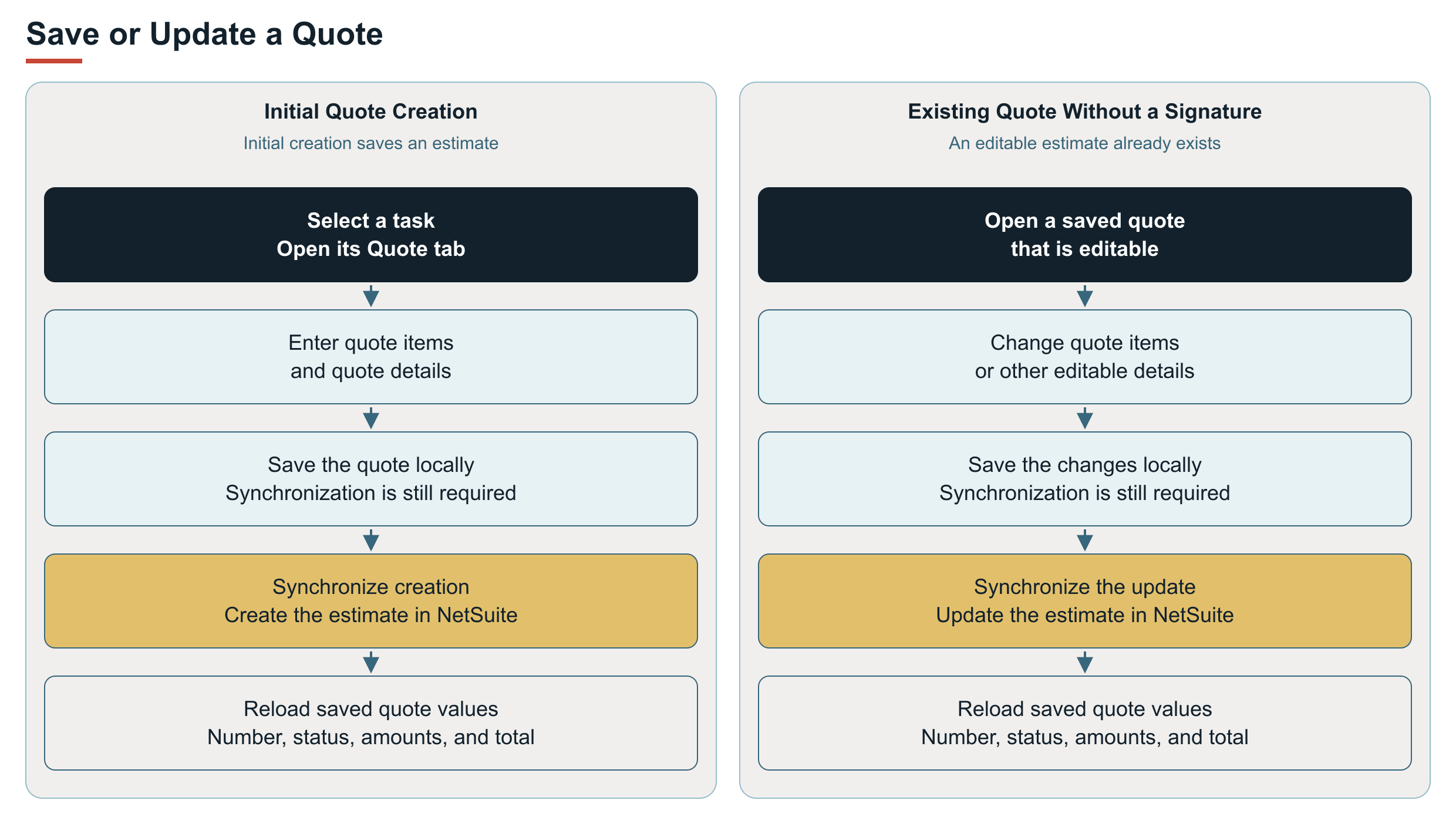
Email requests and Apply to current Job are optional effects of synchronization. Their conditions are described under Key Behaviors. The diagram shows successful saves. Failure consequences are described under Processing Model and Lifecycle.
Convert an Existing Quote to a Sales Order
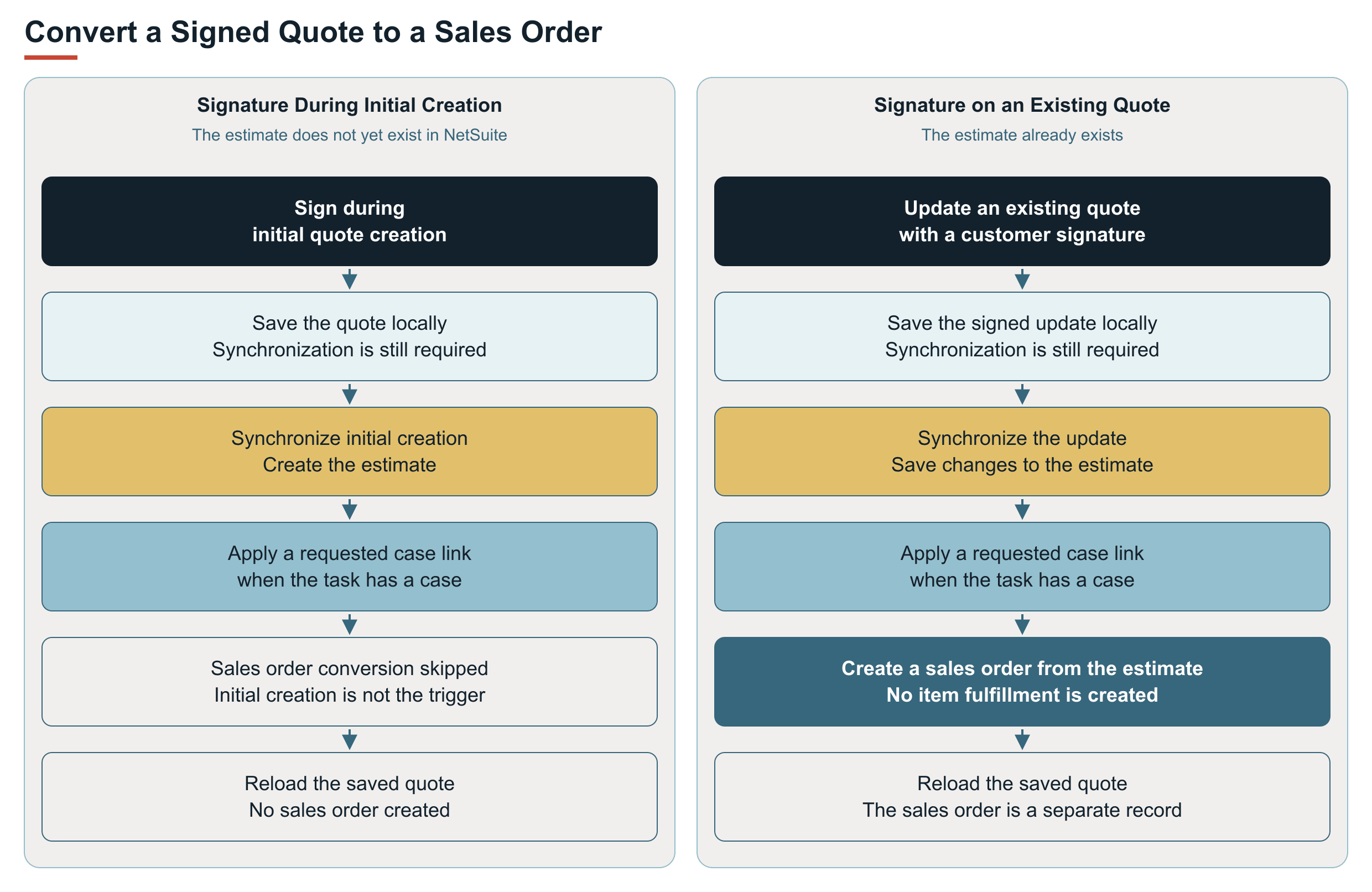
Quote data includes a customer signature. Updating an existing quote with a signature in Sign to create Sales Order starts sales order creation from the estimate and reloads the quote. Signing during initial quote creation doesn't create a sales order through the standard creation path.
Updating an existing quote with a signature starts sales order creation. The signature doesn't have to be newly drawn. A signature captured on another FSM Mobile tab doesn't trigger this quote behavior.
The following diagram separates these two signature scenarios. When requested, the project association is supplied with the estimate save. The case association follows that save. Sales order conversion follows the existing estimate update and any requested case association.
Sales Orders Without Automatic Fulfillment
Sales orders created by quote conversion are not automatically fulfilled. The conversion creates no item fulfillment record, and quote configuration cannot enable automatic fulfillment. Fulfillment settings for the separate Sales Order tab do not apply to this conversion flow.
The quote flow is intended for noninventory item quotes. It allows technicians to quote without depending on stock being available in their FSM Mobile inventory location. Converting the quote does not consume inventory from that location.
The standard shared item list is not filtered by stock availability at the FSM Mobile user's location and can include inventory items marked Field Service Show On Mobile. An item's visibility in that list doesn't extend the supported noninventory quote scope.
Key Behaviors
This section describes how the feature responds to different conditions and actions.
Quote Actions and Restrictions
The following table lists actions and restrictions.
|
Condition |
Result |
|---|---|
|
Quote creation and synchronization succeed. |
Creates an estimate record and reloads its saved values. |
|
An editable existing quote is saved after line changes. |
Updates the estimate record with the changed lines. |
|
Send Email is checked and Emails contains recipients. |
Requests that NetSuite send the quote to those recipients when the quote is saved. |
|
Apply to current Job is checked and the task has a project. |
Associates the quote with the project. The native field depends on whether Project Management is enabled. |
|
Apply to current Job is checked and the task has a case. |
Sets the case's transaction reference to the quote. |
|
A quote has Processed status. |
Displays the quote as read-only. |
|
An existing line is not linked to the current task or project task. |
Displays the line as read-only. |
|
A quote contains read-only lines. |
Prevents deletion through the standard tab. |
Processing Model and Lifecycle
This section explains when processing occurs and what can affect its progress and results.
Synchronization and Sales Order Creation
The FSM Mobile service saves quote changes in NetSuite. After successful synchronization, FSM Mobile reloads the quote number, status, line amounts, and total from NetSuite. Total is read-only.
Amounts from NetSuite, email requests, and sales order creation depend on successful synchronization. Saving a quote locally doesn't confirm synchronization, email delivery, or sales order creation.
The signed-update sequence is shown under How It Works. The response reloads the estimate rather than replacing it with the separate sales order.
To distinguish the outcomes, check the saved estimate and the resulting sales order in NetSuite. The sales order's Created From relationship identifies its source estimate. Refreshed quote amounts alone don't confirm email delivery or identify the resulting sales order.
For a signed update, the estimate save, any requested case update, sales order creation, and reload occur in sequence. If a later case update, sales order creation, or reload fails, an earlier successful estimate save may remain. A synchronization error doesn't establish that earlier record changes were reversed.
Quote conversion is separate from the direct creation and fulfillment workflow described in FSM Mobile Sales Order Management. For the FSM Mobile service's supporting scripts, execution roles, and monitoring, see FSM Script Reference. For local saves, synchronization, and refresh behavior, see FSM Mobile Troubleshooting and Tips.
Configuration Dependencies
The standard Quote tab is available when the task's configured resources include quote.
The following configuration areas affect availability and behavior. Exact settings and setup belong in Configuring FSM Mobile Quote Management and the shared configuration references.
|
Configuration Area |
Behavior and Effects |
Configuration Reference |
|---|---|---|
|
Task resource selection |
The selected task must load |
|
|
Creation, editing, and deletion |
The standard resource permits these actions, subject to the quote and line restrictions in this topic. Resource controls can restrict individual actions. Enabling these controls doesn't remove the standard record and line restrictions. |
|
|
Task context and initial quote defaults |
The task supplies the customer, date, task or project task links, asset context, and initial email address. Changes to event mappings or defaults for initial entries can change these values. Preserve the relationships needed for quote selection, line ownership, and synchronization. |
FSM Configuration, FSM Searches and Field Mapping, and FSM Expressions and Template Tags |
|
Shared item data |
The standard Quote and Order tabs share the |
FSM Configuration and Configuring Item Records for Field Service Management |
Automatic fulfillment of converted sales orders is not a quote configuration option. Changing resource selection, item data, or operation controls does not enable it.
When changing presentation, selection, or permitted actions, configure the existing standard quote resource. Project associations, case associations, and signed-quote conversion depend on specialized server synchronization. A different resource ID with copied JSON, the same estimate record type, or matching field maps doesn't automatically retain that behavior.
Verify synchronization and related NetSuite outcomes for any separate resource or reuse arrangement. A working screen, valid JSON, or local save alone doesn't demonstrate equivalent quote behavior. For shared resource properties, see FSM Mobile Resource Properties Reference. For quote-specific setup and verification, see Configuring FSM Mobile Quote Management.
For screens and controls, see Quote Tab in FSM Mobile.
For account setup and execution roles, see the following topics:
Limitations and Constraints
The following limitations apply to quote management.
Quote Management Limitations
Quote management has the following limitations:
-
The standard Quote tab has no currency selection control.
-
Repeated quote creation requests use the protection described in FSM Mobile Duplicate Creation Protection. This protection concerns creating the estimate. Signing an existing quote is a separate update and conversion.
For offline and refresh behavior, see FSM Mobile Troubleshooting and Tips.
Related Topics
For more information, see the following topics:
-
FSM Mobile Duplicate Creation Protection