FSM Enhanced Technician Notes
Overview
Field Service Management (FSM) Enhanced Technician Notes uses generative AI to revise text entered in FSM Mobile. Technicians can improve spelling, grammar, and readability when preparing service documentation. The capability works on eligible editable text areas across FSM Mobile resources. It is not limited to the Notes tab.
How it works
Enhancement is an editing action. FSM sends the technician's current text to the configured prompt and replaces the input with the response. The technician reviews the replacement before saving the record.
The following diagram shows optional AI editing and the normal save path for manually entered and enhanced notes:
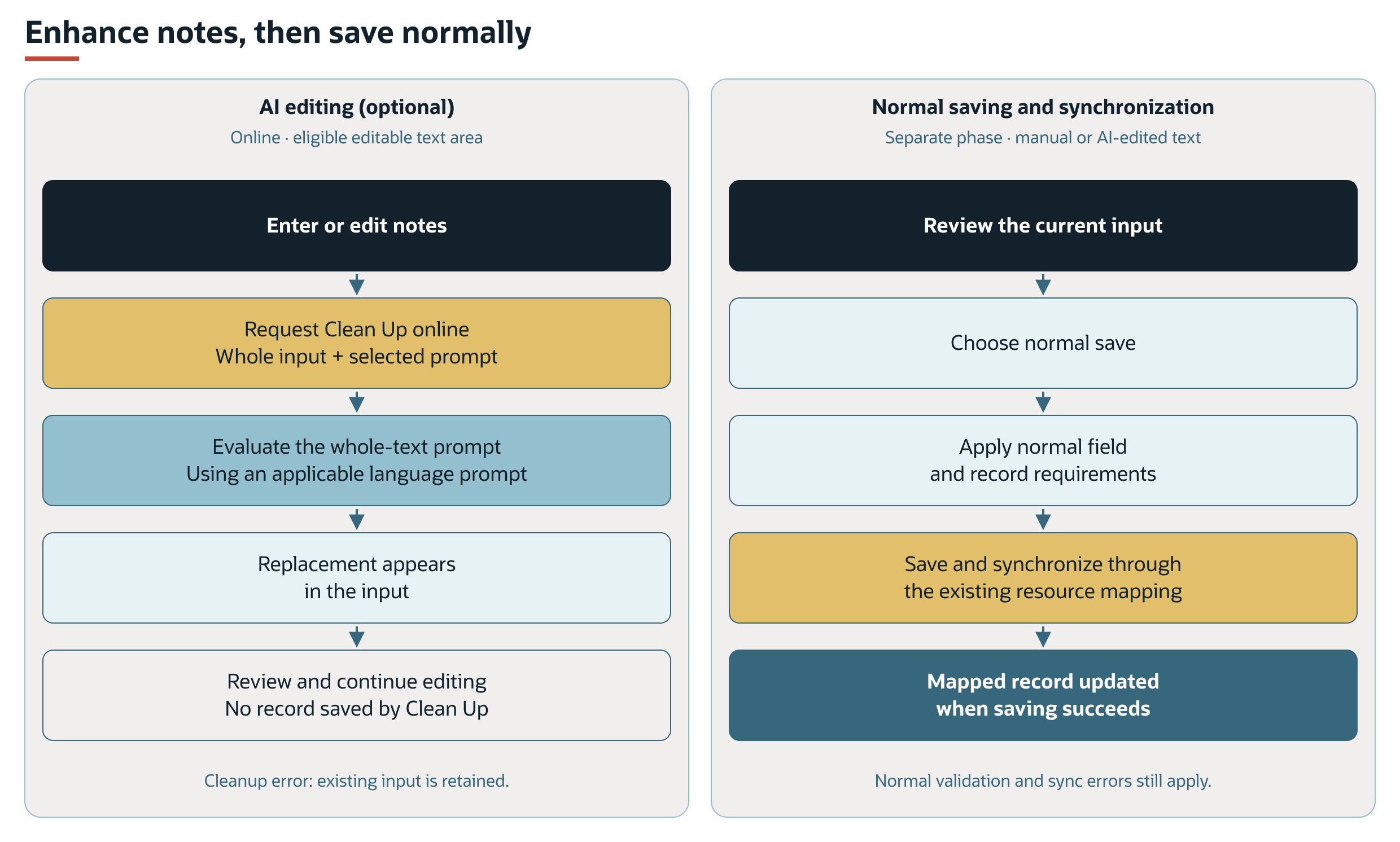
Cleanup failures retain the existing input. Normal validation and synchronization requirements still apply.
The standard configuration supplies no inherited Clean Up action until the feature is enabled. When enhancement is enabled, eligible text areas inherit the configured shared whole-text prompt. The default prompt has internal ID -27. An element configuration can supply a different prompt or remove the action.
Clicking Clean Up processes the entire text area, even if the technician selects only part of the text. The response replaces the input text without saving a NetSuite record, so the technician can review and edit the replacement before saving.
Prerequisites
To use Enhanced Technician Notes, you need:
-
A supported FSM Mobile text area connected to the intended record field and available for editing. Read-only or disabled fields do not offer the action.
-
An available whole-text prompt and the account's required NetSuite generative AI capabilities. See Generative AI Feature Availability in NetSuite.
-
An online FSM Mobile session with access to the cleanup service. Clean Up is disabled when FSM Mobile is offline.
Using Enhanced Technician Notes consumes NetSuite AI Units. For enablement, prompt selection, account setup, and usage information, see Configuring FSM Enhanced Technician Notes.
Key behaviours
The following table summarizes Clean Up availability, outcomes, and prompt selection.
|
Condition |
FSM Behavior |
|---|---|
|
Editable text area with an available prompt |
Displays Clean Up. The button is disabled when the input is empty or FSM Mobile is offline. |
|
Read-only or disabled text area |
Does not offer Clean Up for that input. |
|
Successful cleanup |
Displays the replacement text and offers Undo. Another cleanup is unavailable until the previous replacement is edited or undone. |
|
Cleanup failure |
Displays a cleanup error and retains the existing input text. The technician can continue entering notes manually. |
|
Different technician language |
Attempts to select a related prompt for the effective FSM user language and language variant. If no matching prompt is found, evaluation uses the configured prompt. |
Undo returns the displayed input to the text held before the latest cleanup. It is an editing action, rather than a reversal of a record already saved to NetSuite.
The selected prompt determines the generated wording and language. When Multi-Language is enabled, the employee's Field Service Language helps determine which related prompt FSM selects. If the employee field is blank or Multi-Language is disabled, FSM uses the account's default language. This selection is separate from the customer language used for service reports and notifications. See FSM Localization and Translation.
Record interactions
The following table describes the records and data used by this feature.
|
Record or Data |
Role in the Feature |
|---|---|
|
Prompt Studio prompt |
Supplies the instructions used to revise the submitted text. A related language prompt can be selected for the effective technician language. |
|
Employee language setting |
Helps determine which language prompt FSM requests. It does not itself translate every saved note. |
|
Record edited through an FSM Mobile resource |
Receives the accepted text through its existing field mapping and normal saving and synchronization. Cleanup alone does not create or update that record. |
FSM submits the current text to the prompt. It does not automatically supply the Task, Case, Asset, or other FSM Mobile field values as prompt variables.
Processing model and lifecycle
Cleanup runs on request when the technician edits a field. FSM sends the input text and prompt identifier to its online service, resolves an applicable language prompt, and requests evaluation by NetSuite. The returned text replaces the text in the input.
This request is separate from background task processing and record synchronization. A successful AI response does not establish that the edited resource has passed validation or been saved to NetSuite. Normal FSM Mobile saving, field validation, and synchronization still apply.
Configuration
Administrators can enable an inherited cleanup prompt, choose a different shared prompt, select a prompt for an individual text area, or remove the action from selected text areas.
Text Enhance input properties are defined in FSM Mobile Element Reference. Existing resource and field mappings continue to determine where accepted text is saved.
Limitations and constraints
The following limitations apply:
-
FSM supports whole-text enhancement. Partial-text prompts and enhancement of only the selected text are not supported.
-
Enhancement is intended to improve wording. Review the generated text before accepting it, particularly service findings, identifiers, and quantities that must retain their meaning.
-
The input's ordinary field and record requirements remain. An AI response does not bypass completion rules or guarantee successful synchronization.
-
Enhancement runs only when requested and does not retrospectively rewrite existing records.
Related processes and procedures
For instructions on using Clean Up when entering text in FSM Mobile, see Enhancing Technician Notes.
Related Topics
Additional Information
- FSM Mobile Element Reference
- Configuring FSM Enhanced Technician Notes
-
Enhancing Technician Notes
-
How Technician Language Affects Enhanced Technician Notes