FSM Localization and Translation
Field Service Management (FSM) resolves translation collection references in configuration, interface labels, and notification templates. It also uses browser language to format values in FSM Mobile date, time, and number controls and selected Schedule Board controls.
How It Works
The following table describes the three mechanisms used for localization and translation.
|
Mechanism |
Function |
|---|---|
|
Language selection |
Chooses the language used to resolve translation strings for interface labels, emails, and template-generated report attachments. |
|
Browser formatting |
Determines the presentation of dates, times, and numbers in the controls described in Date and Number Formatting. |
|
Scheduled translation maintenance |
Updates translated names on selected supplied records. |
An employee or customer language selection does not change the browser's language preference. Selecting a language resolves available translation strings. It does not automatically translate literal text, entered record values, or custom labels.
Translation takes place at specific stages of loading or generating content. In each translation pass, FSM finds recognized collection references in the content being processed and replaces the references with available strings. FSM Mobile and Schedule Board receive translated interface strings from the server. Both store the strings in a browser-side dictionary to display the interface. Their data-loading paths differ, as described in the following sections.
FSM Mobile Label Language
FSM chooses a language before resolving available translation strings for FSM Mobile labels. With Multi-Language enabled, the employee's Field Service Language selection takes precedence over the account's default language. If the employee field is blank, or Multi-Language is disabled, FSM uses the account's default language. FSM Mobile emulation follows the emulated employee's selection.
The following diagram shows three alternative language-selection scenarios:
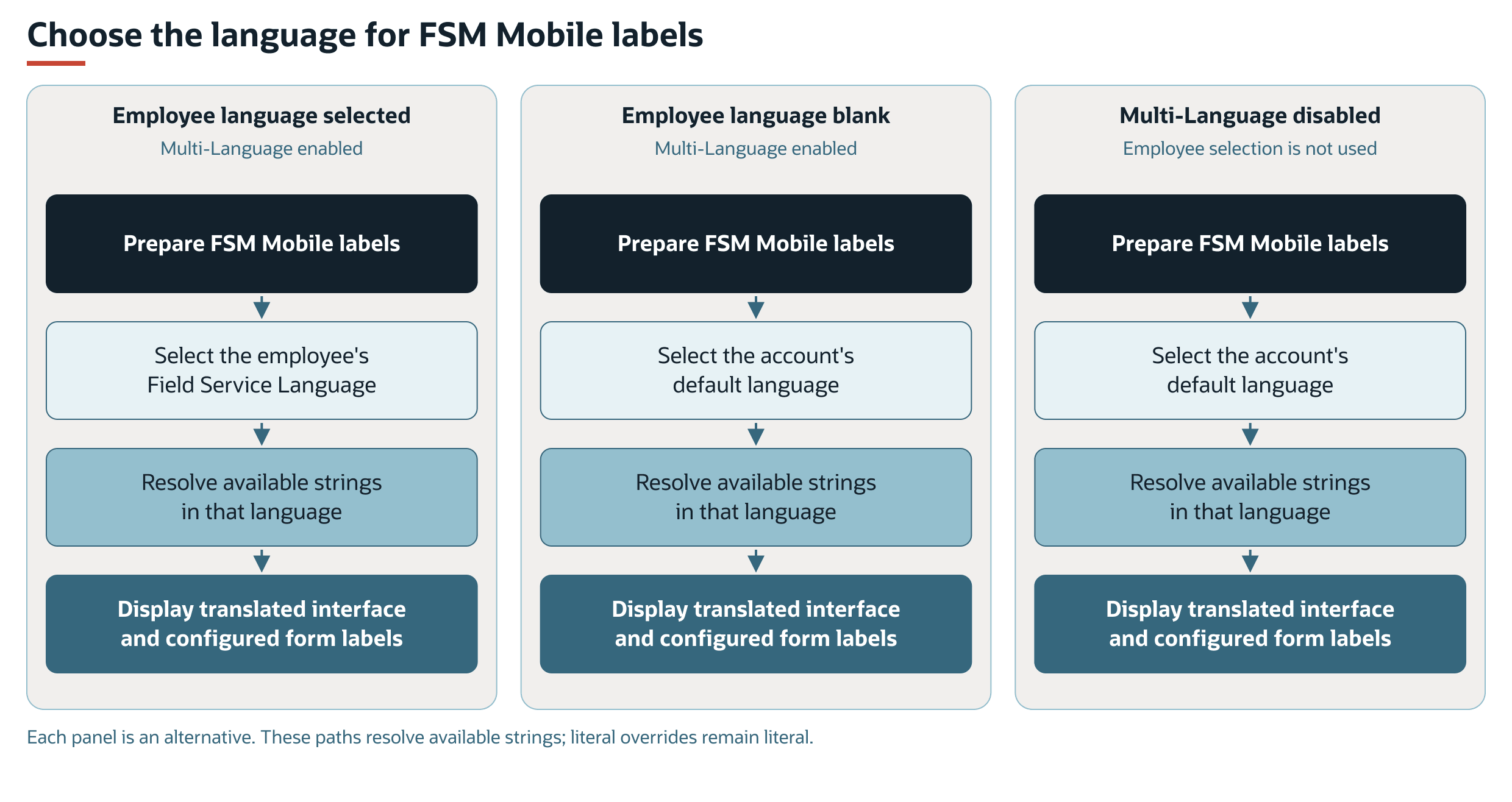
See Language Selection for the language sources and fallback rules.
FSM Mobile Loading and Translation
On initial page loading, the server selects the startup language, resolves references in the startup configuration, and returns the page with translated interface strings. Before an employee is identified, the account default is used. When the startup request identifies an employee, Multi-Language and that employee's language selection determine the language as described in FSM Mobile Label Language.
The browser stores these interface strings in a dictionary. Interface components retrieve their labels from that dictionary when displayed. The components do not request a translation for every label or screen render. In the email/password sign-in path, FSM Mobile creates the employee session and separately requests the session's interface strings. It replaces the dictionary before loading employee and event resources.
Event, resource/form, remote element-option, and article/record responses have a translation step. The server uses the session language to assemble the requested content and resolve recognized references before returning the response. Translation is therefore part of preparing those fetch responses. The browser receives the resolved labels alongside the requested content.
The following diagram shows the separate translation paths for startup, sign-in, and later data requests:
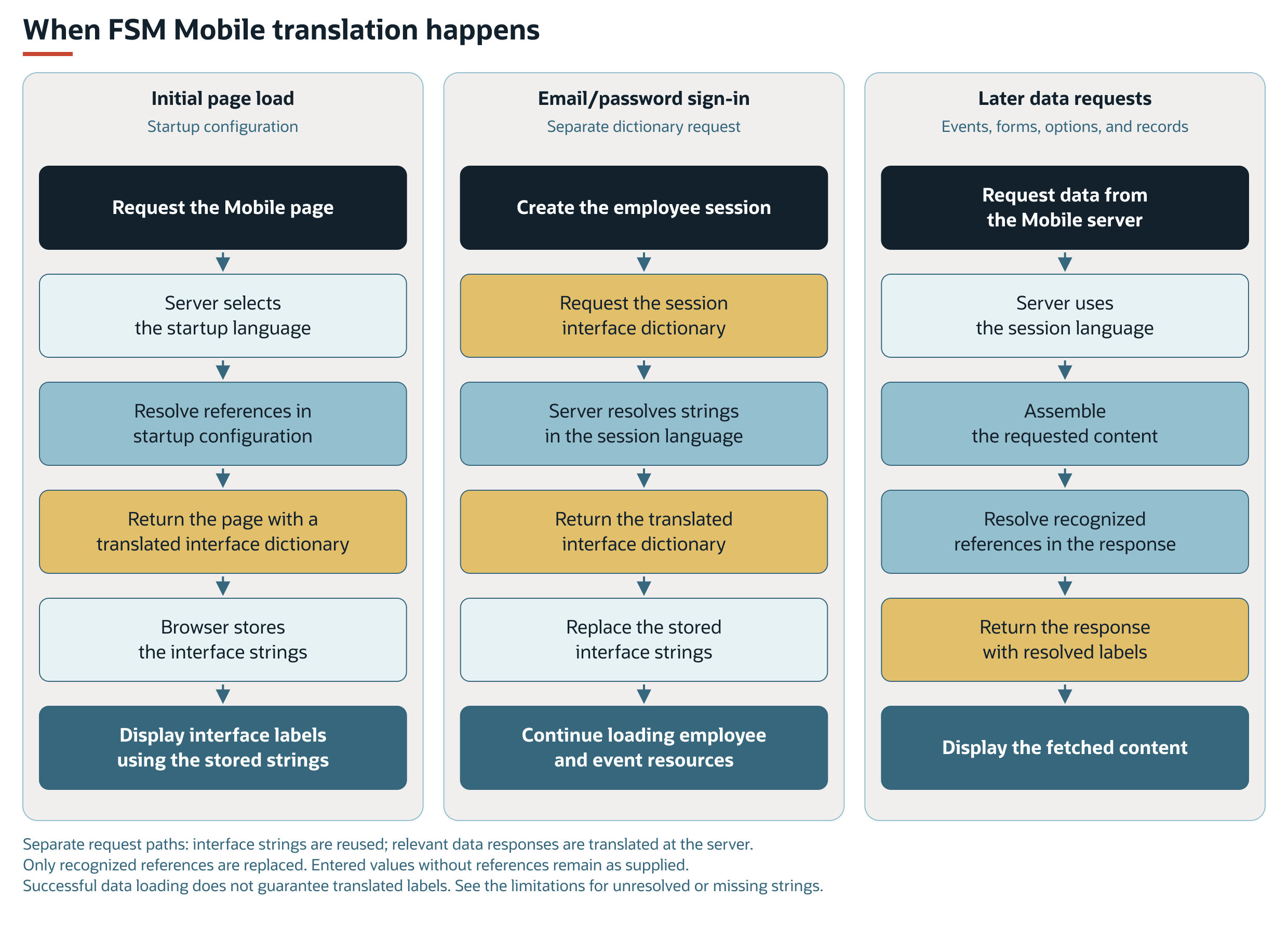
These are separate request paths, rather than steps repeated for every fetch. Loading or refreshing resources does not by itself reload the interface dictionary. The browser reuses the interface dictionary. The server translates relevant data responses during preparation. Literal text and entered values without translation references remain as supplied.
Task and resource data can load even when some labels are untranslated or required interface strings are unavailable. Successful data loading does not establish that every label has been translated. See Limitations and Constraints for the visible outcomes.
Schedule Board Loading and Translation
When the Schedule Board page loads, the server assembles its startup configuration, including interface strings and initial resource and calendar data. It resolves references in that configuration using the NetSuite language preference, then returns it with the page. This path does not check Multi-Language. The browser stores the translated interface dictionary and reuses its strings when displaying the interface.
Later event fetches translate at an earlier stage of data preparation. The server prepares the event definition and resolves its references before retrieving records and building the event response. For example, a supplied caption such as Priority in an event's details is resolved before the search builds those details. The customer name remains record data. The explicit translation pass applies to the definition. It does not scan the returned event data for further collection references.
The following diagram compares startup translation with translation for later event requests:
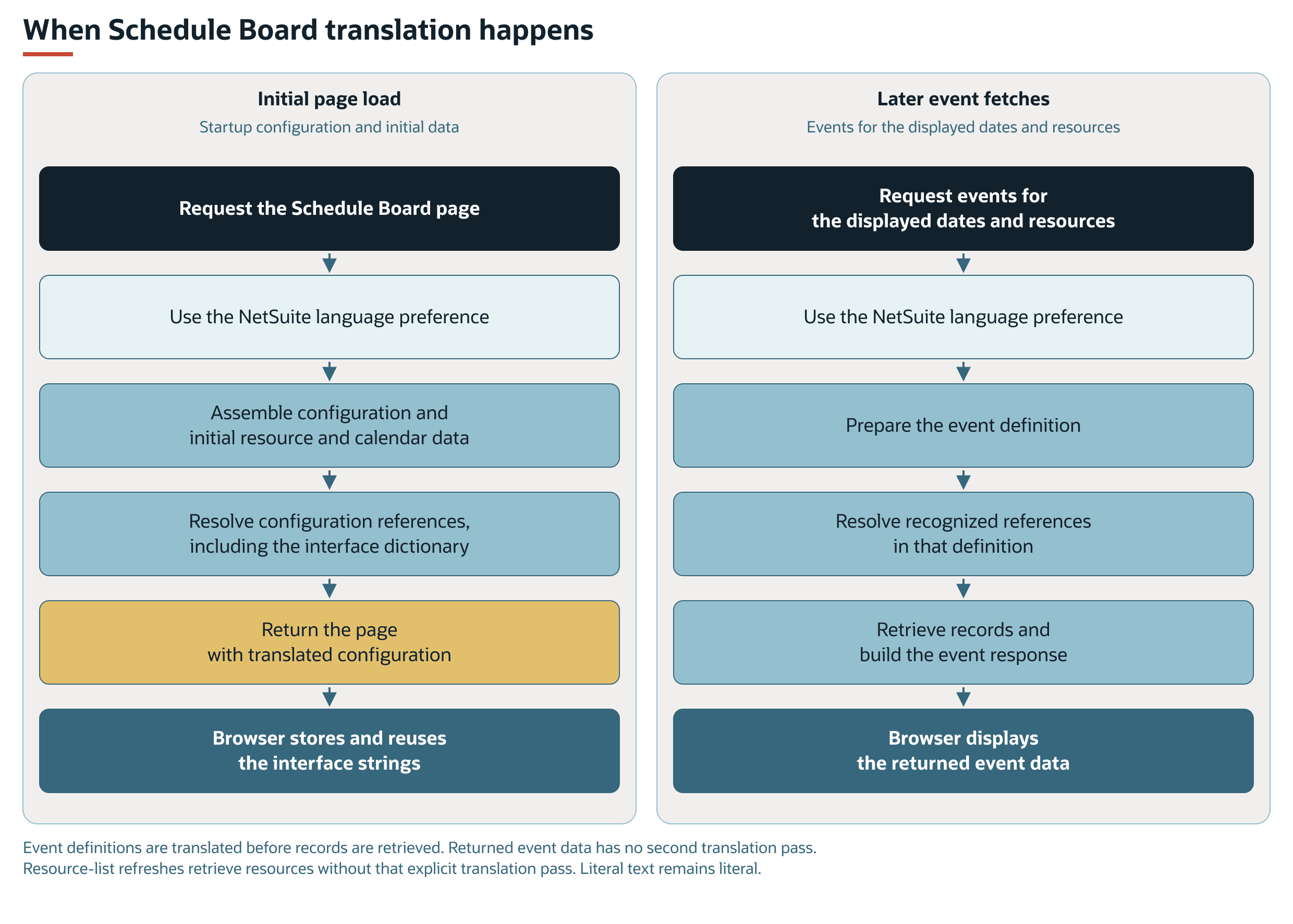
A resource-list refresh retrieves resources without the same explicit translation pass used for event definitions. It does not reload the interface dictionary. Data retrieval and translation are distinct operations. Whether a fetch includes translation depends on its server path. Neither FSM Mobile nor Schedule Board automatically translates arbitrary record names, notes, or other entered text.
Notification and Report Language
Translation happens when FSM prepares the email and its template-generated report attachments. The renderer resolves template references before processing template expressions and producing the output.
With Multi-Language enabled, service notifications select the first available language from the customer, related subsidiary, and account default. Employee notifications use the employee, related subsidiary, and account default. The subsidiary is considered only when that notification has a subsidiary context. Each panel in the following diagram shows a separate notification context:
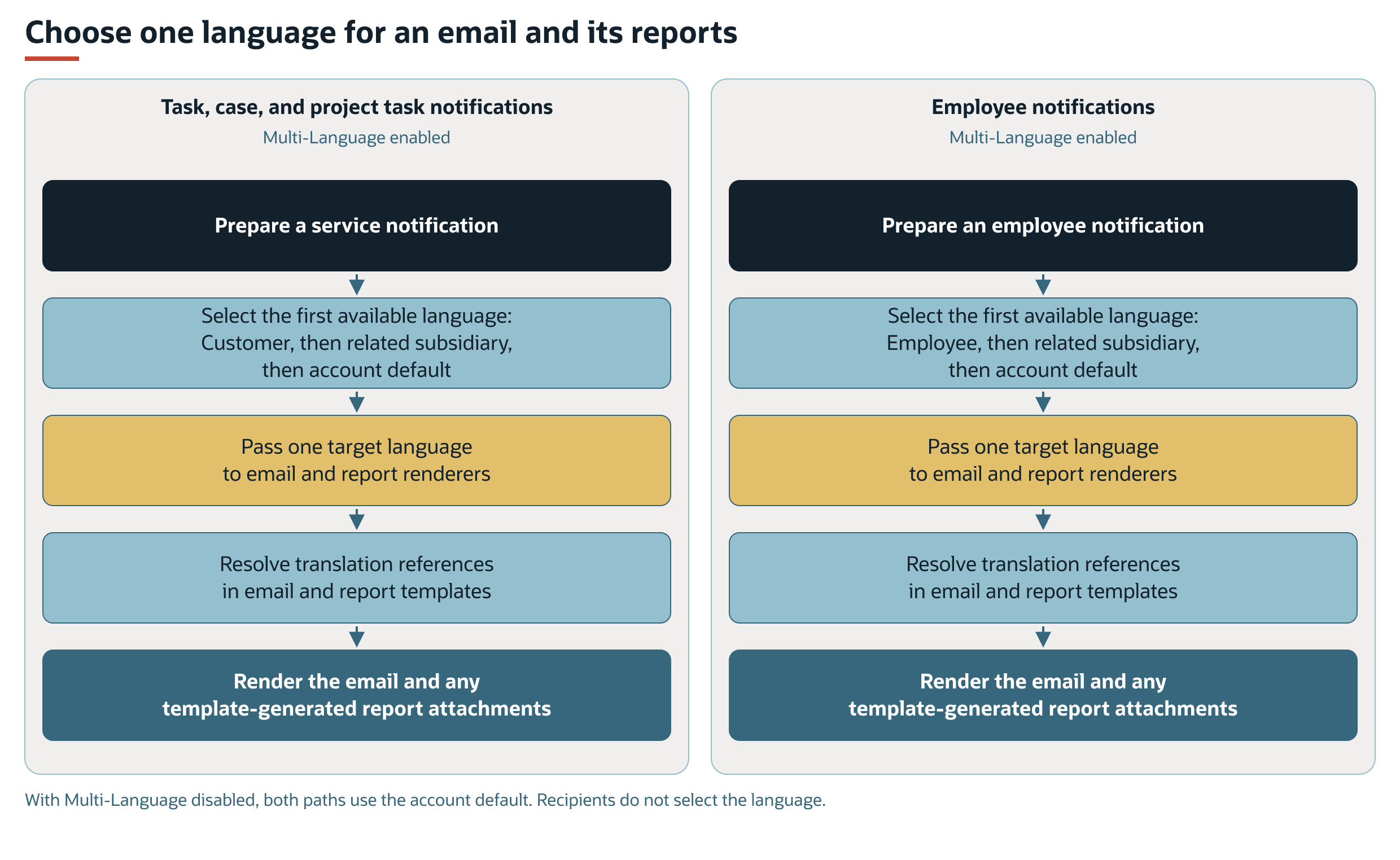
With Multi-Language disabled, both paths use the account's default language. The recipient list does not select the language. Translation references provide translated text. Literal template text remains literal. See Reports and Notifications.
Browser Formatting
The controls described in Date and Number Formatting format loaded values in the browser when the controls are displayed. Formatting uses browser language. It does not fetch translated strings. Employee and customer Field Service Language selections and the Multi-Language setting do not choose the display format for these controls. The following diagram shows FSM Mobile and Schedule Board formatting separately:
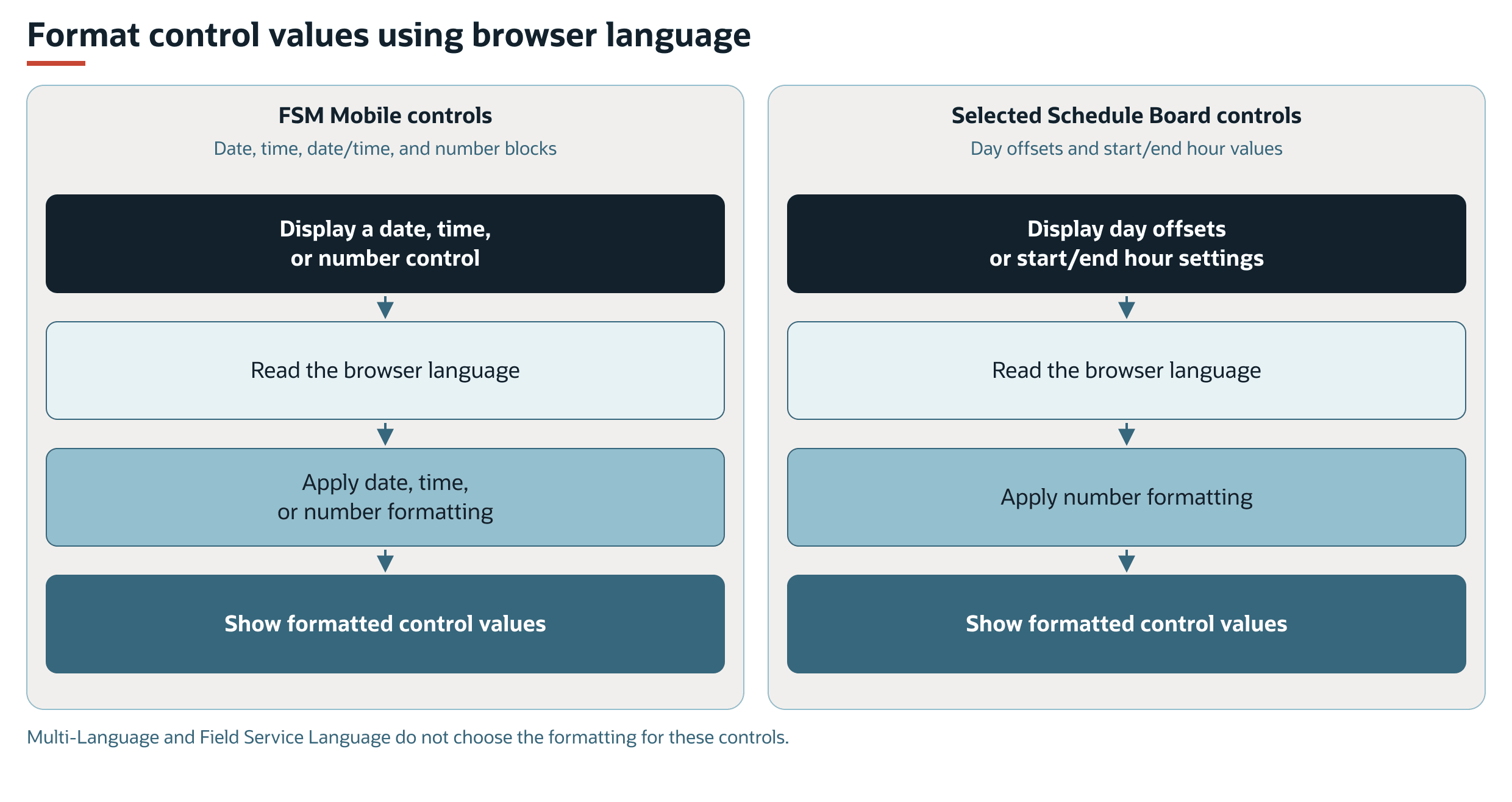
Shared formatters can use an explicitly supplied language. These controls use the browser fallback.
Supplied-Record Translation Maintenance
Scheduled maintenance runs in the background through the language deployment, separately from FSM Mobile and Schedule Board loading. This path saves translated names on records. Interface and response translation prepare content for display. Maintenance selects work only when Multi-Language is enabled and only for specific supplied records whose translated display name is empty. A matching active, unrecovered error prevents the action when retry rules prohibit another attempt. The following diagram compares a successful update with a blocked action:
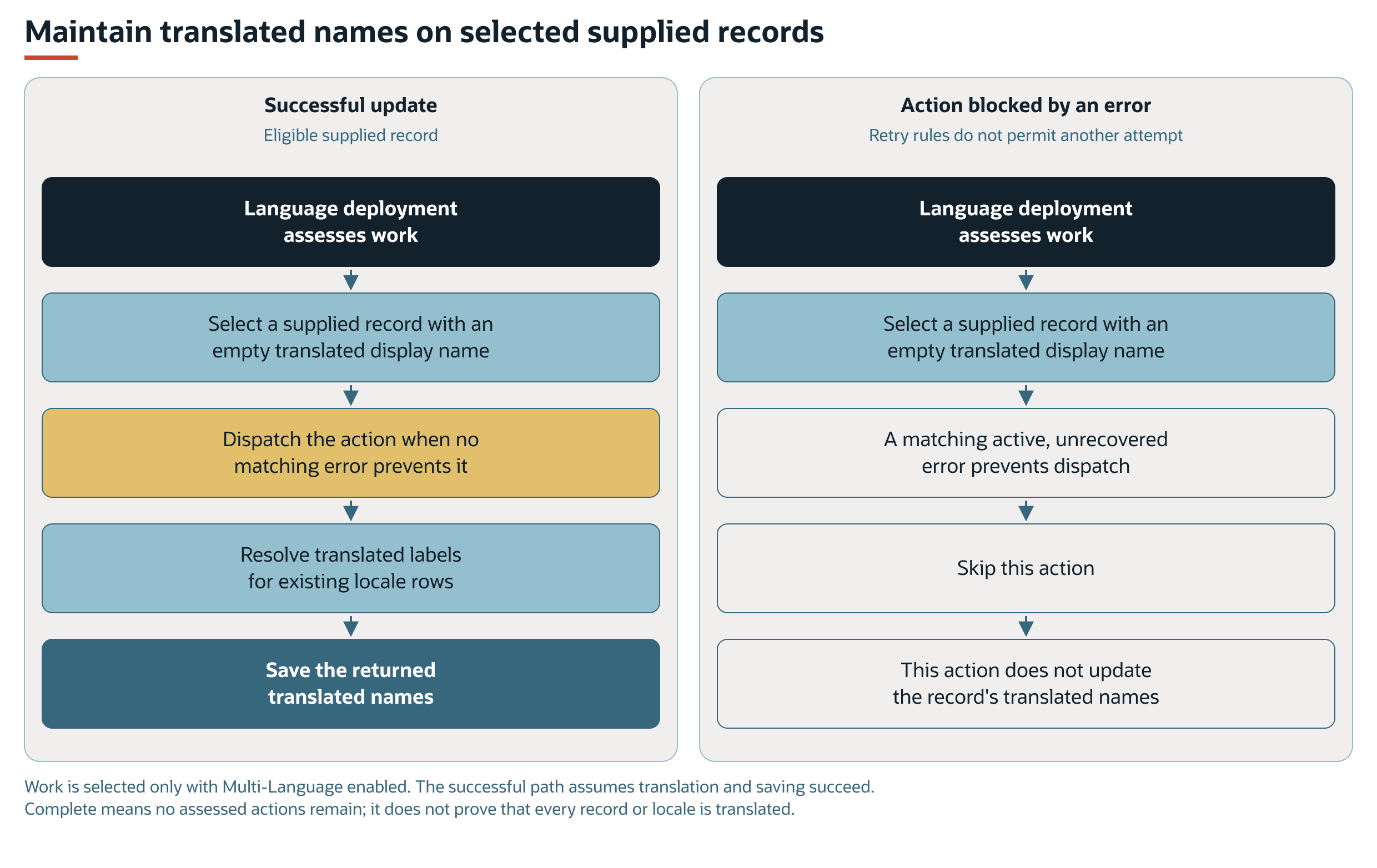
The successful path assumes translation and saving succeed. An assessment with no remaining actions produces the complete log. It does not prove that every record or locale has a translation. See Translation Maintenance for selection, failure, and completion qualifications.
Key Behaviors
This section describes how the feature responds to different conditions and actions.
Language Selection
FSM reads employee and customer language selections when Multi-Language is enabled. The following table shows the language sources used by each path. FSM labels and notification templates reference the supplied translation collection, custcollection_fsm.
|
Area |
Language Setting |
Effect |
|---|---|---|
|
Schedule Board configuration and event definitions |
NetSuite language preference |
Selects the language for startup configuration translation and translation of event definitions before data retrieval. |
|
FSM Mobile labels |
Field Service Language on the employee record |
Selects the language for translated interface and configured form labels. If blank, FSM uses the account's default language. |
|
Task, case, and project task notifications |
Field Service Language on the customer record |
Selects the target language for email content and template-generated report attachments. If blank, FSM checks the related subsidiary language before the account's default language. |
|
Employee notifications |
Field Service Language on the employee record |
Selects the language for translated notification content. If blank, FSM checks the related subsidiary language before the account's default language. |
The subsidiary fallback applies when the notification has a subsidiary context. The task, case, and project task notification processors use the related customer and subsidiary to select language. The recipient list does not participate in this language selection.
The Schedule Board configuration reads the NetSuite language preference without a Multi-Language check.
With Multi-Language enabled, the configuration for FSM Mobile emulation uses the emulated employee's Field Service Language.
If Multi-Language is disabled, FSM Mobile and the notification language selection use the account's default language.
Reports and Notifications
FSM resolves translation collection references in notification configuration and in email and report template files. The notification processor passes one target language to the email renderer and its template-generated report attachments.
The renderer translates references in the template file before processing template expressions. This translation pass replaces recognized collection references. It does not translate literal text that contains no such reference.
For email content and template setup, see FSM Notification Configuration. For report data, templates, and language checks, see FSM Service Report Configuration.
Record Interactions
The following table describes how records support localization and translation.
|
Record |
Role in Localization and Translation |
|---|---|
|
Employee |
Supplies the language for FSM Mobile labels, employee notifications, and language-specific prompt selection in Enhanced Technician Notes. |
|
Customer |
Supplies the language for task, case, and project task notifications and their template-generated report attachments. |
|
Subsidiary |
Supplies a fallback language for notifications that have a subsidiary context. |
|
Field Service Language |
Provides the language choices used by the employee and customer Field Service Language field. |
|
Supplied activity, asset, case, project, and task types, task outcomes, and work calendars |
Contain translated names maintained by the language deployment for selected supplied records. |
Enhanced Technician Notes uses the employee's language when selecting a language-specific prompt. If no matching prompt is available, FSM uses the requested or configured base prompt. See How Technician Language Affects Enhanced Technician Notes.
Processing Model and Lifecycle
This section explains when processing occurs and what can affect its progress and results.
Translation Maintenance
The Field Service Scheduled : Language deployment, customdeploy_nx_language, maintains translated names for selected supplied records. The general FSM scheduled deployment requests this maintenance. Its assessment selects work only when Multi-Language is enabled.
The assessment checks specific supplied activity types, asset types, case types, project types, task types, task outcomes, and the supplied California work calendar. A record is selected when the search returns an empty translated display name. This selection does not include every custom record in the account.
For each selected record, the deployment resolves the corresponding FSM translation strings for the locale entries already listed on that record. It updates the record with the returned labels.
A matching active, unrecovered error can prevent an action from being dispatched unless the retry rules allow another attempt. Failures reported by the scheduled processor create field service error records. The complete log means that the assessment returned no remaining actions. It does not establish that every locale in every record has a translation.
For deployment reference, execution monitoring, log interpretation, and shared retry controls, see FSM Script Reference. For captured error information and state meanings, see Field Service Error Record.
Configuration
Administrators can use translation collection references for configurable labels and template text. Each reference identifies a collection and key and can include a target locale. This allows the same label or template to resolve available strings in the selected language.
A label override that contains only literal text remains literal. To provide translated custom labels, supply the required translation strings and reference the strings in the applicable configuration or template.
For language setup and translated labels, see Configuring FSM Localization and Translation. For shared expression and template-tag syntax, see FSM Expressions and Template Tags. For email and report template settings, see FSM Notification Configuration and FSM Service Report Configuration.
Limitations and Constraints
Localization and translation have the following limitations:
-
Translation output depends on the strings available in the referenced collection for the selected language. A language choice does not establish that every label or locale has a translation.
-
Custom records, fields, forms, labels, and template text do not acquire translations merely because Multi-Language is enabled. Custom text needs its own translation strings and applicable references.
-
Scheduled maintenance updates only the selected supplied records and their existing locale entries. It does not populate translations for every custom record or add every possible locale.
-
Individual translation-key failures can leave collection references visible even when other labels and record data are returned. Failures that prevent a translation collection from loading can stop the affected request.
-
FSM Mobile can display task and resource data even when required interface strings are unavailable. If a string is missing from the loaded interface dictionary, a placeholder such as
Translation selectfilelabelcan appear. -
A temporary failure to load content or resolve translation keys on the server may prevent labels with existing translations from appearing. Refreshing may restore those labels. Recovery depends on the cause and on reloading the affected content. FSM Mobile's resource refresh does not itself reload the interface dictionary, and refreshing cannot supply a missing translation entry.
-
If the same string remains missing for multiple people using the same language after the affected content is reloaded, a shared issue may exist. Possible causes include a missing translation entry, an incorrect key reference, or a configuration problem. Investigation is needed to identify the cause.
Related Topics
- FSM Features
- Configuring FSM Localization and Translation
- FSM Expressions and Template Tags
- FSM Notification Configuration
- FSM Service Report Configuration
- FSM Script Reference
- Field Service Subtabs on Employee and Customer Records
- Configuring Notification Sender and Recipients
- How Technician Language Affects Enhanced Technician Notes