FSM Contact Sourcing and Synchronization
Field Service Management (FSM) uses contact information when you create projects and cases. You can select a project's primary contact during creation, attach customer contacts to a project, and populate case contact details from related records.
Project contact synchronization attaches existing contact records to a project. Case contact sourcing determines the Contact, Email, and Phone values on a case. Each operation has separate conditions.
How It Works
The following diagram shows primary contact selection, project contact links, sourced case fields, and read-only contact display in FSM Mobile. Each column represents a separate operation. The detailed flows in this topic show the conditions for each interaction.
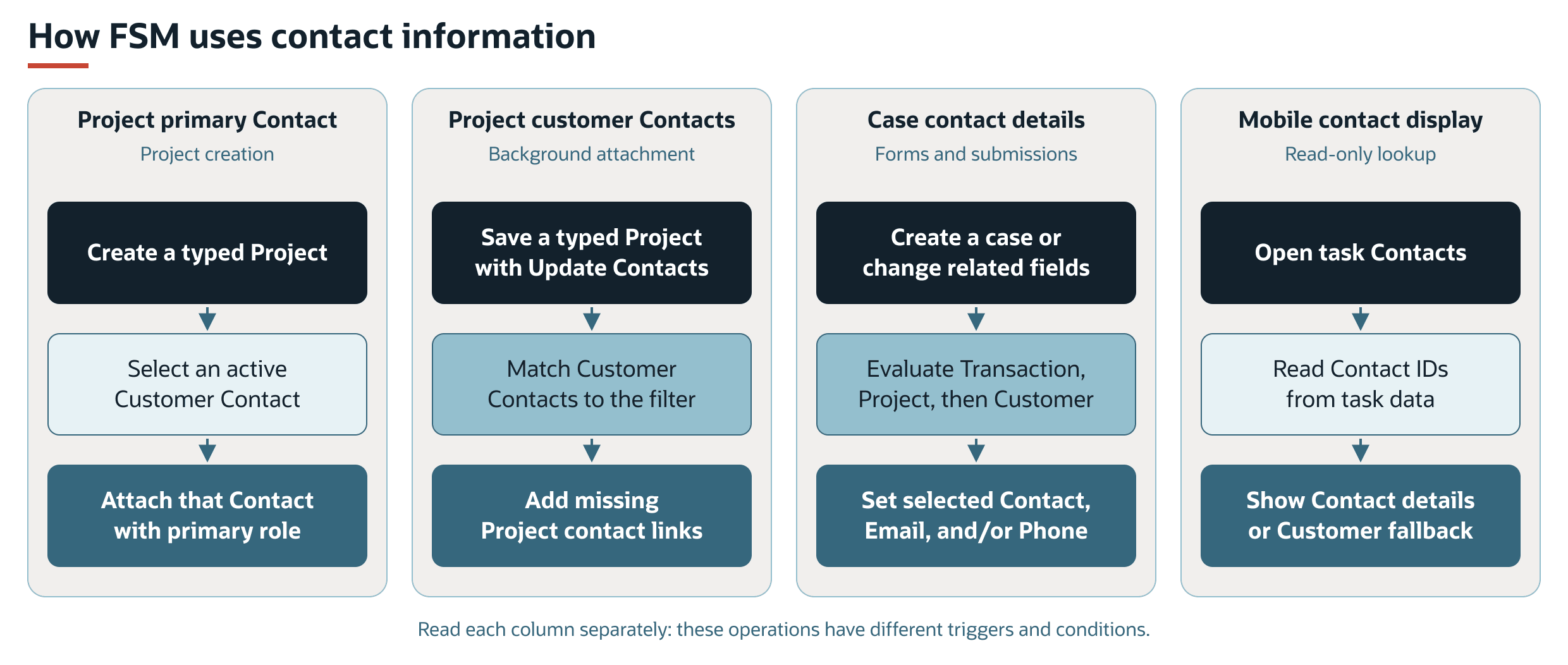
Project Primary Contact
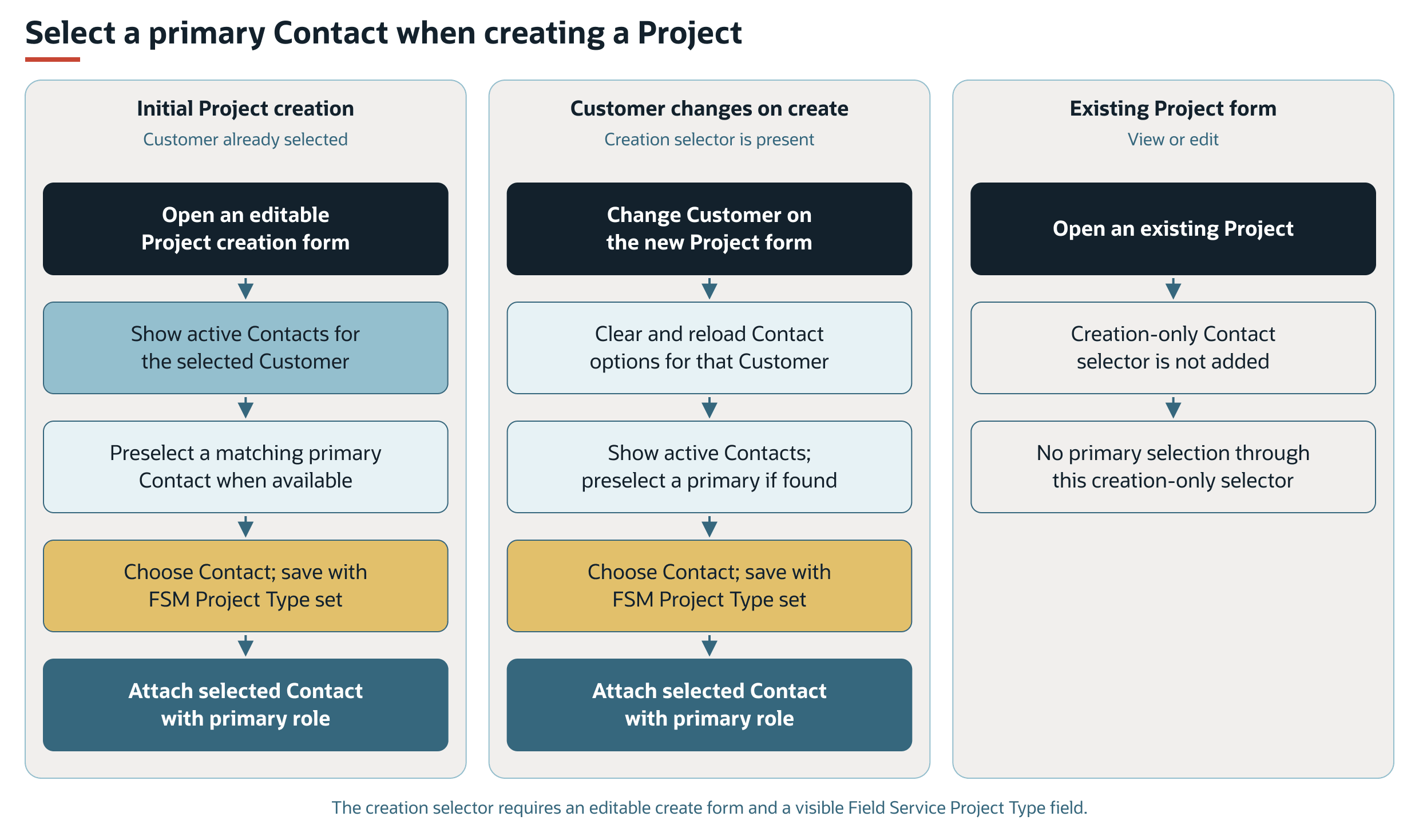
During project creation, the Contact field lists active contacts associated with the selected customer. A primary contact is selected automatically when a matching primary contact is available. Changing the customer refreshes the contact options.
The field appears during project creation when the form is available for editing and the Field Service Project Type field is visible. The same scripted Contact field does not appear when you view or edit an existing project.
When you create a project with a Field Service Project Type and a selected contact, FSM attaches that contact with the primary contact role. This attachment is separate from the background process that attaches other customer contacts.
Primary Contact Selection Flows
The creation flows assume an editable form with a visible Field Service Project Type field. A selected contact is attached with the primary role only when the project being created has a Field Service Project Type. Without a selected contact, this creation path does not attach a primary contact. The separate customer-contact update request can still apply.
Customer Contacts on Projects
The Update Contacts box requests attachment of customer contacts that are missing from the project. The field's full label is Field Service Update Contacts. The supplied Field Service Project form uses the shorter label, Update Contacts.
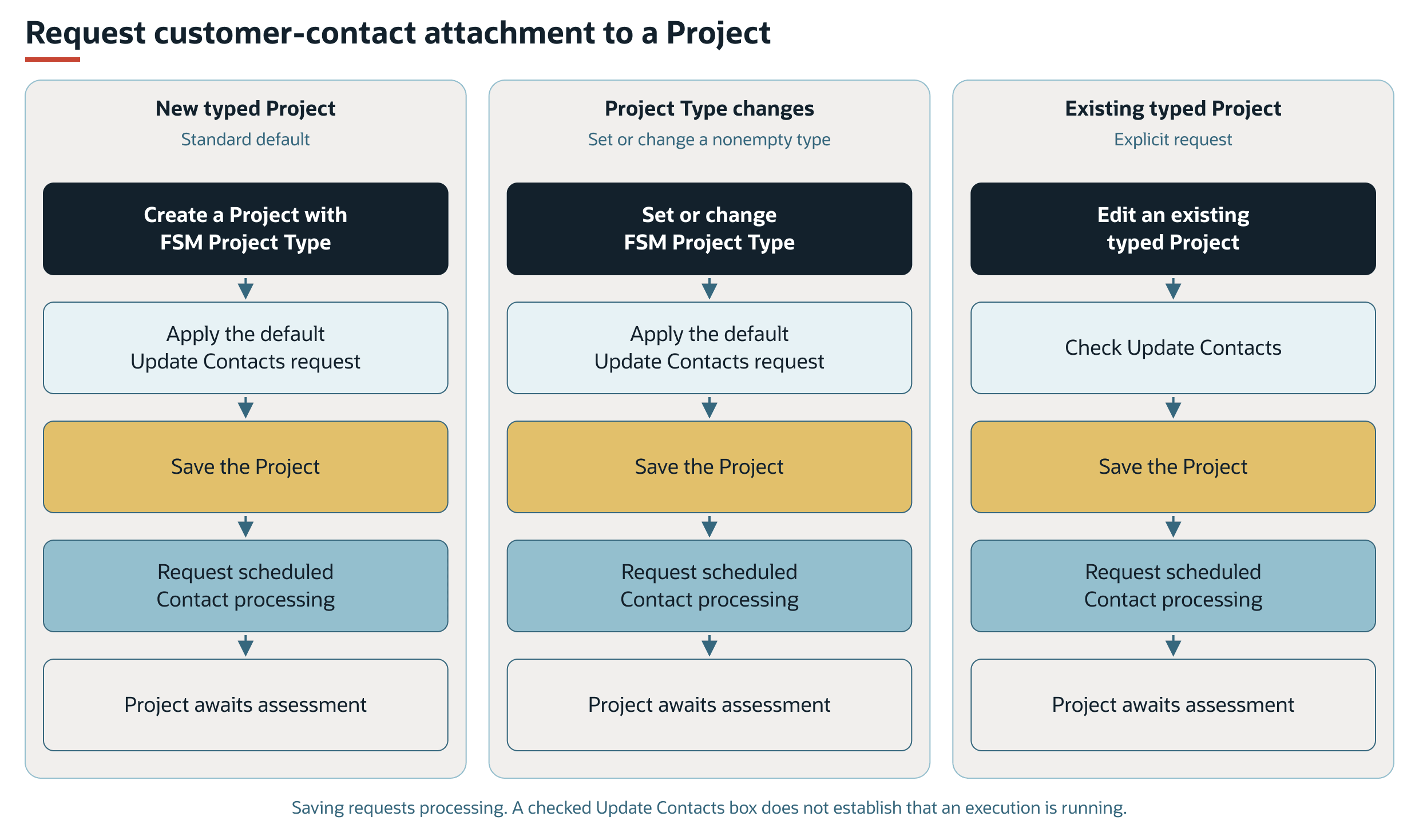
For projects with a Field Service Project Type, the standard project behavior requests contact updates during creation. Selecting or changing a nonempty project type also applies the contact-update default.
Saving a project with a Field Service Project Type and Update Contacts checked requests background processing. The process selects projects with both a project type and the contact-update request.
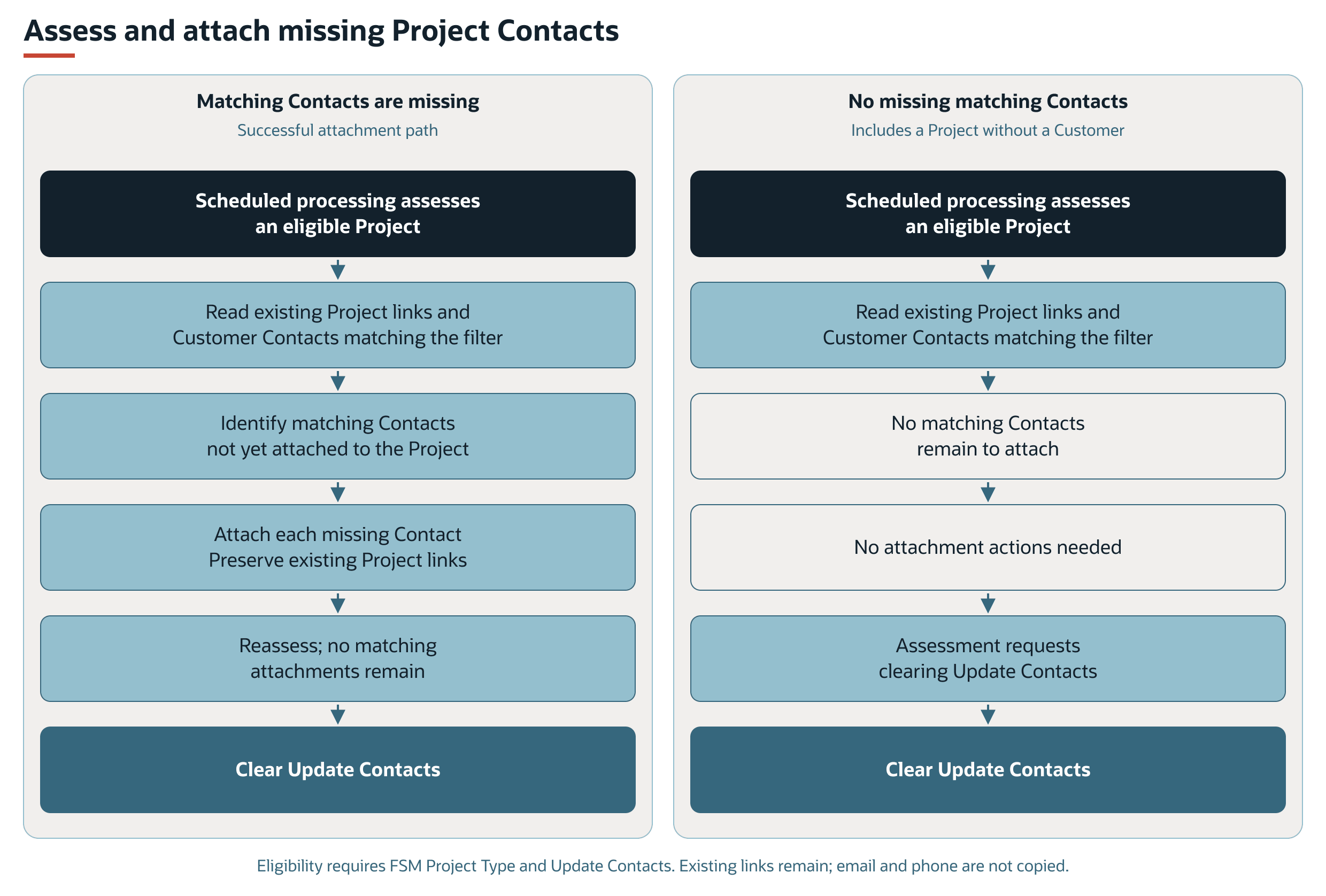
For each selected project, FSM reads the contacts already attached to the project and the customer contacts that match the configured filter. FSM attaches each matching customer contact that is missing from the project.
The attachment process preserves existing project contact links. It does not remove links that fall outside the filter or copy email and phone values.
When a later assessment finds no matching customer contacts left to attach, FSM clears Update Contacts. A project without a customer also has no customer contacts to attach, so its request can clear without an attachment.
Contact Update Request Flows
Creating a project with a Field Service Project Type applies the standard contact-update default. Selecting or changing a nonempty project type also applies this default. An existing project with a Field Service Project Type can also request attachment through Update Contacts. Each path requests background work when the project is saved.
Background Attachment Flows
The successful attachment path and the no-attachment path both finish by clearing Update Contacts after an assessment finds no missing matching contacts. Contacts can already be attached, be excluded by the filter, or be absent because the project has no customer.
Case Contact Sourcing
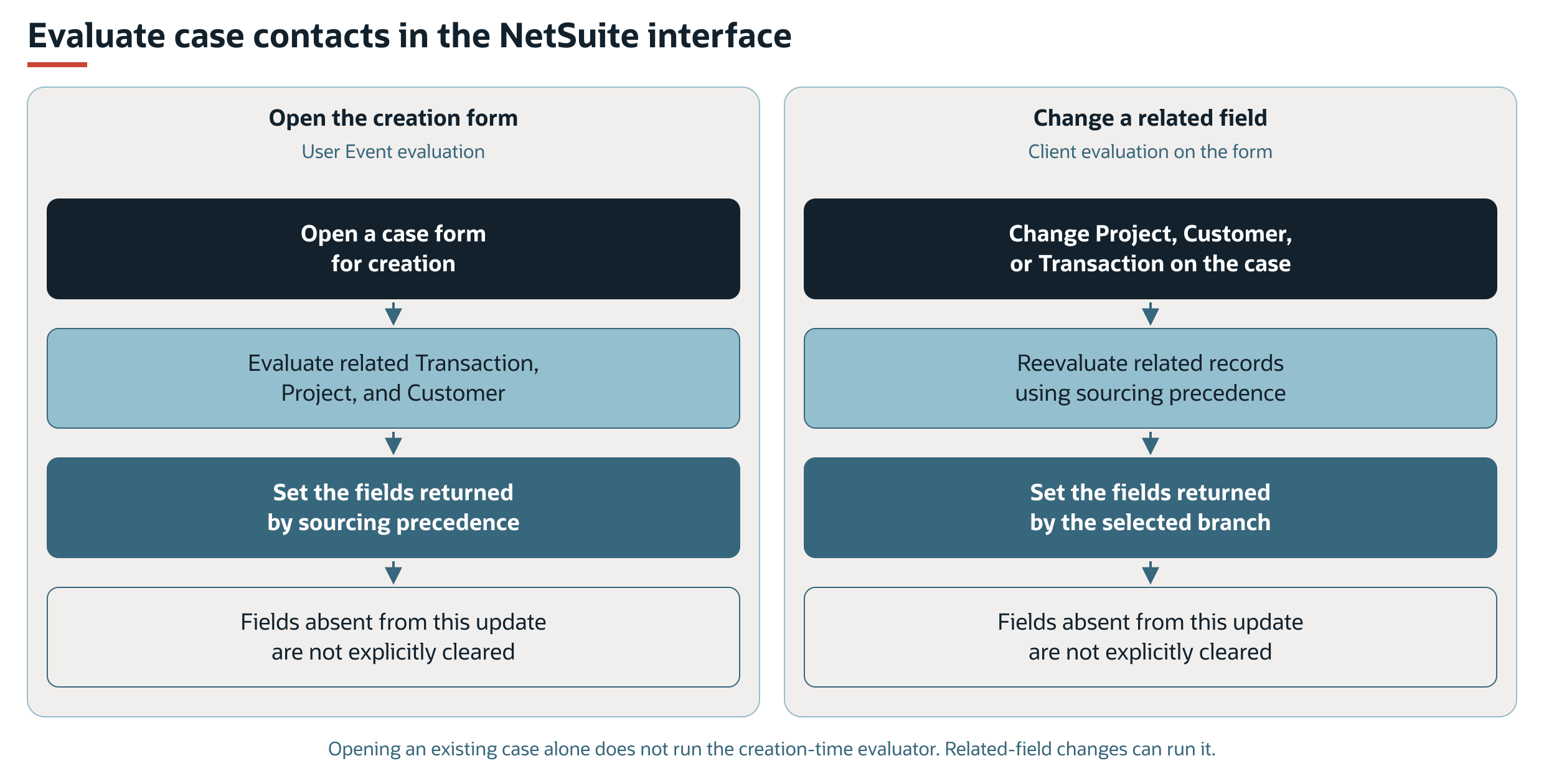
FSM evaluates contact details when a case form opens for creation. In the NetSuite interface, changing the project, customer, or transaction also evaluates the related contact information.
NetSuite Interface Flows
Opening the creation form and changing a related field are separate triggers for the same sourcing rules. Existing Contact, Email, or Phone values do not prevent these interface evaluations. Opening an existing case alone does not trigger FSM contact sourcing.
Sourcing Precedence
Whenever evaluation runs, FSM stops at the first matching condition. If no condition matches, FSM returns no sourcing update. The diagram shows the related record used and the fields explicitly set by that branch.
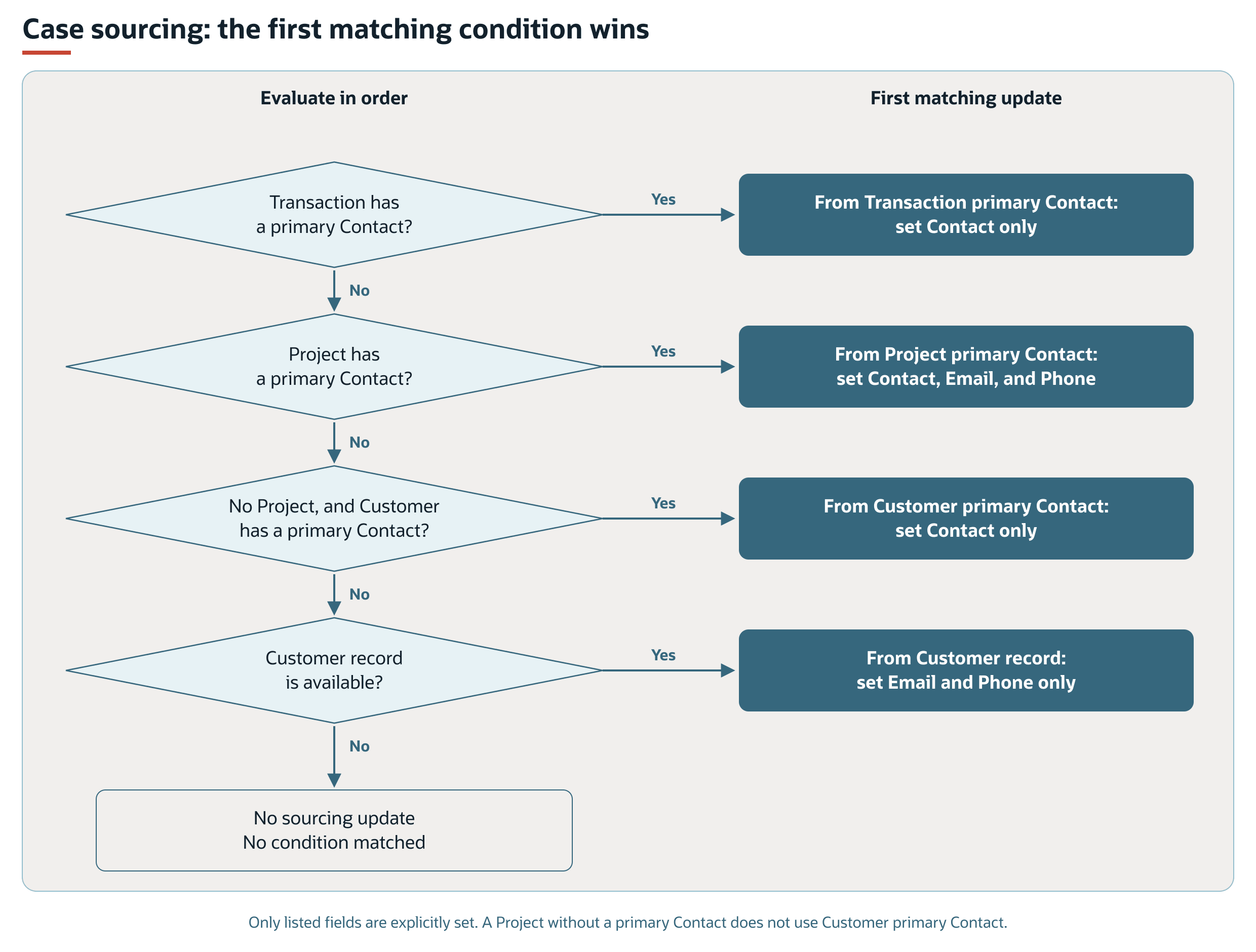
The following table shows the order that FSM uses to select case contact details. The first matching condition applies.
|
Order |
Condition |
Case Update |
|---|---|---|
|
1 |
The transaction has a primary contact. |
Sets Contact from the transaction. |
|
2 |
The transaction does not supply a primary contact, and the project has a primary contact. |
Sets Contact, Email, and Phone from the project's primary contact. |
|
3 |
Neither preceding condition applies, no project is available, and the customer has a primary contact. |
Sets Contact from the customer. |
|
4 |
None of the preceding conditions applies, and a customer record is available. |
Sets Email and Phone from the customer record. |
When the project exists but has no primary contact, FSM does not select the customer's primary contact through condition 3. The customer email and phone fallback can still apply.
The transaction and customer primary-contact branches explicitly set Contact only. The project branch explicitly sets all three fields. The customer-details branch explicitly sets Email and Phone only.
Case Contact Sourcing Outside the NetSuite Interface
For case creation or editing outside the NetSuite interface, FSM checks the submitted Contact, Email, and Phone values. If any field contains a value, the contact component skips automatic sourcing at submission.
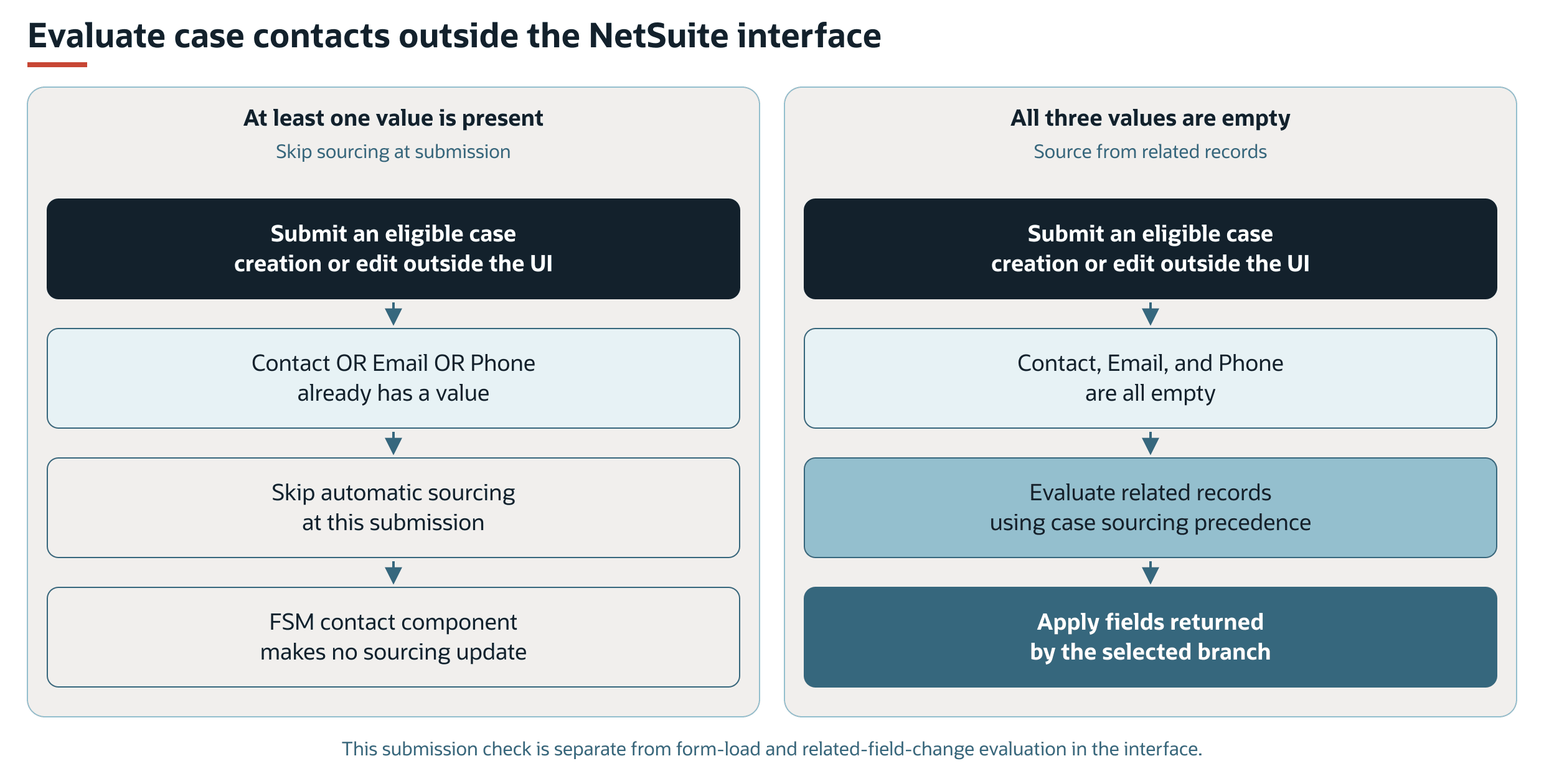
This check does not apply to interface field changes or form loading during case creation. Changing the project, customer, or transaction in the interface can update sourced details even when contact information is already present.
The FSM contact evaluator does not explicitly clear fields that are absent from its selected update.
FSM Mobile Contact Details
The standard Contacts resource in FSM Mobile is read-only. It includes name, email, phone, mobile phone, and image mappings. The resource loads contact records identified by the task data and includes customer details when the contact value is zero.
The customer fallback is selected by a zero contact value, rather than by a failed contact lookup. A zero task contact value loads customer name, email, phone, and mobile details. Both display paths are separate from project attachment and case field updates.
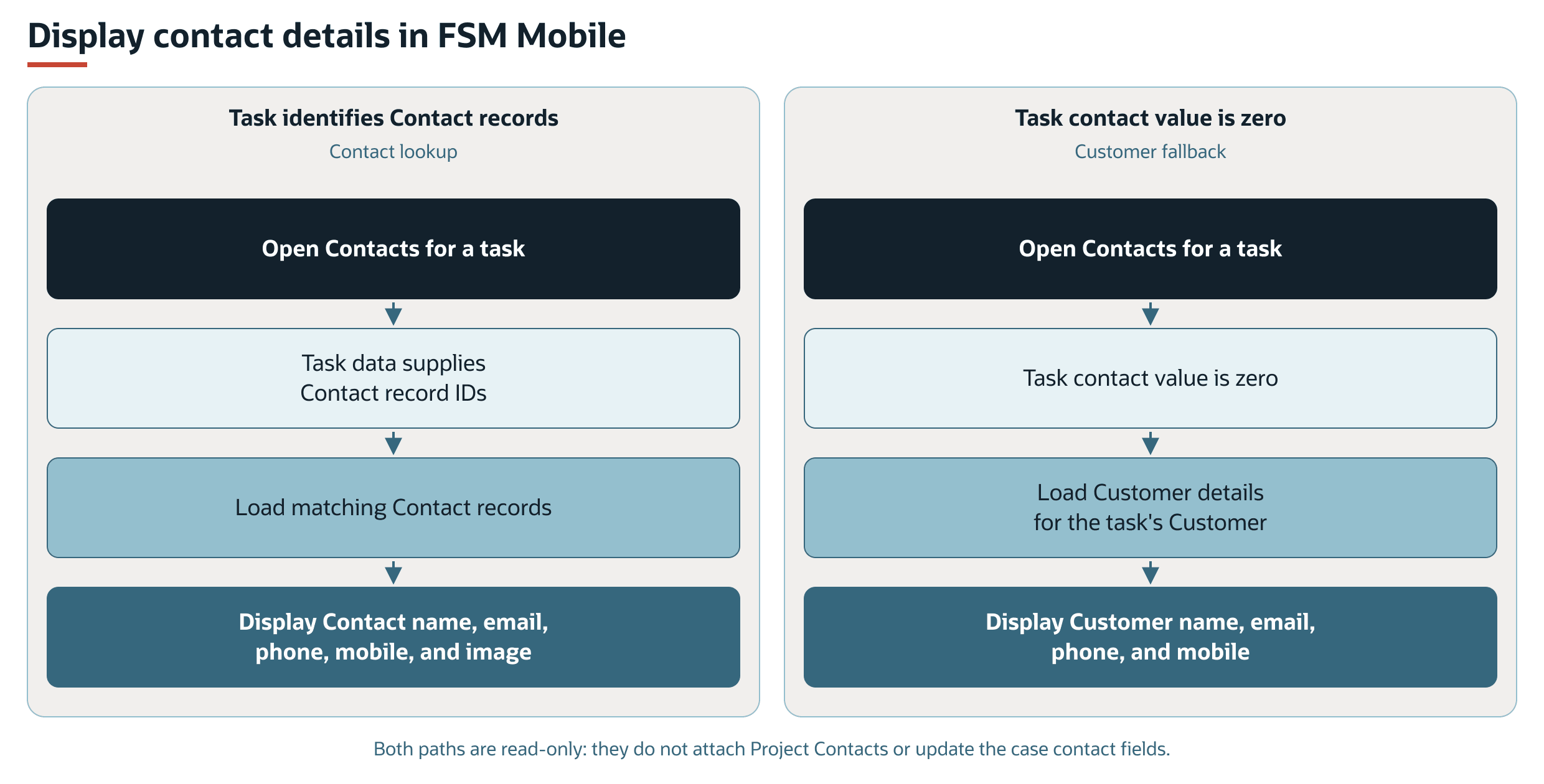
The FSM Mobile contact display is separate from the background process that attaches customer contacts to projects. For display details, see Contact Tab in FSM Mobile. For resource properties, see the contact resource in FSM Mobile Resource Properties Reference.
Record Interactions
The following table summarizes how the capability uses each record.
|
Record |
Contact Role |
FSM Behavior |
|---|---|---|
|
Customer |
Supplies contacts and fallback details. |
Provides customer contact links for project attachment and contact information for case sourcing. |
|
Contact |
Supplies the existing contact records used by the capability. |
Used for selection and sourcing. Attached to a project when selected as its primary contact or matched by the customer-contact attachment process. |
|
Project |
Holds contact associations and the update request. |
Receives missing customer contact links and supplies its primary contact details to a case. |
|
Transaction |
Supplies the first contact choice for a case. |
Provides a primary contact when available. |
|
Case |
Receives sourced contact details. |
Applies the rules in Case Contact Sourcing. |
Processing Model and Lifecycle
This section explains when processing occurs and what can affect its progress and results.
Processing and Completion
The following scripts support the separate form interactions and background attachment process.
|
Script or Deployment |
FSM Role |
|---|---|
|
Field Service Client ( |
Refreshes the project's Contact selector when the customer changes. Evaluates case contact details when the project, customer, or transaction changes in the NetSuite interface. |
|
Field Service User Event ( |
Adds the Contact selector during project creation and handles the selected primary contact when the project is saved. Evaluates case contact details when the case form opens for creation and at eligible submissions outside the NetSuite interface. Project save handling also requests background attachment when Update Contacts is checked. |
|
Field Service Scheduled : Contact ( |
Assesses eligible projects, attaches missing matching customer contacts, and clears Update Contacts when no matching attachments remain. |
For shared execution monitoring and deployment controls, see FSM Script Reference.
Update Contacts indicates requested work. A checked box does not establish that the scheduled script is currently running. The project processing banner can also show Update Contacts because an assessment identifies pending contact work.
The scheduled process reassesses the project after attachment actions. If governance or execution time limits interrupt processing, the runner requests another execution.
An unrecovered error associated with an attachment action can prevent that action from running again. The runner reports failures that are not ignored through Field Service Error records. If every assessed action is skipped because of unrecovered errors, the execution stops with work still pending.
Pending and Blocked Contact Work
These flows distinguish continuation after an execution limit from skipping an attachment action because its matching unrecovered error prevents retry. Other actions may run.
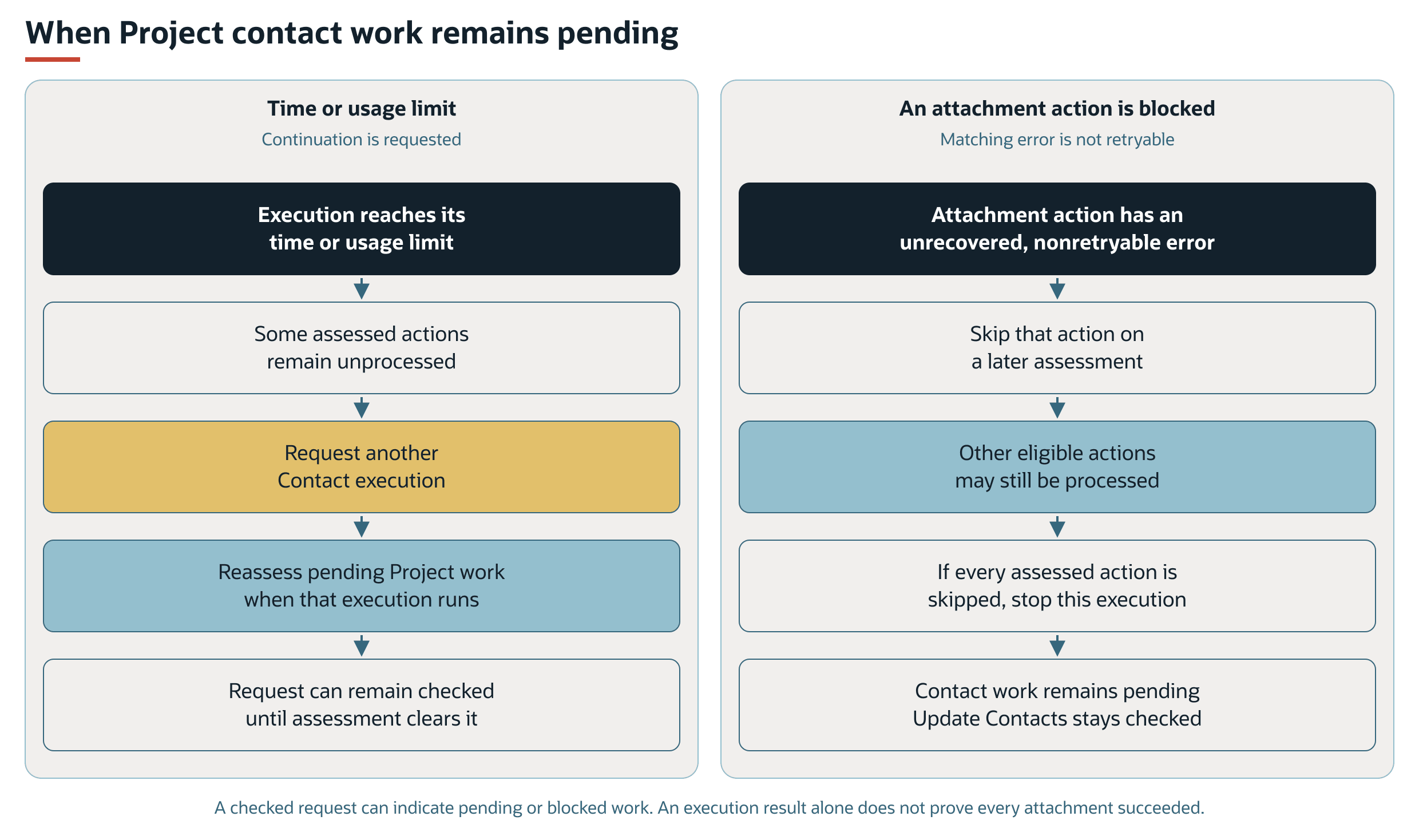
To assess the result, compare the intended customer contact links with the project's contact links and the Update Contacts request. A cleared request indicates that the assessment found no further matching attachments. It does not establish that every customer contact matched the filter.
Configuration
The customer-to-project contact filter controls which customer contacts the attachment process considers. The standard fallback filter does not explicitly exclude inactive contacts. The Contact selector used during project creation separately restricts its options to active contacts.
Filtering the background attachment candidates does not redefine case contact precedence. The contact filter and the case sourcing rules serve different purposes.
For contact-attachment setup, see Configuring FSM Contact Sourcing and Synchronization. It defines the additional filter and provides an active-contact example.
For project contact-update defaults, see the models/project subsection of FSM Record Model Configuration. For creation selector options and form controls, see the views/project/contact subsection of FSM NetSuite View Configuration. These controls affect the project default and creation selector separately from the background attachment filter.
For general configuration guidance, see FSM Configuration.