processItemCreations()
The processItemCreations() function (client-side) creates items required by the configuration using all active item creation records. Active item creation records have a rule that matches user's choices on the product interface. The new items are saved in your account.
You can also verify that items have been correctly created, and use the console to view how items would be created to troubleshoot any possible issue. For more information about item creation records, see Creating Items Required by the Configuration.
If you add existing items as components for an assembly created by scripting, make sure those items are active. Active items don't have the Inactive box checked on their record.
Syntax
Use this syntax for the processItemCreations() function:
            processItemCreations({
    mode: 'create' | 'log',
    testing: true | false,
    log: true | false
}).then(callback);
  .catch(callback);
Return Value
The processItemCreations() function returns a promise that resolves to an object containing the results of the item creation process.
Parameters
All properties are optional.
The processItemCreations() function accepts an object as a parameter. The object includes the following properties:
-
mode(string) - Specifies how active item creation records are processed. This property can take the following values:-
create- Creates items from active item creation records during the configuration process. This is the default mode and can be omitted. -
log- Uses the console to log the items that would be created to troubleshoot any possible issue.
-
-
testing- Iftrue, this property verifies that items were created correctly. The property isfalseby default. The testing results are included in the function output. Testing results include:-
whether the validation passed (
trueorfalse) -
detected errors, if any
-
a comparison between current field values and expected values
-
-
log- Iftrue, this property adds alogkey to the returned data to provide information about the fields that were set for each created item for debugging purposes.
Examples
The following examples show how to use the processItemCreations() function.
Creating Items Required by the Configuration
This example runs item creation in create mode, which creates the required item records. When the promise resolves, the function logs the returned data to the console. Use this approach when the configuration must produce real item records.
              processItemCreations({
    mode: 'create'
}).then(data => {
    console.log('Done', data);
});
Logging Items That Would Be Created
This example runs in log mode, so no items are created. Instead, the function prints details to the console showing which items would be created. Use this approach to verify that item creation records will be processed correctly.
              processItemCreations({
    mode: 'log'
}).then(data => {
    console.log('Done', data);
});
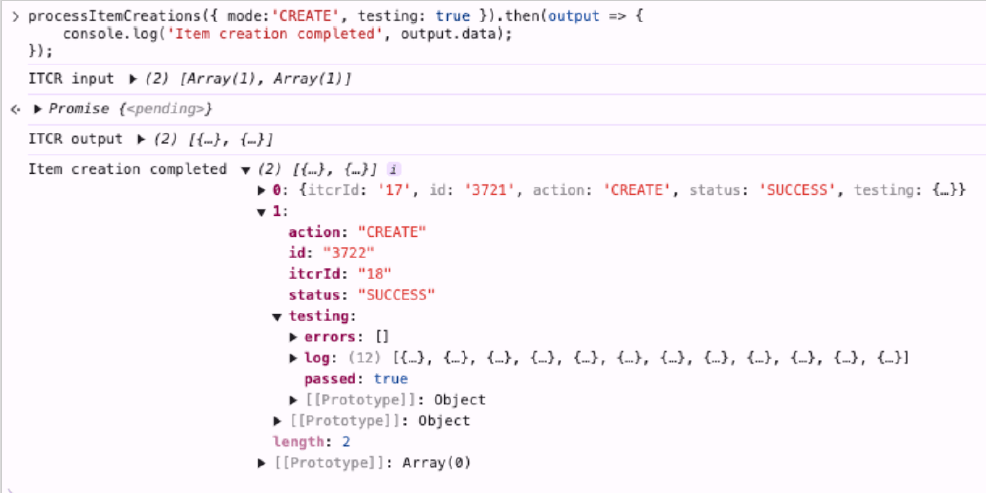
Creating Items And Verifying The Results
This example creates items and verifies the item creation results also includes the testing parameter.
              processItemCreations({
    mode: 'create',
    testing: true
}).then(output => {
    console.log('Item creation completed', output.data);
});
The returned output will include a testing object for each processed item with the following information: validation status (passed), detected errors (errors), and a detailed logs (log).