Referencing Related Records in Formula Fields
This topic describes referencing related records in formula fields. For general information about creating formula fields, see Creating Formula Fields.
When creating a formula field, you can reference data contained in fields on related records.
For example, you create a custom entity field to apply to customer records. You can add a formula field that references a field on the employee record of the sales rep assigned to the customer.
When referencing fields on other records, you're restricted to the records with search joins.
The format for formula field references is:
{fieldOnAppliedRecord.fieldOnJoinedRecord}
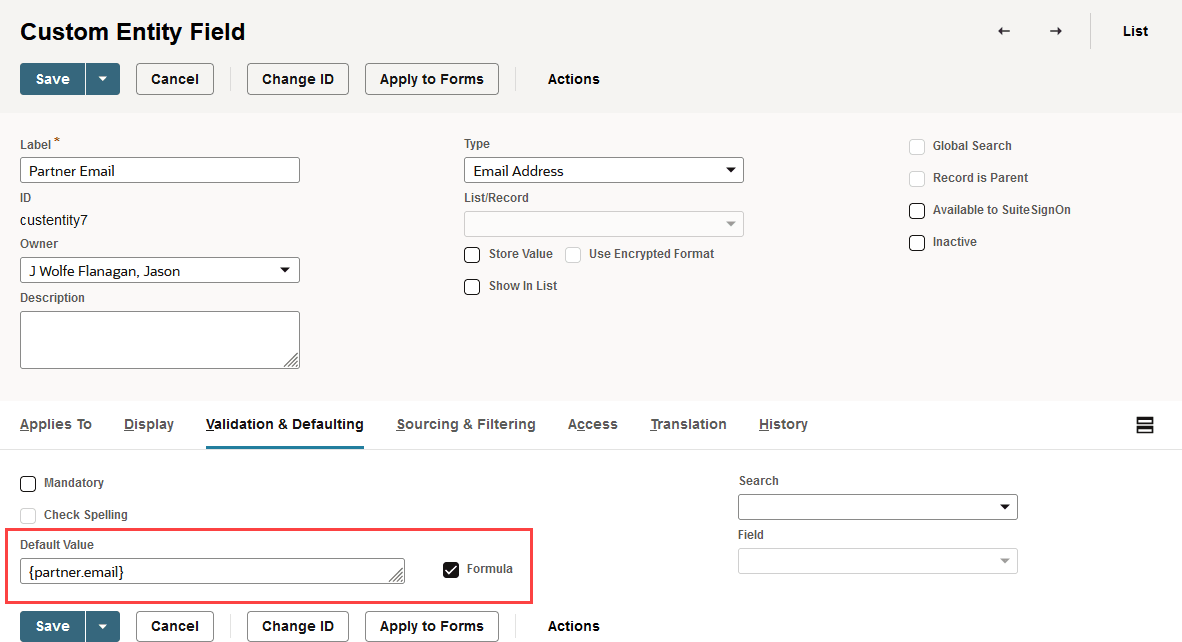
For example, if you wanted to display the partner email address on customer records, the format for the formula would be:

partner is the field ID for the Partner field on the customer record. email is the field ID for the email field on the partner record.
The following example displays the email address on the record for the partner assigned to each customer.

Knowledge of SQL will help you to fully leverage the flexibility and power of SQL functions to define complex formulas, but you can click Set Formula next to the Formula box to add SQL functions or field IDs to your formula.
For more details, refer to SQL Expressions. Also, you can refer to the Working with the SuiteScript Records Browser for tables of NetSuite field IDs.
For information about field types in formulas, see Formulas with Various Field Types.