Creating and Reviewing the Custom Module Script
Copy and paste the following code into your preferred code editor. Save the file as phoneCall.js.
          /**
 * phoneCall.js
 * @NApiVersion 2.1
 * @NModuleScope Public
 */


// This script create a record, so it loads the N/record module.

define (['N/record'] ,

    // The next line marks the beginning of the callback
    // function. The 'record' argument is an object that
    // represents the record module.

    function (record) {

        // The next line marks the beginning of the entry point
        // function.

        function scheduleCall (context) {
            var newPhoneCall = record.create({
                type: record.Type.PHONE_CALL,
                isDynamic: true
            });

            newPhoneCall.setValue({
                fieldId: 'title',
                value: context.phoneCallTitle
            });

            newPhoneCall.setValue({
                fieldId: 'assigned',
                value: context.phoneCallOwner
            });

            newPhoneCall.setText({
                fieldId: 'phone',
                text: context.phoneNumber
            });

            try {
                var newPhoneCallId = newPhoneCall.save();

                log.debug({
                    title: 'Phone call record created successfully',
                    details: 'New phone call record ID:  ' + newPhoneCallId
                });

            } catch (e) {
                log.error({
                    title: e.name,
                    details: e.message
                });
            }
        }

    // Add the return statement that identifies the entry point function.
    return {
        schedule: scheduleCall,
    }
});
Review the Script (Optional)
To learn more about how this script is structured, review the following sections. These images don't show the entire script. For more information, see the comments in Creating and Reviewing the Custom Module Script.
JSDoc Tags
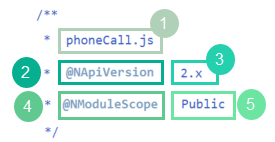
A custom module script isn't required to have JSDoc tags, but you should use them. The following illustration shows this sample's JSDoc block.
|
Callout |
Description |
|---|---|
|
1 |
The file name for this script. You don't have to list this annotation, but it can be useful. Any script that loads this module has to use the file's name. |
|
2 and 3 |
The |
|
4 and 5 |
The |
Entry Point Function
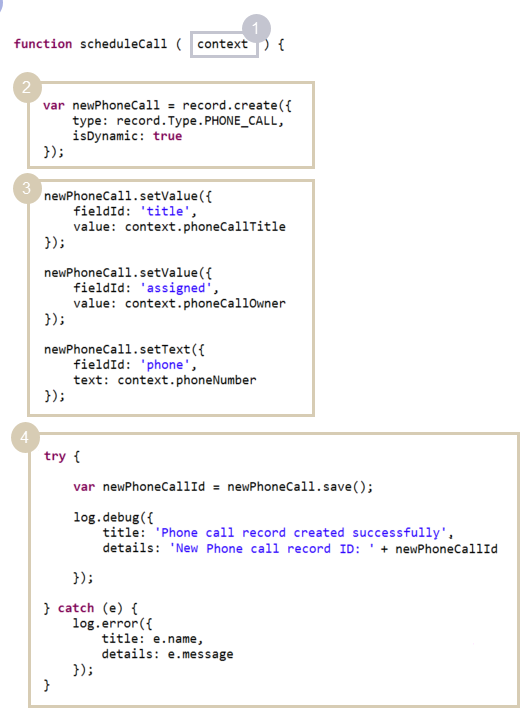
Every custom module script must define an object that the script returns when its entry point is called. This object could be a static value, like a string. However, custom module scripts more commonly return a function, as this script does. Because of how the Return Statement is set up, the entry point function shown in the following diagram runs when the script's schedule entry point runs.
Like an entry point function in a standard script, this function takes a context object as its argument.
|
Callout |
Description |
|---|---|
|
1 |
The context object that's available when the schedule entry point is called. The property values for this object are set in the script that calls this custom module. |
|
2 |
This statement uses the record.create(options) method to create a phone call record. |
|
3 |
These statements set fields on the phone call record. They use the context object's properties, along with the Record.setValue(options) and Record.setText(options) methods. The values of the context object - phoneCallTitle, phoneCallOwner, and phoneCallNumber - must be defined in the script that calls the custom module. |
|
4 |
This try/catch block attempts to save the new phone call record with the Record.save(options) method. If saving fails, the block catches and logs the error that caused the issue. |
Return Statement
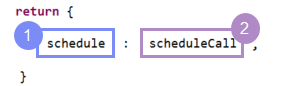
Like an entry point script, the callback function in a custom module script needs a return statement. The return statement must include at least one entry point.
|
Callout |
Description |
|---|---|
|
1 |
The custom module's entry point. As with an entry point script, every custom module script must use at least one entry point. The difference is that an entry point script must use a standard entry point that matches the script type. With a custom module, you create the entry point, so you can use the return statement to name it. |
|
2 |
A reference to an object. This example references a function. This structure is probably the most common. But the entry point could also reference another object, static value. Whatever you reference, it has to be defined in the same script file. |