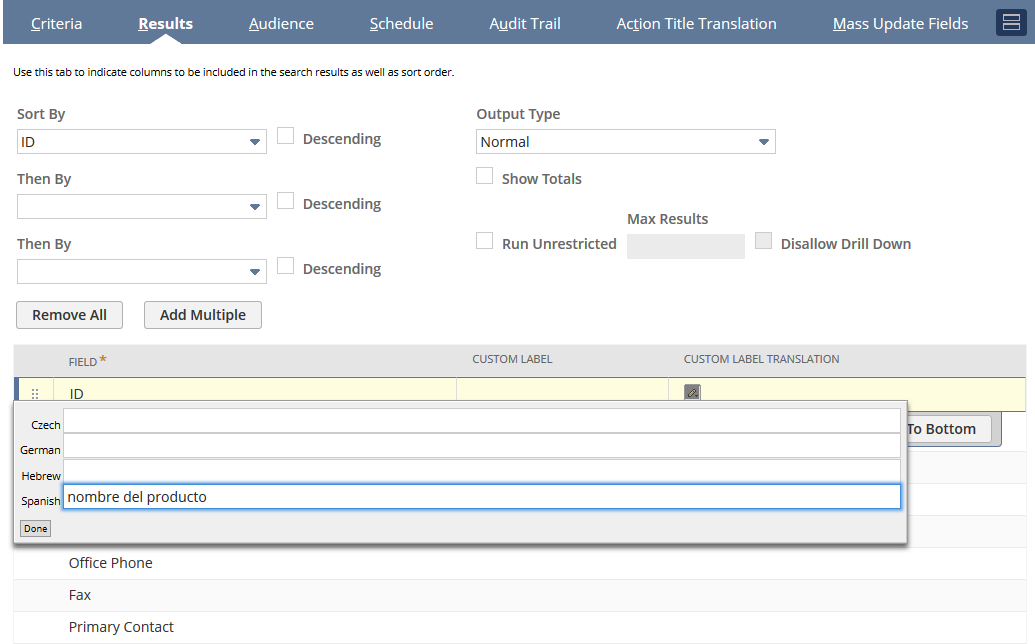
Adding Translations for Mass Update Column Headings
The translated column headings and summary column headings will be displayed in the mass update results.
To add translations for mass update column headings:
-
From the Mass Update definition page, click on the Results subtab.
-
Click the field that you want to edit.
-
Click the Custom Label Translation column.
-
Enter the translated text for each language.
-
Click Done.
-
Click the Summary Label Translation column.
-
Enter the translated text for each language.
-
Click Done.
-
Repeat steps 2-8 for every field that requires translating.
-
Click Save.
Note:If the Multi-Language feature is enabled, the Results subtab of the Mass Update definition page will display two additional columns - Custom Label Translation and Summary Label Translation.