FSM Case Invoice Content Rules
For an overview of invoice sources, button availability, and invoice creation, see FSM Case Invoicing.
For Generate Invoice, an eligible line is a line available on the invoice FSM prepares that also meets FSM's configured line-selection rules. Eligibility is checked in two stages:
-
NetSuite makes lines available. NetSuite prepares the invoice for its customer or project using its billing rules and enabled features. Time and expenses must be available on the invoice's Billable Time and Billable Expenses subtabs. Marking a charge Billable alone doesn't establish that it is available to this invoice. Time must meet the account's approval requirements where those requirements are enabled. For native billing requirements, see Billing Time to Customers, Approving or Rejecting a Time Transaction, and Billing Expenses to Customers.
-
FSM selects from those lines. FSM counts item lines already on the prepared invoice and applies its configured selection rules to the available time and expense lines. With the default configuration, time and expenses must also be linked to a task associated with the invoice's case.
The following table lists the lines that qualify with the default configuration.
|
Line Type |
Qualifying Lines |
|---|---|
|
Items |
Item lines present on the invoice prepared from the eligible sales order selected in Transaction. FSM doesn't require these item lines to have a task link. |
|
Time |
Lines available on the prepared invoice's Billable Time subtab and linked to tasks associated with the invoice's case. |
|
Expenses |
Lines available on the prepared invoice's Billable Expenses subtab and linked to tasks associated with the invoice's case. |
Both invoice source paths use the same configured time and expense selection. Under the default configuration, FSM identifies qualifying tasks from the case linked to the initialized invoice. An invoice transformed from a sales order therefore needs the relevant case link for task-based time and expense selection. Without that link, FSM doesn't select time or expense lines through these rules. Item lines can still qualify the invoice.
The default selects time and expenses linked to tasks associated with the initialized invoice's case. Broader configuration applies all available billable time and expenses and can include other work for the customer or project. Selected lines affect button eligibility and invoice content.
The following diagram compares the default task-based selection with the broader configurable scope:
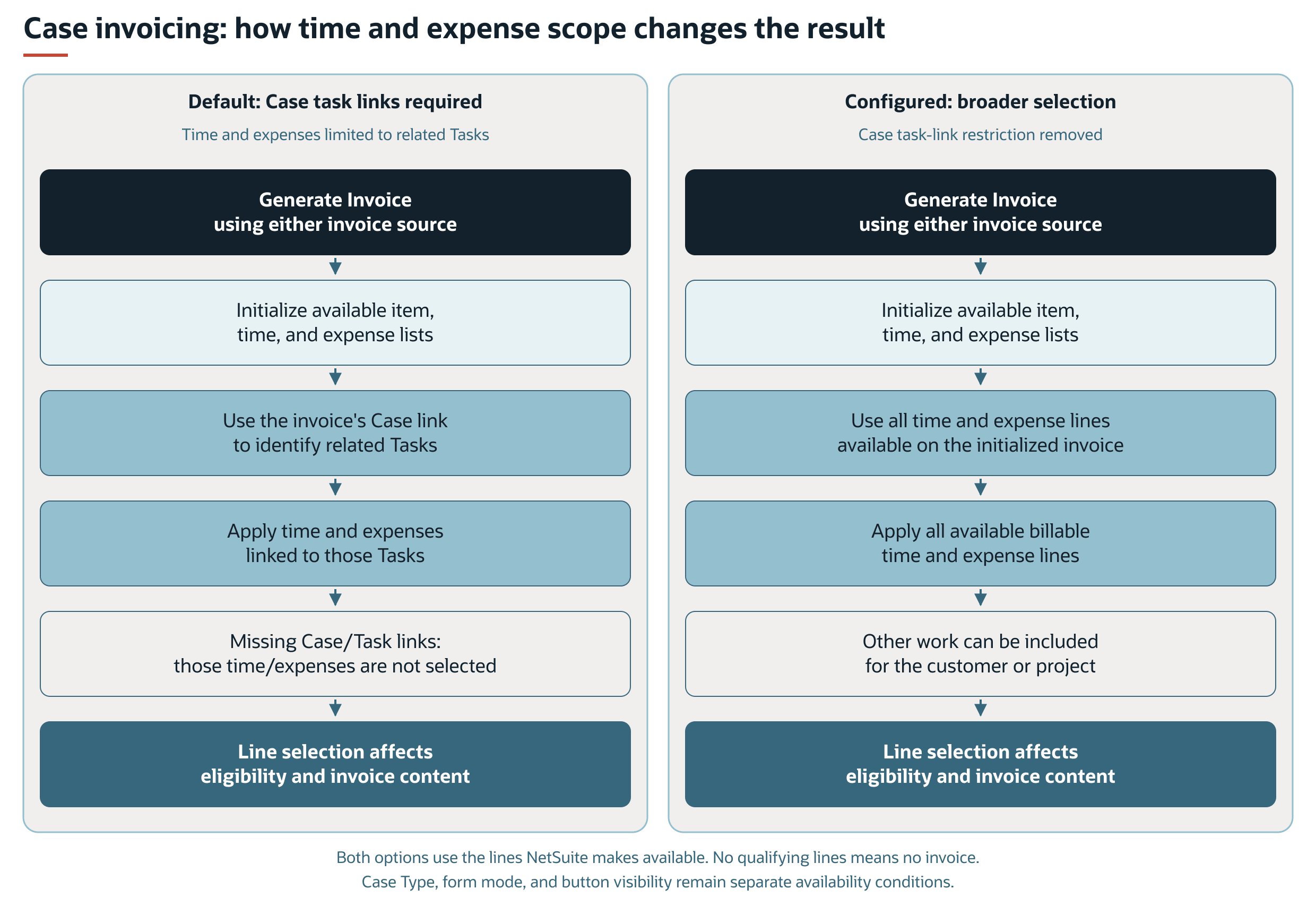
A case link alone doesn't qualify a time or expense line for selection under the default configuration. FSM doesn't save the invoice if it finds no item lines or qualifying time or expense lines.
This check uses the number of qualifying lines, rather than a positive unbilled amount. Passing this check doesn't guarantee that NetSuite accepts the invoice when it is saved.
Why Unbilled Amounts Can Differ
The case's unbilled amount fields report charges using separate calculation rules. These fields don't identify the exact lines that Generate Invoice selects. The following table compares examples of unbilled amount calculations and default case invoice selection.
|
Charge |
Unbilled Amount Calculation |
Default Case Invoice Selection |
|---|---|---|
|
Approved billable time linked directly to the case, without a task link. |
Can contribute to Unbilled Time. |
Excluded because the required task link is missing, even if NetSuite makes the time available on the invoice. |
|
A billable expense report line on a report linked to the case, without a task link for that expense. |
Can contribute to Unbilled Expenses. |
Excluded because the required task link is missing, even if NetSuite makes the expense available on the invoice. |
|
Unbilled amounts on a sales order linked to the case but not selected in Transaction. |
Can contribute to Unbilled Sales Orders. |
That order doesn't supply the invoice's item lines. FSM uses the selected eligible sales order or creates the invoice from case details. |
A positive unbilled total therefore doesn't guarantee that Generate Invoice appears or that the invoice includes every reported charge. FSM Case Unbilled Amount Calculation describes the amounts reported by these fields.