Location Prefix on a Location Record
This topic describes how to configure a location prefix on the location record so that autogenerated transaction numbers reflect specific location identifiers. For an overview and related examples, see Autogenerated Transaction Number with Transaction Type and Location Prefixes Examples.
You set up the location prefix on the location record.
If you're using a custom entry form, make sure it shows the Location field. For help with custom forms, see Adding Custom Forms for a Custom Transaction Type.
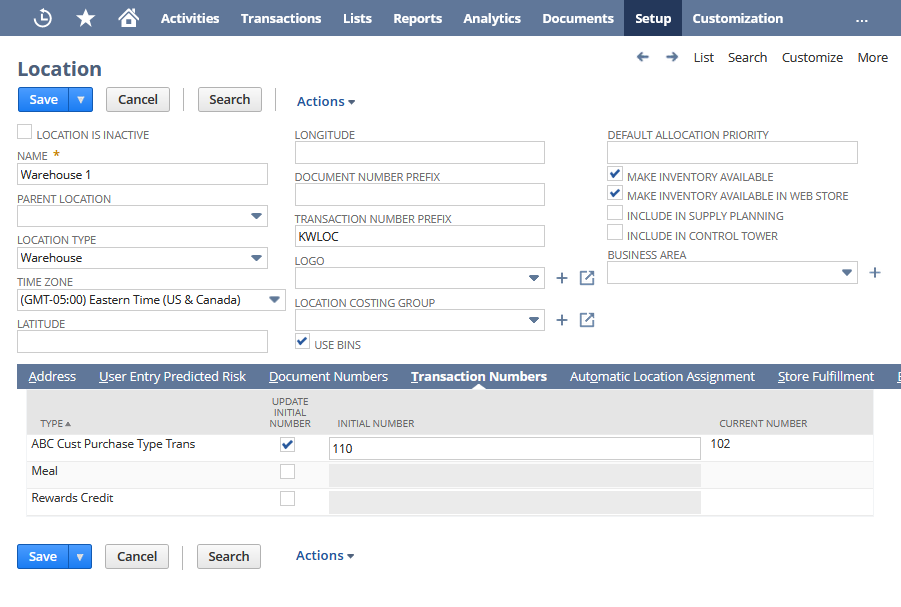
On the location record in the following example:
-
The Transaction Number Prefix has a location prefix of KWLOC. prefix is added to the transaction numbers of all instances that are associated with this location. In the generated transaction number, this prefix follows the location (or subsidiary) prefix if one is used.
-
The Transaction Numbers subtab, the Update Initial Number box is checked for the transaction type, and an initial number is defined in the Initial Number field. This setting is optional and defines the initial number that should be used for the first transaction instance that uses the location. If you don't enter a value, NetSuite (in most cases) starts the sequence at 1. If a value is entered here, it overrides the initial number on the custom transaction type record, if one is defined.
For more information, see Defining Numbering Preferences for Subsidiaries and Locations.