Transaction Type Prefix on a Custom Transaction Type Record
This topic explains how to set up a transaction type prefix for custom transaction types, enabling you to prepend an identifier to autogenerated transaction numbers. For an overview and related examples, see Autogenerated Transaction Number with Transaction Type and Location Prefixes Examples.
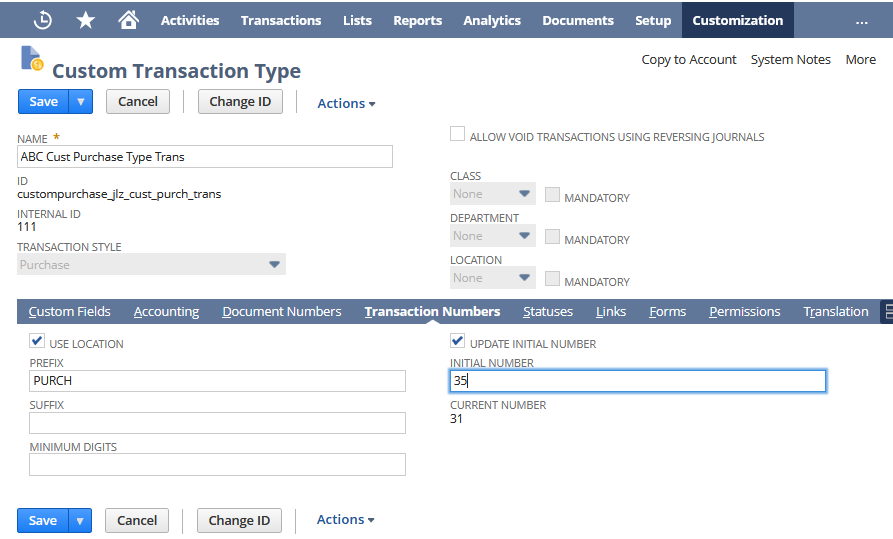
You set up the transaction type prefix on the custom transaction type record. In the following example, on the Transaction Number sublist:
-
The Use Location box is checked. With this box checked, the resulting transaction number includes the location prefix if one is defined on the location record.
-
The Prefix field has a transaction type prefix of PURCH. This prefix is added to the transaction numbers of all instances of this transaction type. In the generated transaction number, this prefix precedes the location (or subsidiary) prefix if one is used.
-
The Update Initial Number box is checked, and an initial number is defined in the Initial Number field. This setting is optional and defines the number that should be used for the first transaction instance. If you don't enter a value, NetSuite (in most cases) starts the sequence at 1. This initial number is used for transactions that don't use a location (or subsidiary) prefix. If a location (or subsidiary) prefix is used, this number is ignored and the initial number setting on the location (or subsidiary) record is used instead.
For more information, see Creating a Custom Transaction Type.