Analyze Team Composition with AI Assistance
The Employment Team Analyst Agent is a conversational assistant that helps managers and HR specialists quickly understand the structure and distribution of their teams. It provides fast, natural-language insights without requiring users to navigate multiple UI pages or build reports manually.
The agent aggregates both direct and indirect reports and presents the information in an intuitive, easy-to-understand format. It supports insights into team size, workforce distribution, and reporting relationships to help users make better, data-driven decisions.
The agent works in the context of a single employee. Users can analyse their own team by default or specify another employee whose team they want to review. The analysis is always performed for one employee’s team at a time to ensure accuracy and clarity.
The Team Analyst Agent complements the existing team management UI. It focuses on delivering quick, guided insights while the UI remains available for detailed exploration or actions. The agent provides read-only insights and does not make changes to employee or assignment data.
Key insights that the agent can provide include:
- Count of total reports, including both direct and indirect reports
- Count of direct reports only
- Breakdown of the team by job, location, department, grade, position, and country
- Insights by reporting relationship type, such as line reports and project reports
- Clear, natural-language summaries that highlight team composition and distribution patterns
This makes it easier for managers and HR specialists to quickly interpret team structures, support workforce planning, and respond to leadership queries without manual analysis or running separate reports.
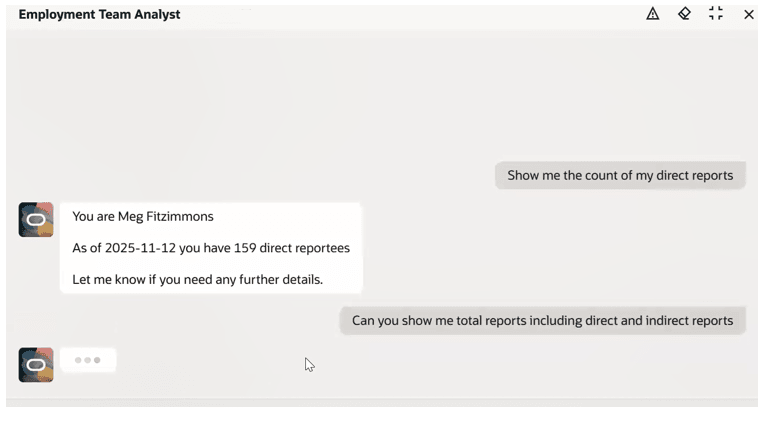
Displays direct reports and lets the user ask for total reports
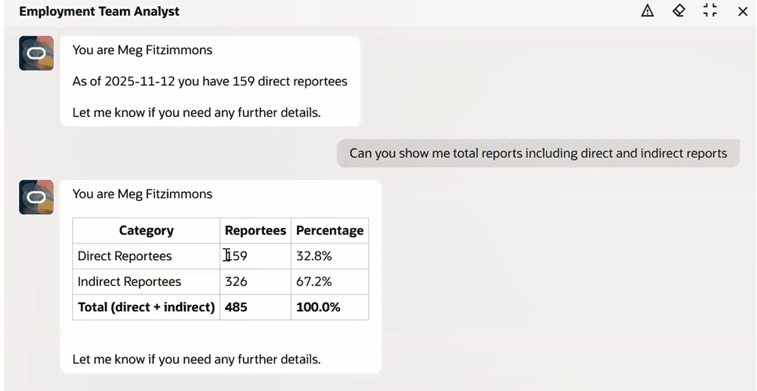
Shows the breakdown of direct and indirect reports
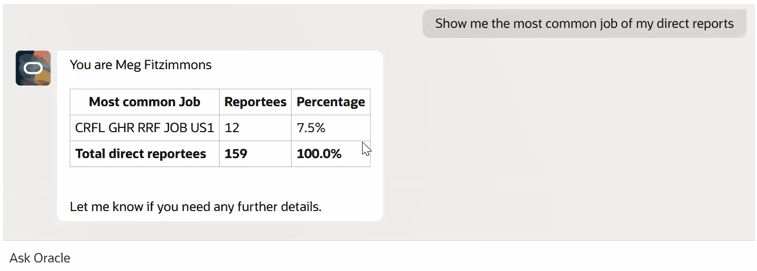
Displays the top job held by direct reports
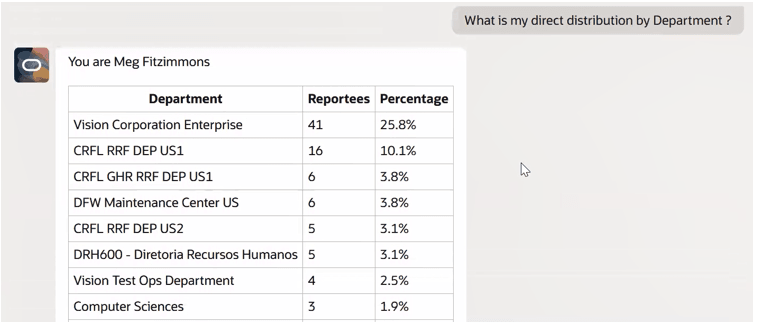
Shows department-wise breakdown of direct reports
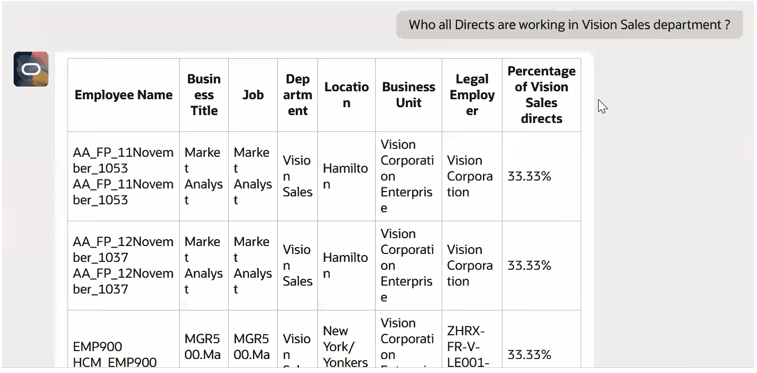
List of direct reports in the Vision Sales department
The Team Analyst Agent enables managers and HR specialists to access team insights instantly by transforming complex organizational data into simple, conversational summaries. It improves clarity, reduces manual analysis, and provides immediate visibility into how teams are structured and distributed. This creates a smarter, more intuitive way to understand workforce dynamics, supporting better planning and more informed business decisions.
Steps to enable and configure
- Your environment must have certain necessary configurations. Ask your help desk to contact Oracle Support, who can verify what your environment has and address any gaps. For more information, see FAQ2521 on My Oracle Cloud Support.
- Set the Enable Security Console External Application Integration (ORA_ASE_SAS_INTEGRATION_ENABLED) profile option to Yes and enable permission groups for the appropriate roles. See Access Requirements for AI Agent Studio.
To learn how to set up AI agents, see Create AI Agents Using Preconfigured Agent Team Templates.
Key resources
Access requirements
The agents you can view depend on the roles and privileges assigned to you. To access this agent, your role must be explicitly granted access to it by an AI Studio Administrator. See How can I give users access to AI agents and Access Requirements for AI Agent Studio.