Update Employee Marital Status with AI Assistance
The Person Legislative Information Assistant - AI Agent allows employees to update their marital status. Built on Oracle’s AI Agent framework and powered by advanced large language models (LLMs), the agent interprets natural language questions and delivers accurate, role-based information.
Agents created from this template will respond to questions about an employee's own marital status. With the Person Legislative Information Assistant, an employee can:
- View their current and future-dated marital status details.
- Update their marital status for a current or future date.
The agent includes these features:
- The employee is presented with the choices for marital status that are valid for their legislation. The agent uses the lookup MAR_STATUS to find the valid values.
- For example Civil Union is a valid marital status in the United States, but Civil Partnership isn't. For U.S. employees, the agent will display the former as a choice, but not the latter.
- To achieve this, the agent retrieves the configuration from the Common Lookup table and shows only the values appropriate for the legislation (country).
- If the employee has marital status data for more than one legislation, the agent will prompt the user for the country before updating.
- The employee can only update their marital status with a current or future date.This aligns with the restrictions in the Personal Details page for the employee role.
In the following example, we created an AI Agent called Person Legislative Information 26A from the preconfigured template. The employee has asked to update their marital status. The agent displays the list of the employee's marital status values in a table form, and asks the employee to specify the legislation (country) to be updated. The employee chooses United States and the agent then presents the user with a list of valid values for marital status in the United States legislation. The agent then prompts the user to pick one of the values, and to specify the effective date of the change. The agent validates the input and completes the update.
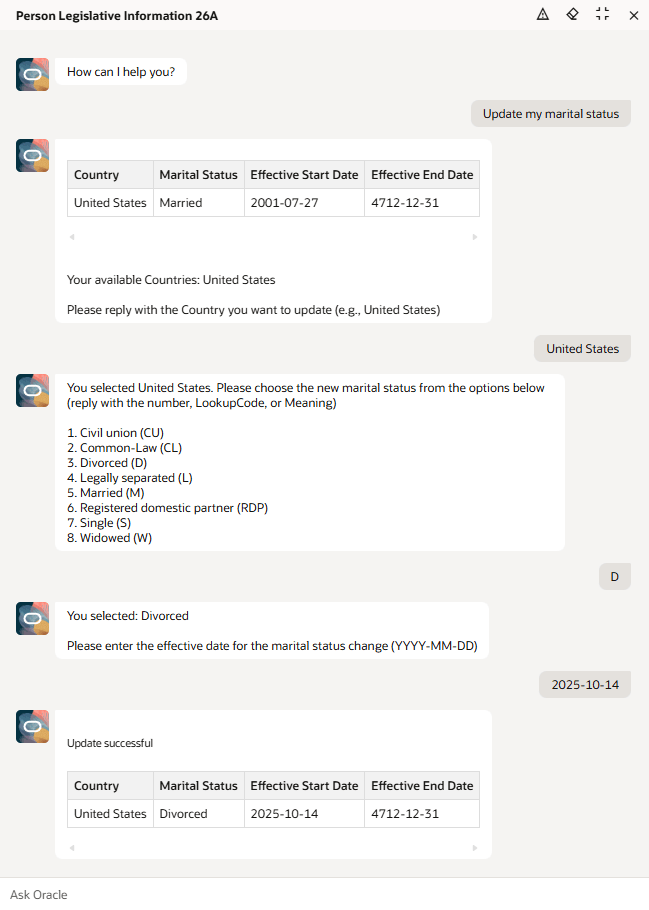
Legislative Information Assistant - AI Agent
Business benefit: The agent gives an enhanced user experience, as employees can easily update their marital status.
Steps to enable and configure
- Your environment must have certain necessary configurations. Ask your help desk to contact Oracle Support, who can verify what your environment has and address any gaps. For more information, see FAQ2521 on My Oracle Cloud Support.
- Set the Enable Security Console External Application Integration (ORA_ASE_SAS_INTEGRATION_ENABLED) profile option to Yes and enable permission groups for the appropriate roles. See Access Requirements for AI Agent Studio.
- The Personal Legislative Information Assistant is a preconfigured template. You need to create your own agent using the preconfigured template.
- To learn how to set up AI agents, see Create AI Agents Using Preconfigured Agent Team Templates.
Tips and considerations
Controlling what information the agent can return
- What's honored: Role-based data security (RBAC). Users only see the data that their role permits.
- What’s not honored: Localization rules and your own business rules in Visual Builder Studio aren't enforced by the Agent.
- Examples
- If you created a rule that hides the marital status from the employee, that's not enforced by the agent.
- If you created a rule that prevents the employee from updating their marital status, that's not enforced by the agent.
- Options to prevent unwanted fields from appearing
- Since this agent is only designed to view or update marital status, don't deploy the agent if you don't want employees to take those actions.
What's not included
The agent, tool, and business object descriptions include references to other attributes besides marital status. For example: gender, legislative DFFs. Those attributes aren't included in this agent.
In this release, the following limitations apply:
- Approvals. The agent template includes a Person Approvals business object tool, but that business object isn't functional. If approvals are enabled, the approval rules are ignored in this agent.
- Pending Updates.
- When retrieving information, any updates that are pending approval aren't retrieved by the agent. In other words, if an update was performed in the UI and it's not yet approved, that data isn't retrieved by the agent.
- If the agent performs an update while there's pending information, the update from the agent will go through. If a user later approves the pending update, it will fail.
- Attributes other than marital status aren't included. In this version of the template, the Manage Person Demographic Info business object only includes a function to update the marital status. It doesn't include functions for any other attribute. This strictly limits the scope of what the agent can update.
Key resources
Access requirements
The agents you can view depend on the roles and privileges assigned to you. To access this agent, your role must be explicitly granted access to it by an AI Studio Administrator. See How can I give users access to AI agents, and Access Requirements for AI Agent Studio.