Redwood: Prevent Goal Evaluation If The Goal Setting Period Isn't Finished
You can prevent performance goals from being evaluated in performance documents until the goal setting period defined in Goal Management ends.
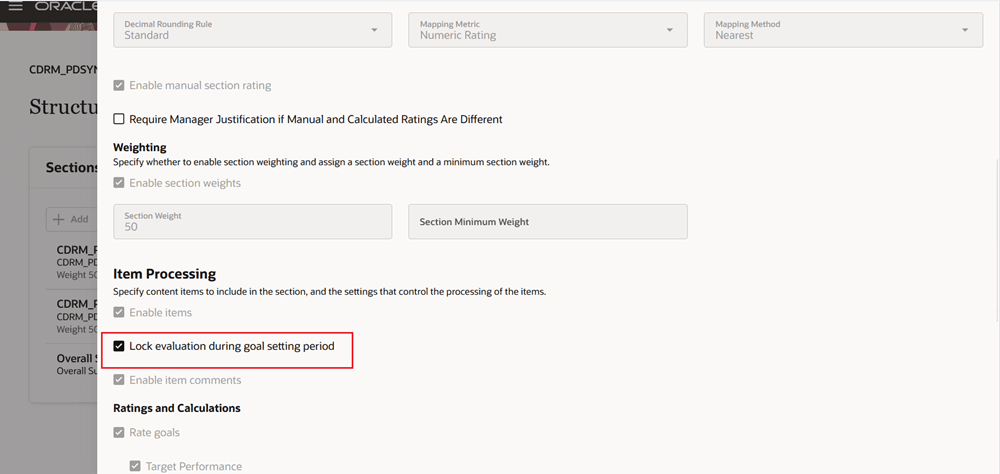
Option to Lock Evaluation During Goal Setting Period
HR specialists can enable the Lock evaluation during goal setting period check box in the performance goals section. When the goals section is used in a performance template, the configuration prevents the goals from being evaluated in the performance document
As an employee, manager, or participant when you evaluate performance goals if the goal plan used to populate the goals section is within the goal setting dates a message displays indicating that the goals can’t be evaluated. The ratings and comments for the performance goals will be read-only with any existing ratings already selected or added.
Business Benefit: This feature enables you to provide a holistic approach to goal assessment.
Steps to enable and configure
For details, see How do I prevent goals from being evaluated if the goal setting period hasn’t yet finished?
You need to configure the profile options for Redwood performance documents as indicated in the following table.
| Profile Option Code | Description | Value |
|---|---|---|
|
|
Enable VBCS Progressive Web Application User Interface | Y |
| ORA_HRA_PERFORMANCE_DOCUMENTS_AND_GOALS_REDWOOD_ENABLED | Enable performance documents and employee performance and development goals to display in Redwood. | Yes |
|
ORA_HRA_SETUP_REDWOOD_ENABLED |
Enable Redwood setup pages for Performance Management. |
Yes |
Tips and considerations
- The Lock evaluation during goal setting period check box is only editable if Rate goals or Enable item comments is enabled in the performance template configuration.
- The evaluation can still be submitted if the goal evaluation is locked unless goal evaluation is required in which case the evaluation can't be submitted until they have rated or commented on the required items when the evaluation lock is removed.
Key resources
- For more information, see:
- For a listing of all profile options for the recreated pages across HCM, see the following document in My Oracle Support: