Making System Saved Search Available in Team Journeys
You can now allow users to set a saved search as the default system search on the Team Journeys page. Earlier, this functionality was only available on the Organization Journeys page.
Here’s an example of an administrator creating a saved search and setting it as the default system search on the Team Journeys page.
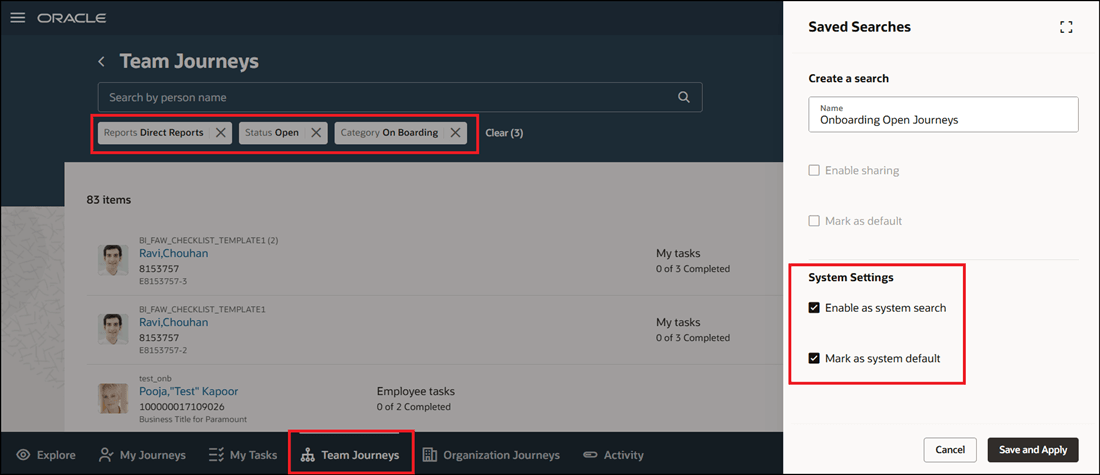
Saved Search on Team Journeys Page
When a line manager opens Journeys from the My Team tab, the saved search is automatically applied on the Team Journeys tab.
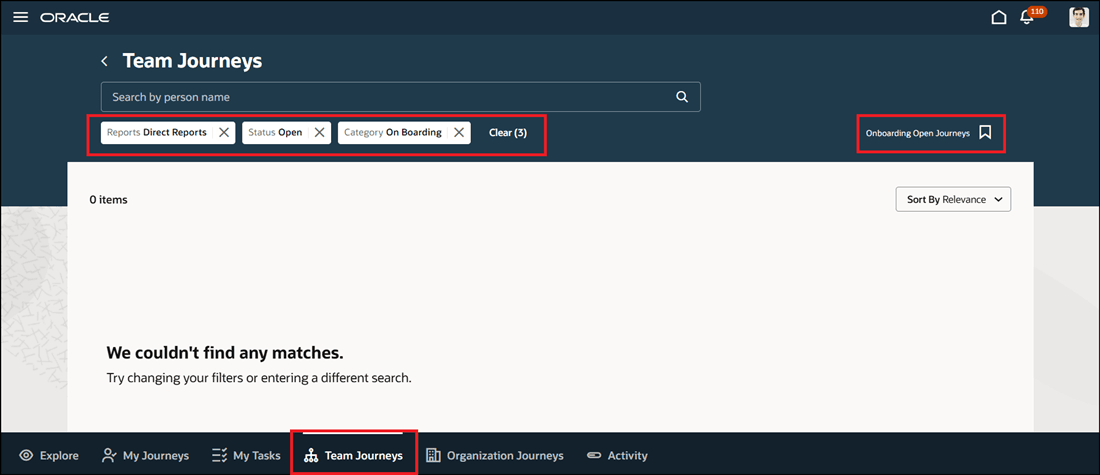
Default System Search Applied on Team Journeys Page
This feature allows users to configure a saved search as the default system search and share them with other users.
Steps to enable and configure
The Team Journeys tab is auto enabled when you enable Oracle Search for Journeys. For more information about enabling Oracle Search for Journeys, refer to the Oracle Search-Based Journeys feature in the 24B Global Human Resources What's New.
Tips and considerations
- This feature is only available on Redwood pages. Your saved searches on Responsive pages won't carry forward to the Redwood Experience.
Key resources
For more information, see these resources:
-
Implementing and Using Journeys guide on Oracle Help Center.
-
Organization Journeys Tab for Professional Users feature in the 24B Global Human Resources What's New.
Access requirements
To configure system saved searches which other users can access, you need to be granted the HRC_MANAGE_SYSTEM_SEARCHES_PRIV privilege.