Person Data Assistant Workflow Agent Replacing Personal Information Assistant with Expanded Data Support
The Person Data Assistant AI Agent introduces a new workflow-based design, replacing the previous Personal Information Assistant as the recommended template for new development. This update improves how person-related information is managed by organizing capabilities into focused components.
In this release, the agent supports creating, updating, deleting, and retrieving a user’s own data and data for others for these objects, with supported operations varying by object:
- Name
- National Identifier
- Ethnicity
Flexfields aren't supported for create, update or delete but you can ask the agent to retrieve the values.
In addition, the Person Data Assistant workflow agent leverages the existing Personal Information Assistant (Supervisor agent) to support:
- Searching by person number, display name, or email.
- Create and update capabilities that were introduced in 26B, for demographic, biographical, phone, and email objects.
- Retrieving data and providing deep links for objects not yet supported for update.
In this initial release, there are a few limitations:
- Updates for supported data areas (Name, National Identifier, Ethnicity) are typically handled directly within the conversation when a person number is provided. Requests using name or email will likely route through the Personal Information Assistant (Supervisor agent) for worker search. In these cases, the Supervisor agent doesn't perform updates directly and instead provides a deep link to complete the update in the application.
- The agent will handle requests for one person, and one object at a time.
Here are a few points to note:
- If you're currently using agents built from the Personal Information Assistant (Supervisor agent) template, those agents will continue to function. However, as the template will no longer be enhanced, the Person Data Assistant is recommended for all new development.
- Person Data Assistant is a new, separate workflow agent that extends person data management with workflow-based child agents for selected data areas, while preserving support for previously delivered functionality through the Supervisor agent until those areas are transitioned to workflow-based components.
Example
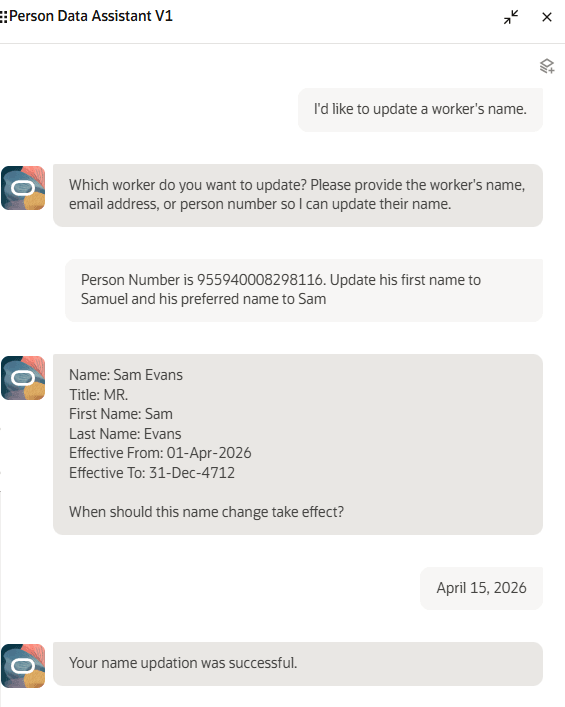
In the following example, let's say you created an AI Agent called Person Data Assistant V1 from the preconfigured template.
The user starts by asking to update a worker's name. The agent responds by asking for more identifying information for the worker, either name, email address or phone number. The user provides the person number and asks to change the first name to Samuel and the preferred name to Sam. The agent displays the existing name details for the worker, and asks the user to provide the effective date of the change. The user replies with the date of April 15, 2026. The agent updates the name details and displays a confirmation message.
Person Data Assistant AI Agent
The new agent provides enhancements to person data management through a workflow-based approach.
Steps to enable and configure
-
Your environment must have certain necessary configurations. Ask your help desk to contact Oracle Support, who can verify what your environment has and address any gaps. For more information, see FAQ2521 on My Oracle Cloud Support.
-
Set the Enable Security Console External Application Integration (ORA_ASE_SAS_INTEGRATION_ENABLED) profile option to Yes and enable permission groups for the appropriate roles. See Access Requirements for AI Agent Studio.
-
The Person Data Assistant is a preconfigured template. You need to create your own agent using the preconfigured template.
-
To learn how to set up AI agents, see Create AI Agents Using Preconfigured Agent Team Templates.
-
Tips and considerations
Token limits (which control how much content can be processed at once) vary by the model you're using, and apply to both the current request and prior conversation context. If these combined inputs are too large, responses may be truncated or fail. Consider breaking large requests into smaller parts or starting a new conversation if needed.
The Person Data Assistant (Workflow agent) uses child workflow agents to manage supported data areas and invokes the Personal Information Assistant (Supervisor agent) for other capabilities.
- Child workflow agents (supporting create, update, and delete, where supported by the object):
- Person Name Data Assistant (Name)
- Person National Identifier Data Assistant (National Identifiers)
- Person Ethnicity Data Assistant (Ethnicity)
- Objects handled by child supervisor agent, Personal Information Assistant:
- Create, update, and delete supported for:
- Demographic Info (excluding Religion and Ethnicity)
- Phone
- Update supported for:
- Biographical Info
- Retrieve supported for:
- Religion
- Address
- Citizenship
- Driver’s License
- Passport
- Visas and Permits
- Family and Emergency Contacts
- Create, update, and delete supported for:
Worker search
- The agent doesn’t return workers whose hire date is in the future.
- The agent doesn’t support advanced worker-search filtering, such as requests to find workers by location.
Controlling what information the agent can return, create, update, or delete
- What's honored: Role-based data security (RBAC). Users only see the data that their role permits.
- What's not honored:
- Localization rules and your own business rules in Visual Builder Studio aren't enforced by the agent.
- Differences built into the "Me" versus "My Client Groups" versions of the page, such as those which exclude Add or Edit buttons from page sections.
- Examples
- Religion: Built-in templates hide it in some countries, but the agent can still return the value.
- Date of Birth: You may have added a business rule to hide it for the employee role, but the agent may return it if RBAC allows access.
- Demographic Info: The "Me" version of the Personal Details page doesn't include an add button. But the security privileges allow the employee role to add demographic info records, so the agent will do so as well.
- Biographical Info: The "Me" version of the Personal Details page doesn't include an edit button. But the security privileges allow the employee role to update biographical info, so the agent will do so as well.
- Options to prevent unwanted fields from appearing
- Prompt guardrails: Update the prompt or topic to include: "Don't display [fields]. If asked, say it's restricted."
- Scope data: Create a custom agent that excludes the business object or use a trimmed-down version of the business object without restricted attributes.
Date logic
- For viewing or editing a user's own data, the agent uses session date as the effective date, even if another date is provided. The user can update only current and future records, not historical records.
- For viewing and editing another person's data, an effective date can be specified. If omitted, the agent uses the session date as the effective date. The user can update records that are current or future relative to the specified effective date.
Object details
-
Name
- Operations supported: read, update, delete.
- Both global and local name can be updated by the agent.
- If local name is set to required in the Manage Name Styles setup page, the agent won't update the name unless you provide the local name in your request.
- Updating name and changing name style when a worker has multiple work relationships isn't supported.
-
National Identifier
- Operations supported: read, create, update, delete.
- National Identifier won't be masked in agent responses, even though it's masked in the UI.
- The “Me” Personal Details page hides the Add and Edit action, but the agent allows the employee to update their own national identifiers.
-
Ethnicity
- Operations supported: read, create, update, delete.
- If the agent is asked to add ethnicity data for a country where there isn't already a legislative record present, the agent creates the record as a new demographic row.
- The “Me” Personal Details page hides the Add action for Demographic info, but the agent allows the employee to add a new record.
- For the United States, multiple ethnicities are allowed. For other countries, if you specify more than one, the agent ignores all but the first value.
- The Personal Details page includes business rules which allow you to hide the ethnicity fields for certain countries. The agent allows viewing, creating, updating, and deleting for all countries.
Approvals
- When approvals are enabled, changes are routed for approval and take effect only after approval.
- When updates are pending approval:
- The agent won’t allow a new change. Person data pages such as Personal Details, Identification Info, and Contact Info, support edit-by-initiator. But the agent doesn't. Instead, it provides a deep link to modify the in-flight transaction in the UI.
- When retrieving data from the Demographic Info, Biographical Info, Email, Phone, Name, National Identifier, and Ethnicity, the agent will retrieve values that are pending approval and identifies them as pending. For other objects including Religion, pending values aren't returned.
- Comments and attachments aren't supported via the agent for approval-enabled updates. If needed, ask the agent for the page link and add them in the application.
- Approval notifications aren't viewable from the agent.
Key resources
Access requirements
The agents you can view depend on the roles and privileges assigned to you. To access this agent, your role must be explicitly granted access to it by an AI Studio Administrator.
See How can I give users access to AI agents, and Access Requirements for AI Agent Studio.
The seeded Human Resource Specialist role includes the duty role required to use the Person Data Assistant. To grant access to users with other roles, such as Employee, Line Manager, or a custom Human Resource Specialist role, add this duty role to the applicable role:
- Person Data Assistant Access Duty (ORA_PER_PERSON_DATA_ASSISTANT_ACCESS_DUTY)
To add the duty role, edit the target role and go to the Role Hierarchy page. On the Roles and Permission Groups tab, add the Person Data Assistant Access Duty role to the role hierarchy, then save your changes.
For line managers or custom roles, the role needs to also include Use REST Service - Worker Searches V2. To add this privilege, edit the target role and go to the Role Hierarchy page. On the Roles and Privileges tab, add Use REST Service - Worker Searches V2 to the role hierarchy, then save your changes.