Document Records Integration for Redwood Family and Emergency Contacts Page
The Redwood Family and Emergency Contacts page has been integrated with the Document Records attachment functionality. By default, the Document Records region isn't displayed. But you can display it by associating a document type using the Set Document Type for a Family or Emergency Contact page property in VB Studio. The following image shows a sample business rule for displaying the Document Records integration on the Family and Emergency Contacts page. The page property is set in the My contacts section of the Family and Emergency Contacts page.
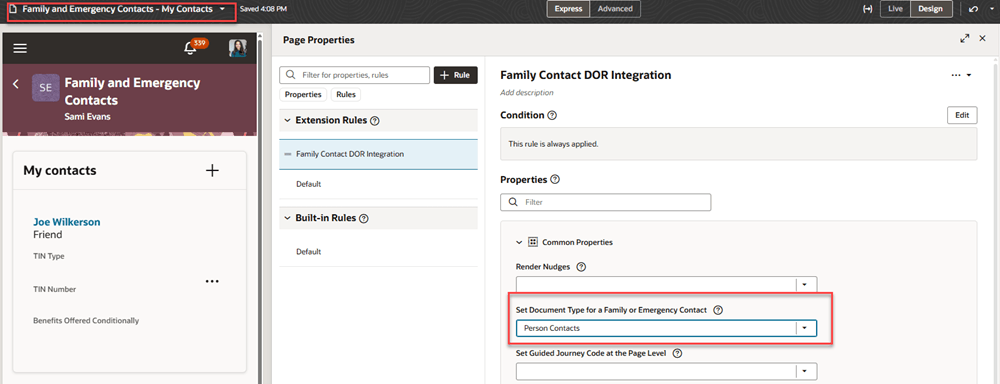
VB Studio page property for Document Records integration to Family and Emergency Contacts
The integration is available for the employee page (Me) and the elevated user page (My Client Groups). For the elevated user, the Family and Emergency Contacts page already includes an action on the 3-dots menu called Document Records, as shown in the following image.
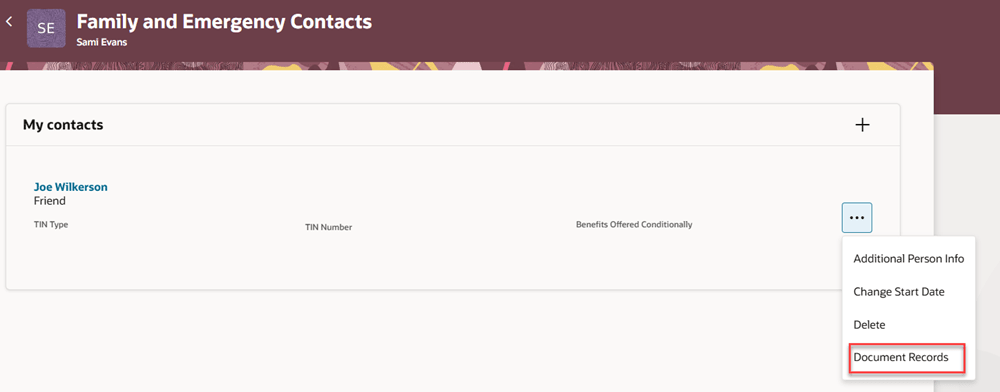
Document Records menu item in the My contacts section
Prior to this update, the Document Records action navigated the user to the standalone Document Records page. If you leave the Set Document Type for a Family or Emergency Contact page property blank, the Document Records action will continue to work this way. However, when you set a value for the new page property, the Document Records action will no longer navigate to the standalone Document Records page. Instead, it will open up a panel drawer where you can view the associated document record and its attachments.
The following image shows an example of the new integration. Two contacts are listed in the My contacts section of the Family and Emergency Contacts page. Each contact has a 3-dots menu on the right, as shown in the previous image. When the user clicks on the Document Records menu item in the 3-dots menu, a panel drawer will show the document record attachments associated with that contact. Users can download and preview the attachments from the panel drawer.
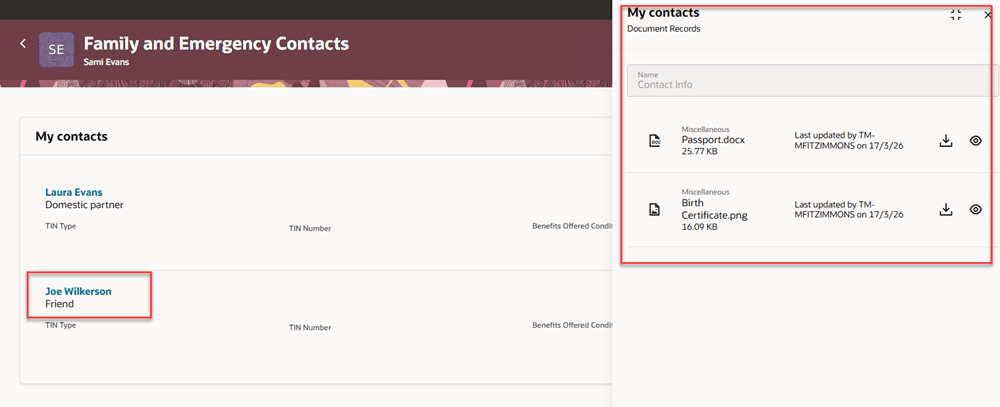
My Contacts section with panel drawer showing the document records for a contact
For a user who doesn't have the 3-dots menu, such as an employee viewing his own contacts, there will be a new icon to view the Document Records as shown in the following image.
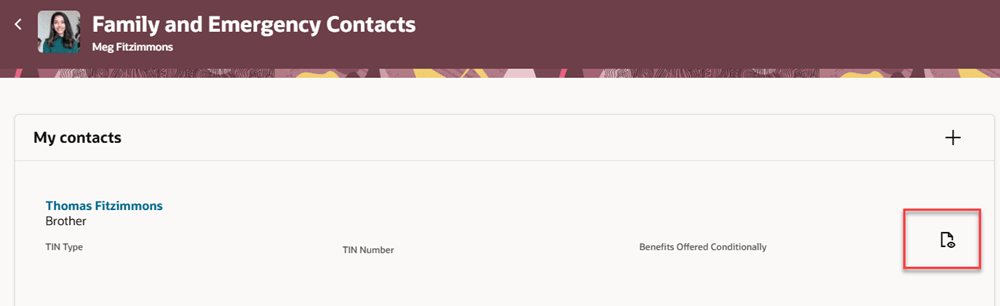
My Contacts section for employee viewing their own contacts
You manage the document record attachments when you add or edit a contact. In the following image, a new contact is being added using the Create a New Contact option. The Document Records region displays at the bottom of the page, when you've configured the Set Document Type for a Family or Emergency Contact page property. The Document Records region is available only for creating a new contact. It's not available when you're selecting an existing person using the Select a Person as a Contact option.
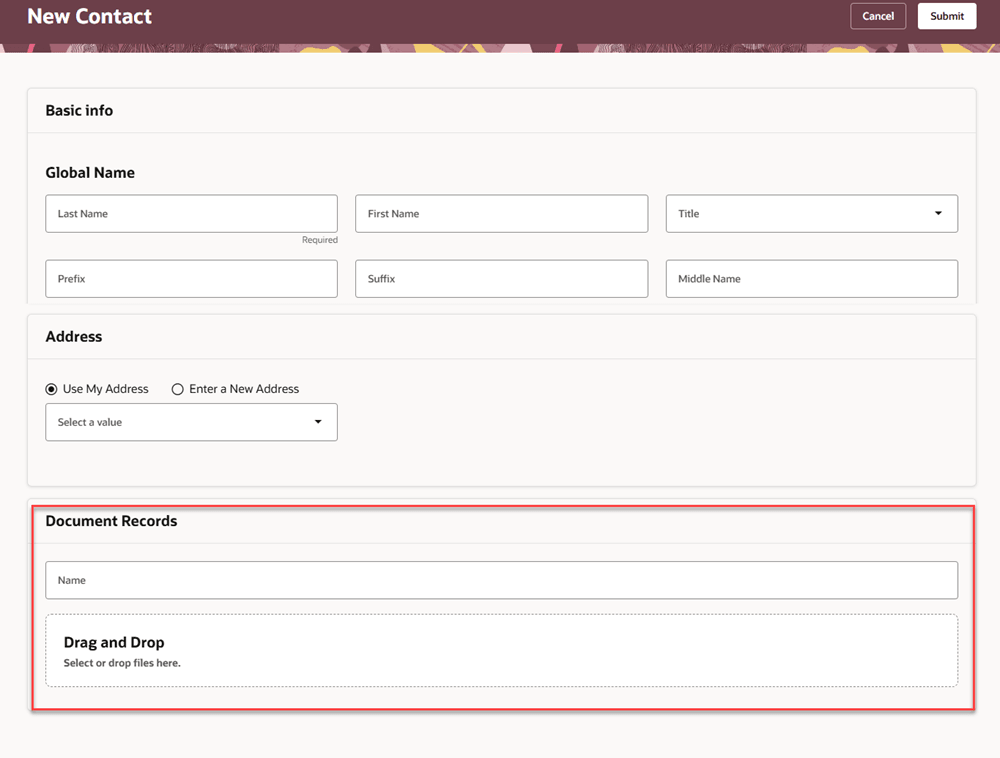
Document Records region for adding attachments when creating a new contact
After you've added the document record attachments, you can see them at the bottom of the page where you view the contact details. In the following image, the user has selected the name of a contact. The page displays the information about the contact, including relationship attributes, name, demographic info, biographical info, phone, email, other communication accounts, and address information. At the end of the page is the Document Records region, which shows the associated attachments. This region is displayed if you've configured the Set Document Type for a Family or Emergency Contact page property.
You can add and remove attachments in this region. However, any changes you make to attachments in the Document Records region when editing a contact aren't routed through approvals.
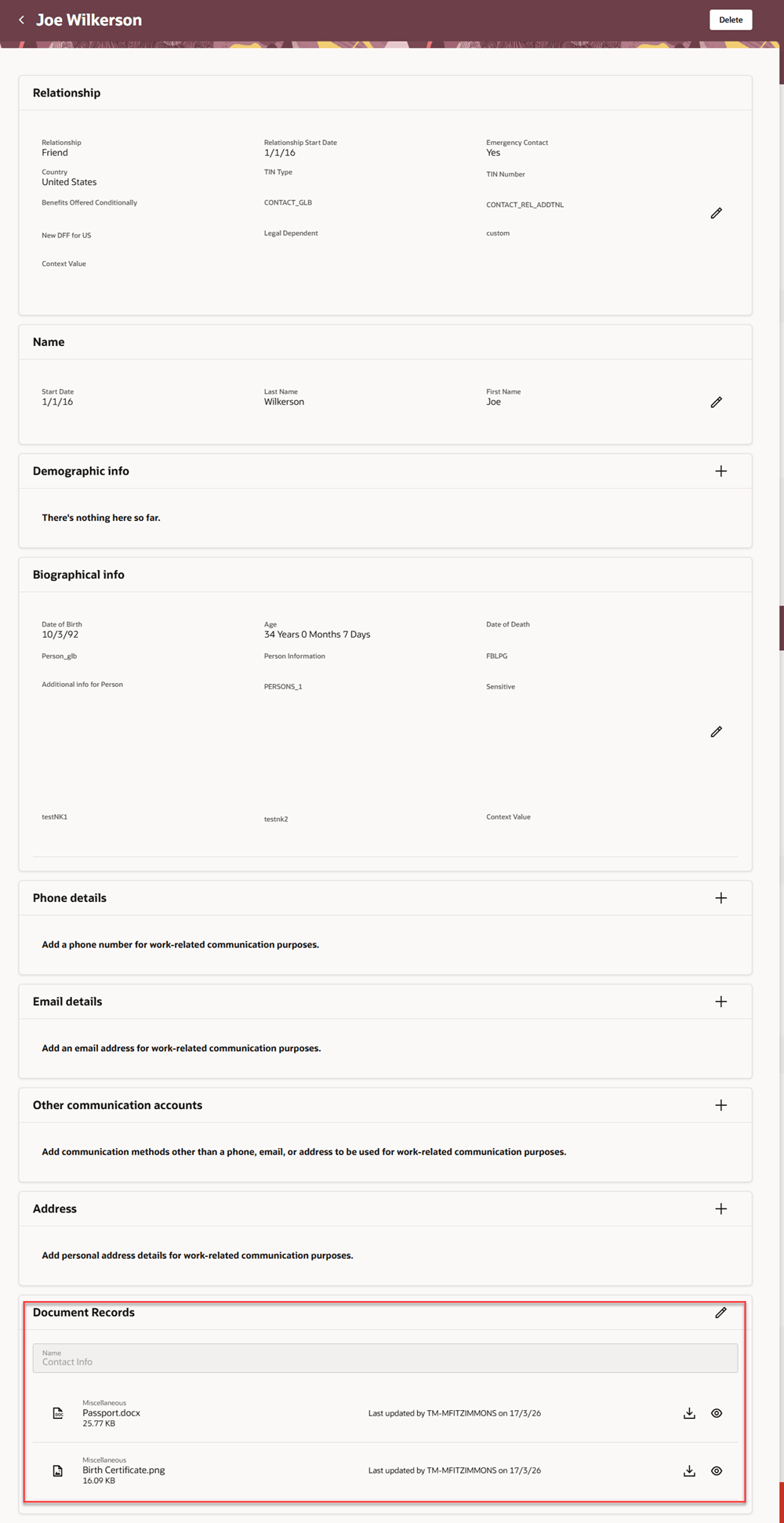
Document Records region in the contact page
This feature enables you to retain attachments relating to a person's family or emergency contact.
Steps to enable and configure
For more information about how you display the Document Records region, see How do I display the Document Records region on Redwood Person pages?
Tips and considerations
- The integration isn't available for a contact that's created using the Select a Person as a Contact option. A person can't manage any personal details, including document records, for another person.
- The Set Document Type for a Family or Emergency Contact page property controls the integration on these pages:
- The panel drawer for each contact in the My contacts list in the Family and Emergency Contacts page.
- The Document Records region when you create a new contact
- The Document Records region when you edit a contact.
- Approvals
- The integration in the Family and Emergency Contacts page differs from the integration in the Personal Details and Identification Info pages. On Family and Emergency Contacts, the document record is associated with the contact person, rather than the attributes such as Name of the person.
- Therefore, Document Records is displayed as a separate region, rather than within each section of the page.
- Because of this, adding or deleting a document in the Document Records region doesn't go through approvals.
- If approvals are enabled for Change Personal Information: Create a new Contact, attachments in Document Records are included in the approval, along with info in other sections such as Name and Address.
- When editing a contact, if approvals are enabled for a specific section, only attachments in that section are routed for approval. For example:
- If the Change Personal Information: Contact Relationship approval rule is enabled, attachments in the Relationship section are routed for approval, but attachments in the separate Document Records region aren't routed.
- If the Change Personal Information: Name approval rule is enabled, attachments in the Name section are routed for approval, but attachments in the separate Document Records region aren't routed.
- If you edit a contact and the only change is to the attachments in the Document Records region, approvals aren't supported.
- Only the attachments associated in the Document Records region will be retained after the transaction is approved.
- The integration in the Family and Emergency Contacts page differs from the integration in the Personal Details and Identification Info pages. On Family and Emergency Contacts, the document record is associated with the contact person, rather than the attributes such as Name of the person.
Key resources
For more information, refer to these resources on the Oracle Help Center.
- Overview of Document Records in the Implementing Global Human Resources guide.
- Work With Page Properties chapter in Extending Oracle Cloud Applications in Visual Builder Studio Express Mode.
For information about the Personal Details and Identification Info pages, see Expanded Document Records Integration for Redwood Personal Details and Identification Info Pages in 26B.
For information about the Name region, see Name Section of Redwood Personal Details Page is Integrated with Document Records in 26A
Access requirements
You can see the Document Records region if your role has this aggregate privilege: Manage Person Documentation by Worker (ORA_PER_WORKER_DOCUMENT_MANAGEMENT_DUTY).