Hiring Workspace for Store Managers
Store managers often spend valuable time navigating multiple dashboards, inboxes, and recruiting tasks while trying to fill open positions. The Hiring Workspace for Store Managers brings hiring activities into a single, intelligent workspace that helps managers identify priorities, engage top candidates faster, and keep hiring processes moving efficiently.
Hiring Workspace uses AI-powered insights and specialized agents to help store managers:
- Identify stalled or at-risk requisitions requiring attention.
- Surface top candidates ready for review and advancement.
- Monitor upcoming interviews and generate interview guides.
- Track pending feedback and identify candidates ready for offers.
- Reduce administrative effort through automated communications and recommendations.
The Hiring Workspace for Store Managers is available through the Hiring Workspace for Store Managers quick action within My Team for users granted the appropriate access privileges.
Upon entering the workspace, managers receive a dynamic summary highlighting the hiring activities that require immediate attention.
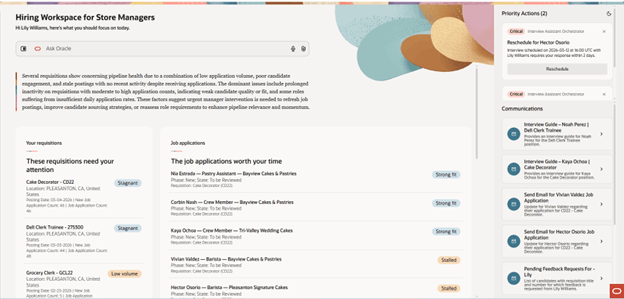
Hiring Workspace for Store Managers
Ask Oracle
Use Ask Oracle conversational widget to ask questions and get info about requisitions, job applications, interviews and feedback available in the workspace.
Requisition health monitoring
The workspace proactively identifies up to 5 requisitions that may need intervention, including:
- Stagnant requisitions with little recent activity. Stagnant means 10 or more applications with no activity for 3 or more days.
- Low-volume requisitions receiving insufficient applications. Low volume means fewer than 3 applications per day.
- Skill-gap requisitions where candidate qualifications don't align with job requirements. A requisition needs to have 5 or more applications with an average skill score less than 3.
Managers can quickly review affected requisitions and take corrective actions such as suspending (for requisitions with 0 applications), closing (for requisitions with 1 or more job applications), or sourcing new candidates.
Requisition insights
Selecting a requisition provides:
- A detailed explanation of requisition health concerns.
- AI-recommended candidates with strong matching qualifications.
- Pipeline visualizations showing candidate progress through the hiring process.
- The ability to add promising candidates as prospects.
Faster candidate review and advancement
The workspace highlights:
- Top new candidates who closely match requisition requirements.
- Stalled applications that require manager review.
- AI-generated resume summaries to support faster decision-making.
Managers can immediately:
- Advance candidates in the selection process.
- Reject candidates.
- Send follow-up communications to candidates.
This helps ensure strong candidates move through the hiring process without unnecessary delays.
Interview management made easy
The workspace consolidates upcoming interviews and provides recommendations when action is needed.
Priority interview actions
Managers can quickly identify interviews that:
- Fall on weekends or holidays
- Have scheduling conflicts
- Have interviewers who haven't yet accepted invitations
Recommended actions include:
- Rescheduling interviews (Reschedule actions check interviewer availability and, when the interviewer isn't available, reschedule for 2 days after the current interview date).
- Automatically generating interview guides for interview participants
Managers can streamline communications through built-in automation, including:
- Generating interview guides
- Sending candidate follow-up emails for stalled applications
- Sending reminder emails to feedback providers
These capabilities help keep candidates engaged and hiring teams aligned.
Move top candidates to offer faster
The workspace identifies candidates who are ready for the offer stage based on interview ratings and feedback scores.
Managers can:
- Review offer-ready candidates
- Move qualified candidates directly into the offer process
- Monitor outstanding feedback requests that may be delaying hiring decisions
This helps reduce time-to-hire and improves the candidate experience.
Business benefit: By bringing requisitions, candidates, interviews, feedback, and communications into a single AI-assisted experience, the Hiring Workspace for Store Managers helps retail managers:
- Reduce administrative workload
- Improve candidate responsiveness
- Accelerate hiring decisions
- Minimize candidate drop-off
- Fill open positions faster
Steps to enable and configure
- Enable the Redwood Experience in Recruiting. For details, see Set profile options for Redwood pages.
- Enable candidate and job application indexes.For details, see Redwood Experience for Candidate List Page and Redwood Experience for Job Applications List Page.
- Enable the job application AI rating feature. For details, see How do I set up AI rating for job applications?
- Create a custom role or update an existing one and inherit the ORA_HCM_IRC_HIRING_MGR_WF_AGENT_ACCESS role.
- Assign the Access Hiring Workspace for Store Managers (IRC_ACCESS_HIRING_WORKSPACE_FOR_STORE_MANAGERS_PRIV) privilege to your appropriate role. This privilege gives access to the Hiring Workspace for Store Managers quick action.
- If managers need to suspend or close requisitions from the requisition health panel, assign the Update Job Requisition (IRC_UPDATE_JOB_REQUISITION) privilege.
- If managers need to see suggested candidates, assign the Candidate Search (ORA_IRC_SEARCH_FOR_CANDIDATES) privilege.
- If managers need to use the Invite to Apply action in the Recommended Candidate widget, assign the Add Candidate to Job Requisition (IRC_ADD_CANDIDATE_TO_JOB_REQUISITION) privilege.
Tips and considerations
There's a known issue with the Hiring Workspace for Store Managers quick action URL. By default, the URL includes "fscmUI". Users need to replace it with "hcmUI" for the quick action to appear.
Access requirements
This table lists the functional privileges that support this feature. If you're using custom job roles, then you need to add privileges identified as new in this update as well as validating you have the existing privileges listed.
| Privilege status | Privilege name and code |
|---|---|
| New |
Access Hiring Workspace for Store Managers privilege IRC_ACCESS_HIRING_WORKSPACE_FOR_STORE_MANAGERS_PRIV |
| Existing |
Update Job Requisition IRC_UPDATE_JOB_REQUISITION For managers to suspend or close requisitions from the requisition health panel. Note: If you don't assign the Update Job Requisition privilege, the actions will still appear but managers will get an error message when trying to use the actions. |
| Existing |
Candidate Search ORA_IRC_SEARCH_FOR_CANDIDATES For managers to see suggested candidates. Note: If you don't assign the Candidate Search privilege, the suggested candidates widget won't load any data. |
| Existing |
Add Candidate to Job Requisition (IRC_ADD_CANDIDATE_TO_JOB_REQUISITION) privilege. For managers to use the Invite to Apply action in the Recommended Candidate widget. |