Control the Display of Actions in the My Contacts Section of the Family and Emergency Contacts Page
You can now use page properties to control which actions appear in the My contacts section of the Family and Emergency Contacts page in My Client Groups:
These new page properties are available in the Page Property Editor under the My contacts section:
- Show Additional Person Info Action in the My Contacts Section
- Show Change Start Date Action in the My Contacts Section
- Show Delete Action in the My Contacts Section
- Show Document Records Action in the My Contacts Section
Each page property defaults to showing the action, so existing behavior is preserved even if you don't set a value.
In the following example, page properties for the Human Resource Specialist role are configured to show the Change Start Date and Document Record actions and hide the Additional Person Info and Delete actions.
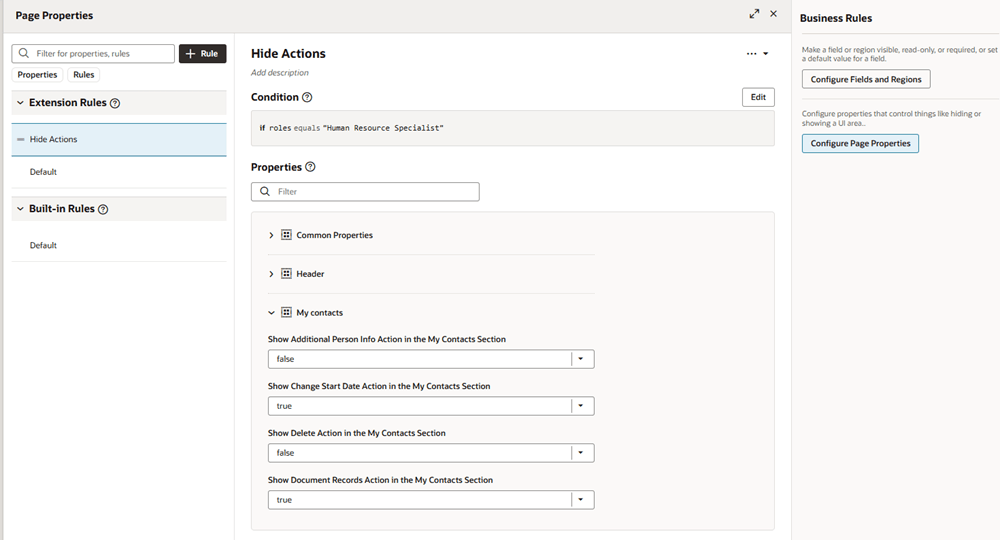
Page property editor showing rule that hides Additional Person Info and Delete actions for Human Resource Specialist role
The following image shows how the page appears to the Human Resource Specialist.
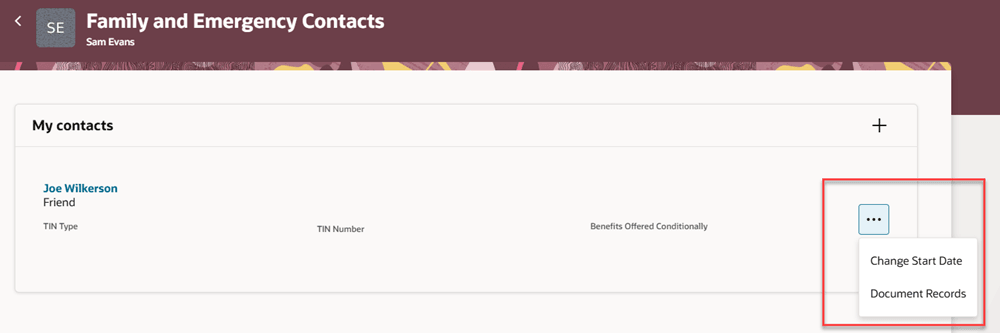
My Contacts section configured to show only the Change Start Date and Document Records actions
With this enhancement, you can tailor the actions menu to those actions that are relevant for your business processes.
Steps to enable and configure
For more information about how to control the display of the Edit icon, see How do I control the display of a UI element in Visual Builder Studio?
Tips and considerations
- If a contact has changes that are pending approval, no actions appear for that contact, regardless of the page property configuration.
- If only one action is available, that action appears as an icon instead of in the actions menu.
- Page Property Behavior for Document Records
How the Document Records page properties are applied depends on whether the Set Document Type for a Family or Emergency Contact page property is configured for the Redwood Family and Emergency Contacts page. This page property is available in the Common Properties section of the Page Property Editor. For more information, see Document Records Integration for Redwood Family and Emergency Contacts Page in the 26C What’s New.
The Set Document Type for a Family or Emergency Contact page property controls the Document Records integration. If this page property has a value, the application uses the integration and ignores the Show Document Records Action in the My Contacts Section page property.
If Set Document Type for a Family or Emergency Contact is blank, the integration doesn’t apply to the action in the My contacts section. In this case, the Show Document Records Action in the My Contacts Section page property controls whether the Document Records action appears. When the action appears, it navigates to the standalone Document Records page.
For example:
- If Set Document Type for a Family or Emergency Contact has a value, the Document Records action uses the Document Records integration, regardless of the value set for Show Document Records Action in the My Contacts Section.
- If Set Document Type for a Family or Emergency Contact is blank and Show Document Records Action in the My Contacts Section is set to false, the Document Records action is hidden.
- If Set Document Type for a Family or Emergency Contact is blank and Show Document Records Action in the My Contacts Section is set to true, the Document Records action appears and opens the standalone Document Records page.
- Co-worker as a contact
- For co-worker contacts, Change Start Date and Delete can be controlled by the same page properties. Additional Person Info and Document Records actions don't apply to co-worker contacts.
Key resources
For more information, refer to this resource on the Oracle Help Center.
- Work With Page Properties chapter in Extending Oracle Cloud Applications in Visual Builder Studio Express Mode.