Bulk migrate self-paced offerings using a REST API
Use the learningSelfPacedOfferingMigrations REST API to replace multiple eligible self-paced offerings with self-paced learning in one request. The API applies the same validation and migration behavior as the existing Replace with Self-Paced Learning action.
Submit the offering numbers in a POST request. You get a process ID that you can use to track the migration while it's processed asynchronously.
URL: https://{{host}}/hcmRestApi/resources/11.13.18.05/learningSelfPacedOfferingMigrations/action/migrateOfferings
Headers: Content-Type: application/vnd.oracle.adf.action+json
Sample:
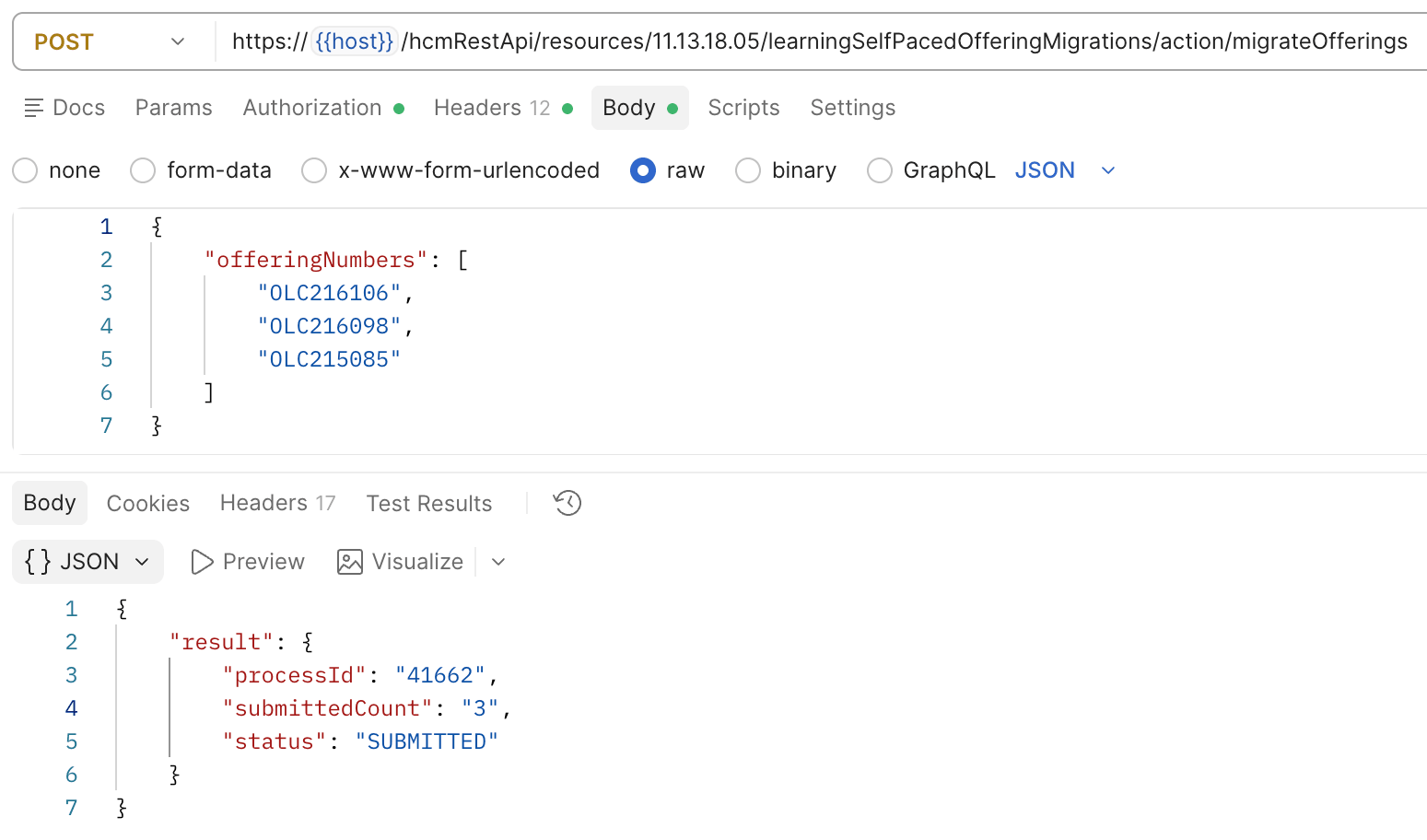
Sample Payload
Use the process ID in a GET request to check the migration results. The response includes:
- Overall process status.
- Submission details.
- Migration status for each offering.
- Replacement self-paced learning number for each successful migration.
- Error code and message for each unsuccessful migration.
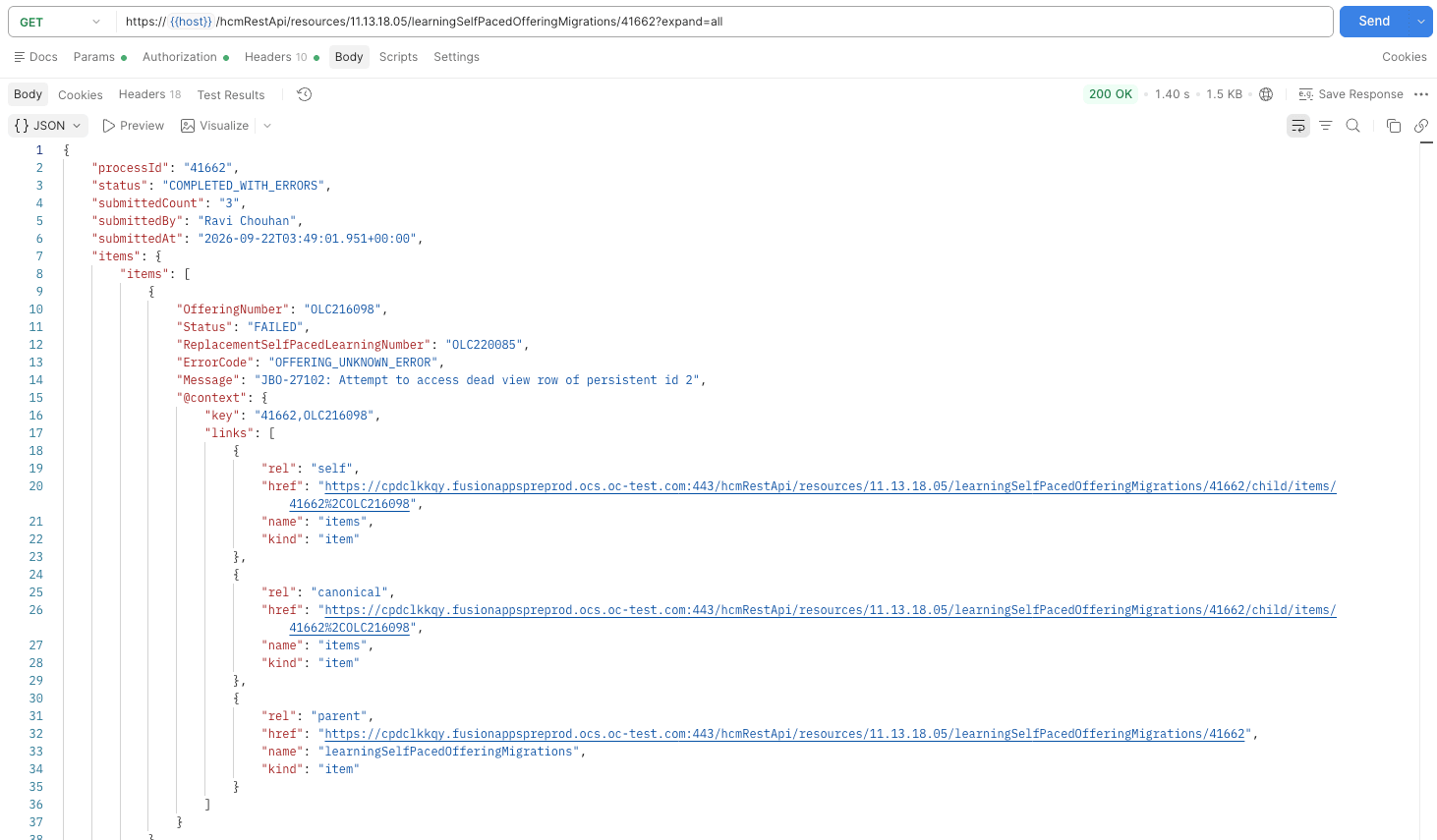
Process ID in a GET request to check the migration results
Each eligible offering is migrated independently, so one unsuccessful migration doesn't prevent other eligible offerings in the same request from being processed.
For each successful migration, the replacement self-paced learning remains linked to the same course. The original offering is deprecated, while completed and in-progress assignments remain associated with it for audit, reporting, and transcript purposes.
For each successful migration, the replacement self-paced learning remains linked to the same course. The original offering is deprecated, while completed and in-progress assignments remain associated with it for audit, reporting, and transcript purposes.
Business benefit: Reduce the manual effort required to migrate large volumes of self-paced offerings while preserving auditability and preventing individual failures from disrupting other migrations.
Steps to enable and configure
You don't need to do anything to enable this feature.
Tips and considerations
- A request can complete with errors when some offerings migrate successfully and others don't. Duplicate offering numbers are processed only once.
- You can replace an offering with self-paced learning only when all these conditions are met:
- The offering contains one self-paced or manual activity, or one self-paced or manual activity plus one feedback activity.
- The activity content wasn't created through connector integrations.
- You have permission to edit the offering and create self-paced learning.
- Replacement self-paced learning that's linked to a course doesn't inherit access groups, payment and pricing information, or descriptive flexfield values from the original offering. It appears through the course's available offerings and not as standalone self-paced learning in Learning Catalog search.
- Deprecated offerings are read-only. They can't be edited, copied, assigned, recommended, enrolled in, or used for learners to complete the learning again. Learners can't discover them in catalog search, available offerings, self-enrollment flows, or deep links.
- Completed and in-progress assignments remain associated with the deprecated offering so learners can complete work already in progress and retain their transcript history. Learners can continue to access transcript information for completed assignments.
- Existing initiatives and manager-created assignment profiles associated with the deprecated offering are canceled or made inactive, and active recommendations are withdrawn.
- When content is cloned during replacement, the replacement self-paced learning uses the cloned content. The original content remains read-only in My Client Groups > Learning and Development, but learners who previously completed it can still review it using Review Content.
Key resources
- The Customer Connect post Clone and Deprecate Self-paced Offerings on the Learning Catalog Administration page.
- Release 26D What's New feature: Support for Self-Paced Learning in Courses