Create Data-Driven Salary Recommendation and Offer Creation Assistance using Job Applicant Advisor
The Compensation Recommendation and Job Offer Creation Advisor helps hiring managers and recruiters create data-driven compensation proposals for candidates at the offer stage. The AI agent consolidates relevant candidate, compensation, and offer information, then guides users through a conversation to create a draft job offer.
How salary recommendations are determined
The Compensation Recommendation and Job Offer Creation Advisor generates a salary recommendation within the approved salary range for the requisition. It uses available candidates and compensation information, including:
- Requisition salary range: The range entered for the job requisition, including ranges captured in requisition seeded fields, descriptive flexfields, or the requisition posting description.
- Candidate fitment score: A score out of 10 based on the candidate's match to the job requisition and interview rating.
- Current employee salary range: The minimum and maximum annualized full-time salary for employees who share the requisition's grade, legal employer, and currency. The peer group requires at least 10 employees.
The advisor uses the available information to provide a detailed explanation of the recommendation and the salary range considered. Peer salary data acts as a guardrail when available, helping keep recommendations aligned with comparable employees.
If the salary range isn't available on the job requisition, the advisor doesn't generate a salary recommendation and indicates that no salary range was found for the requisition. Other unavailable or invalid optional inputs are excluded from the calculation.
Recommendations are presented as annual amounts with the currency code. For weekly, monthly, or hourly salary ranges, the advisor also shows the corresponding amount in the original frequency. The advisor doesn't use protected characteristics, such as age, gender, race, nationality, disability, marital status, or religion, when generating a recommendation.
How job offer creation agent can help
- Once salary recommendation is provided by the agent, it helps in drafting the job offer by prefilling relevant job requisition and assignment information, including legal employer, proposed worker type, business unit, department, grade, and primary work location.
- Present proposed action, proposed start date and salary basis choices for selection during the conversation.
- Create a draft job offer after user confirmation and notify designated stakeholders, primarily the recruiter, to complete the remaining offer details.
Note: Compensation Recommendation and Job Offer Creation Advisor is embedded in the new seeded workflow agent “Job Applicant Advisor” and can't be implemented independently. Job Applicant Advisor is an "ask me anything" type assistant that allows users to retrieve information such as, but not limited to, feedback responses and scores, lifecycle information, actions taken in the past x number of weeks, and assessment and background check information. Once you enable Job Applicant Advisor, Compensation Recommendation and Job Offer Creation Advisor will automatically be enabled if the user has all the required security privileges and permissions.
Try it out
1. Ask any question to the advisor about the job application like:
- Does this candidate meet the experience level of the job?
- Does this candidate align with the required skills of the job?
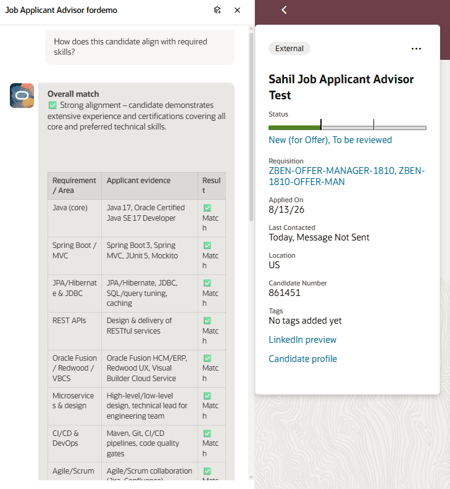
Asking question to the advisor
- Ask for salary recommendation for the candidate if you have finalized this candidate for the offer stage. Review the compensation recommendation and proceed with offer creation.
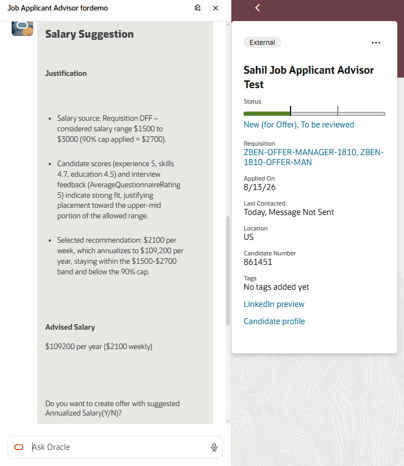
Asking for salary recommendation for a candidate
- Confirm the proposed action, start date, and salary basis for the offer.
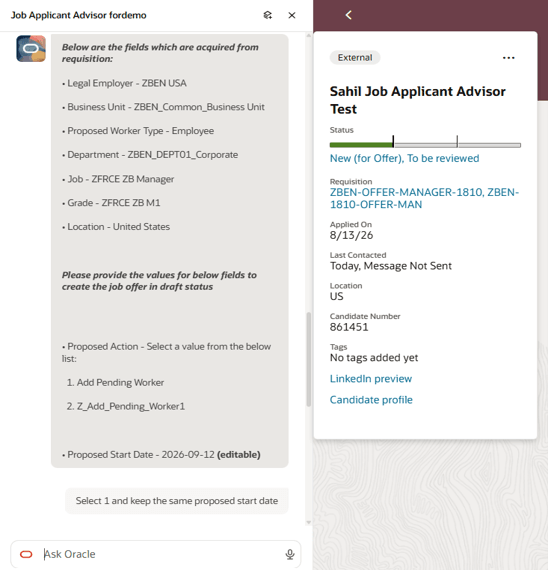
Confirm proposed action, start date, salary basis
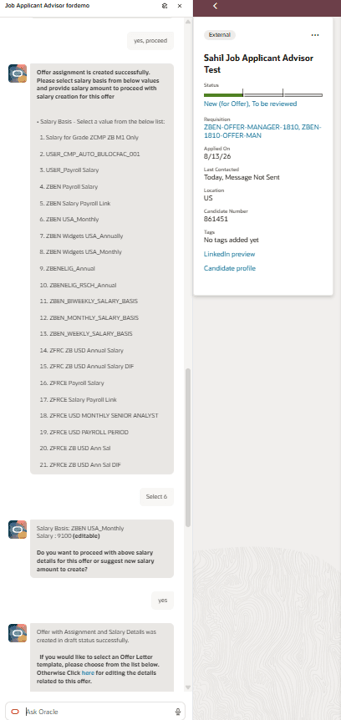
Confirm proposed action, start date, salary basis
- Job offer is created in draft status. Use the link in the panel to open the offer and complete the remaining details for submitting the job offer.
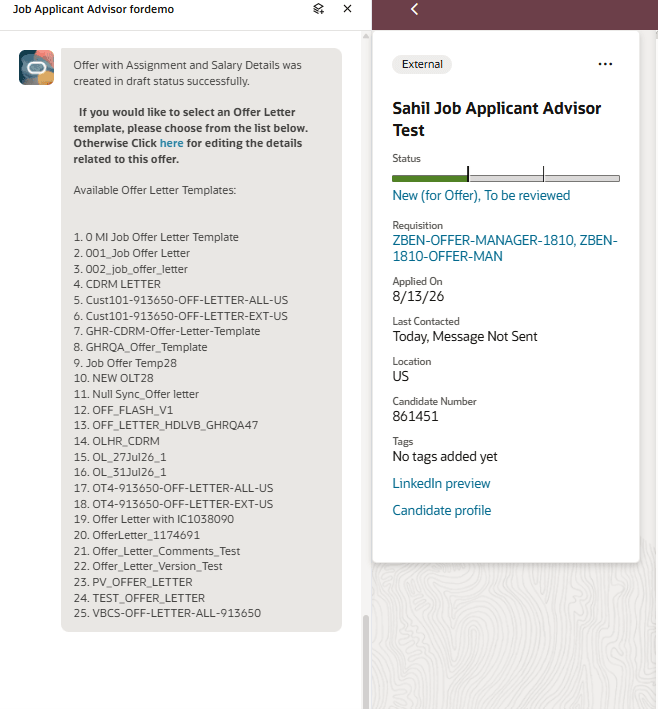
Link to open the offer and complete details
Business benefit: Streamline compensation planning and offer creation with data-driven recommendations based on relevant candidate, requisition, and organizational compensation information. Reduce manual research and data entry while giving hiring teams supporting information to review before confirming the proposal and creating a draft job offer.
Steps to enable and configure
- Create a guided journey and add a task. For details, see Configure Agent Guided Journey. You need to select the Job Applicant Advisor (ORA_HCM_IRC_JOB_APPLICANT_ADVISOR_AGENT) agent while configuring this task.
- In Visual Builder Studio, browse to a job application and select edit. For details, see Extend Application Page with Agent Guided Journey.
- Add the guided journey task code.
- Publish the page.
Tips and considerations
If you have enabled the old Job applicant screening advisor on Job application details page, our recommendation will be to disable that old advisor and configure this new "Job Applicant Advisor" to take advantage of salary recommendation and job offer creation assistance use cases.
Access requirements
The agents users can view depend on the roles and privileges assigned to them. To provide access to the Compensation Recommendation and Job Offer Creation Advisor agent, you need to update the existing custom Recruiter and Hiring Manager roles.
- Go to Navigator > Tools > Security Console > Roles, and open an existing custom role.
- On the Function Security Policies page, select Add Function Security Policy, then add the Access Intelligent Agent Chat (HRC_ACCESS_AI_AGENT_CHAT_PRIV) privilege.
- On the Role Hierarchy page, open the Roles and Permission Groups tab, then add the FAI GenAI Agent Runtime Duty (ORA_DR_FAI_GENERATIVE_AI_AGENT_RUNTIME_DUTY), ORA_HCM_IRC_HIRING_MGR_WF_AGENT_ACCESS, or ORA_HCM_IRC_RECRUITER_WF_AGENT_ACCESS duty role.
- For Salary recommendation use case, users need the View Job Offer (ORA_IRC_VIEW_JOB_OFFER) and View Job Requisition (ORA_IRC_VIEW_JOB_REQUISITION) security privileges.
- For Job offer creation use case, user would need Update Job Offer (ORA_IRC_UPDATE_JOB_OFFER) security privilege.
- Save the custom role.
See How can I give users access to AI agents and Access Requirements for AI Agent Studio.